When you install third-party apps on your iPhone, they sometimes automatically install apps on your Apple Watch, too. Some of these wrist-based apps can be worthwhile additions, but many simply duplicate the function of the iPhone app and just fill up your Apple Watch with useless cruft. This article shows you two quick ways to delete unwanted Apple Watch apps.
How to Uninstall Apple Watch Apps Using iPhone
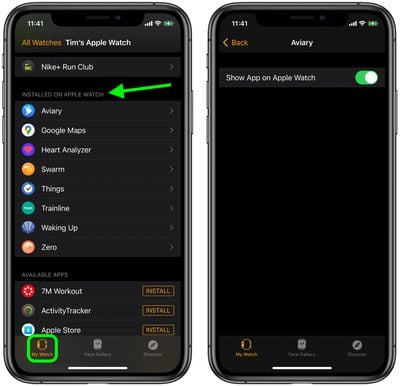
- Launch the iOS Watch app on your iPhone.
- Tap My Watch in the bottom-left corner of the screen.
- Scroll down to the "Installed on Apple Watch" list and tap the app that you want to uninstall.
- Toggle the switch next to Show App on Apple Watch to the grey OFF position.
How to Delete Apple Watch Apps From Your Wrist
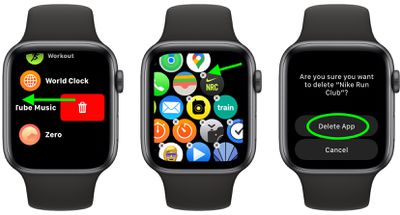
- Press the Digital Crown on your Apple Watch to bring up the App View.
- If you're using List View, swipe left across the app you want to remove, then tap the red trash button. If you're using Grid View, tap and hold to activate jiggle mode, then tap the X in the top-left corner of the app you want to remove.
- Tap Delete App to confirm.
Want more tips for Apple Watch? Check out our favorite tips and tricks for watchOS 7.
Related Roundups: Apple Watch 11, Apple Watch SE 3
Buyer's Guide: Apple Watch (Neutral), Apple Watch SE (Buy Now)
Related Forum: Apple Watch