

How to Disable Auto-Playing Video Previews on Apple TV - MacRumorsOpen MenuShow RoundupsShow Forums menuVisit ForumsOpen Sidebar
Skip to Content

How to Disable Auto-Playing Video Previews on Apple TV

by

With the release of tvOS 13, Apple brought new features like Apple Arcade to Apple TV as well as a number of changes to the set-top box's interface. One of those changes includes autoplaying trailers on the Home screen.
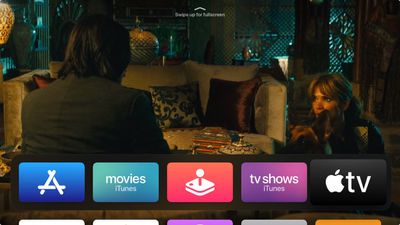
tv app
The new content previews on the Home screen make interacting with your ‌Apple TV‌ a little different. For example, in previous tvOS versions, using the Siri Remote to highlight Apple's TV app would make your Up Next queue appear in the Top Shelf of the Home screen. Now, it plays video trailers advertising content available on the iTunes Store.

This is similar to what you'd expect to see on Netflix, which routinely auto-plays trailers in the hope that it will help you discover content more easily. Not everyone wants to see the same behavior on their ‌Apple TV‌ though, and the good news is that you can turn it off with an option buried in the device's settings.

  1. Launch the Settings app on your ‌Apple TV‌.
  2. Select General -> Accessibility -> Motion.
  3. Toggle off the switch for Auto-Play Video Previews.
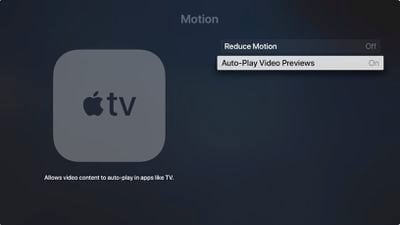
Apple TV
You can also move the TV app from the top row of the your ‌Apple TV‌'s Home screen and the videos should stop autoplaying. To do so, hover the selector over the TV app, then click and hold down on the Remote's touch surface for a couple of seconds.

The app icon will start jiggling, at which point you can swipe to place it where you want. Simply click the touch surface again once you have moved the TV app from the top row to another location.


Related Roundup: Apple TV
Tag: tvOS 13
Buyer's Guide: Apple TV (Don't Buy)

Top Rated Comments

macduke Avatar
88 months ago
This never should have been a default setting.
Score: 15 Votes (Like | Disagree)
DDustiNN Avatar
88 months ago
Good. I hate this. So incredibly annoying. I wish I could also turn it off in Netflix.
Score: 13 Votes (Like | Disagree)
NickName99 Avatar
88 months ago
I sometimes browse Netflix on my iPhone rather than my TV, because of how annoying the auto play is.
Score: 8 Votes (Like | Disagree)
DNichter Avatar
88 months ago
I just want MY stuff to show. Pisses me off.
Score: 7 Votes (Like | Disagree)
Porco Avatar
88 months ago
Without the option to turn this off I simply would not have ever updated my AppleTV. That is how much I loathe it. Good for Apple for providing a better choice on the matter than Netflix (i.e. providing a choice at all!).
Score: 7 Votes (Like | Disagree)
clcnyc Avatar
88 months ago
Can we get the UP Next back on the home screen instead of having to click into TV?
Score: 7 Votes (Like | Disagree)

Popular Stories

General visionOS watchOS and tvOS Betas Feature Redux

Apple Releases Second watchOS 26.6, tvOS 26.6 and visionOS 26.6 Betas

Monday June 15, 2026 10:06 am PDT by
Apple today provided developers with the second betas of upcoming watchOS 26.6, tvOS 26.6, and visionOS 26.6 betas for testing purposes. The software comes three weeks after Apple seeded the first betas. The software updates are available through the Settings app on each device, and because these are developer betas, a free developer account is required. There's no word on what's in the...
f 5d631a2d7714517b0b0137e38aadf744d175cb3e

Apple Releases First iOS 27, iPadOS 27, and macOS 27 Betas to Developers

Monday June 8, 2026 11:40 am PDT by
Following the WWDC 2026 keynote event, Apple has seeded the first betas of iOS 27, iPadOS 27, macOS 27, watchOS 27, tvOS 27, and visionOS 27 to developers for testing purposes. Registered developers can opt in to betas and download the software through the Settings app on each device. The software includes many of the new features that were shown off earlier today, though some of what...
Apple TV 2025 Thumb 2 Sans Text

Apple Announces tvOS 27 With These New Features

Monday June 8, 2026 2:00 pm PDT by
Apple barely touched on tvOS 27 during its WWDC 2026 keynote today, but the update exists, and it adds some new features to the Apple TV. In a slide that was shown very briefly during the keynote, Apple revealed some of tvOS 27's new features and enhancements: A redesigned Podcasts app Smoother app launches and animations Faster AirPlay connectivity with other Apple devices Smart ...













