

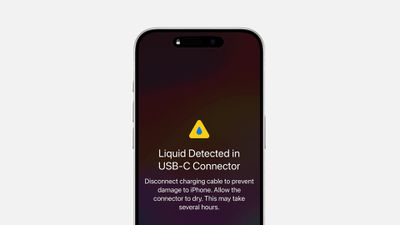
Apple's iPhones have been resistant to splashes, dunks, and even water submersion for several years now, but there are still times when they can get too wet, causing a liquid-detection alert to be displayed on the screen.
A well-known, long-running folk remedy for such occasions is to put your iPhone in a bag of rice. According to the theory, the dry, absorbent rice will help extract the moisture from the device. But according to tests, it's not even particularly effective. And in a recently updated support document, Apple has come out and said that it's just a bad idea all round.
"Don't put your iPhone in a bag of rice. Doing so could allow small particles of rice to damage your iPhone," says Apple. Instead, the company recommends a series of steps to properly dry an iPhone:
- If a liquid other than water splashes on your iPhone, rinse the affected area with tap water.
- Wipe your iPhone off with a soft, lint-free cloth, such as a lens cloth.
- To dry your iPhone, tap it gently against your hand with the Lightning or USB-C connector facing down to remove excess liquid.
- Leave your iPhone in a dry area with some airflow. Placing your iPhone in front of a fan blowing cool air directly into the Lightning or USB-C connector might help the drying process.
- Avoid using an external heat source or inserting a foreign object, like a cotton swab or a paper towel, into the Lightning or USB-C connector.
Furthermore, it's important not to charge the iPhone until it is completely dry, as charging a wet iPhone might damage it. If you receive a liquid detection alert, it's a sign that there's moisture in the connector, and you should allow up to 24 hours for it to dry out fully before attempting to charge or connect an accessory again.




















