

In iOS 17 and tvOS 17 and later, Apple includes a feature that lets Apple TV users locate a misplaced Siri Remote using their iPhone. Keep reading to learn how it's done.
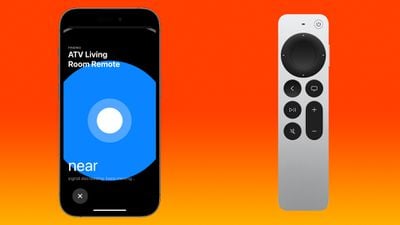
Prior to the launch of the latest Apple TV 4K, there were rumors that Apple would build Find My functionality into the Siri Remote. That didn't happen. Instead, Apple introduced a new iPhone option that does essentially the same thing.
If a Siri Remote becomes lost, the Apple TV remote control available in the Control Center on an iPhone can be used to locate the missing remote. When enabled, users will see a Find My-like interface on their iPhone that guides them toward the remote, with an onscreen circle that changes in size to guide movement in the right direction.
Note that Find My for the Siri Remote is available on the second and third-generation Siri Remotes, and the feature is limited to the Apple TV 4K models released in 2021 and 2022 with updated firmware.
Find Your Siri Remote With Your iPhone
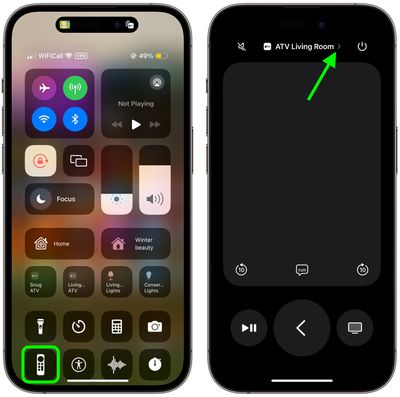
- Bring up the Control Center from your iPhone by swiping down from the upper right corner of the screen (on an iPhone with a Home button, swipe up from the bottom of the screen).
- Tap the Apple TV Remote button (if it's not there, you can manually add it to Control Center).
- Tap the chevron next to the name of the connected Siri Remote.

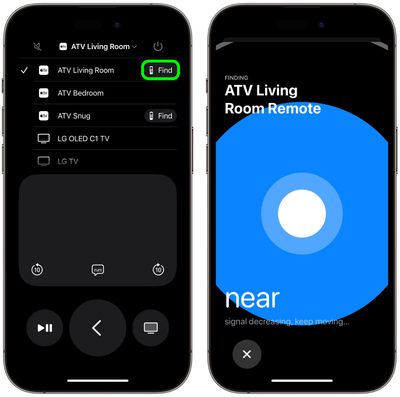
- Tap the Find button next to the misplaced Siri Remote.
- Use the onscreen Find My-like interface to locate the remote. The size of the circle increases to guide movement in the correct direction. When your iPhone is right next to the remote, the screen shows a solid white orb.
- Tap the X button to close the location interface.
In our experience, the proximity accuracy of the feature is equivalent to locating an AirTag with Find My, so it's really helpful for locating your Siri Remote even if it's just hidden between the sofa cushions.
























Top Rated Comments
Well worth updating just for this tbh
So what is this black magic? How the hell does this work?