

If you're running out of space on your Mac's internal drive, macOS Sequoia 15.1 includes a handy new feature that lets you install large apps directly to external storage. Here's how to use it to preserve space on your boot drive.
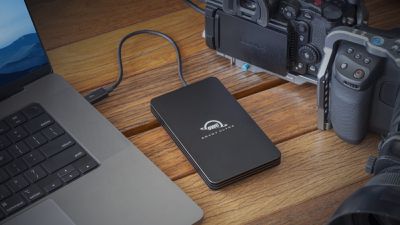
Apple is known for charging customers a very high markup for additional storage when buying a new Mac. Given that internal storage usually can't be upgraded after purchase, it's no wonder that external drives are a popular solution for many Mac users who want the extra space but don't want to pay a premium for the privilege.
Until recently, macOS automatically installed new apps downloaded from the Mac App Store to a Mac's boot drive, which was not particularly helpful to users with dwindling internal storage. In macOS Sequoia 15.1, however, Apple has added a new option that lets you download and install apps that require more than 1GB of storage to an external drive. Anyone working with large apps like Final Cut Pro or Logic Pro, or gamers with space-consuming titles, will surely welcome this ability to download and install large apps to a separate disk.
Installing Mac Apps to External Storage
- Connect your external drive to your Mac.
- Open the App Store.
- Click App Store in the menu bar and select Settings....
- Check the box next to "Download and install large apps to a separate disk."
- Select your external drive from the dropdown menu.
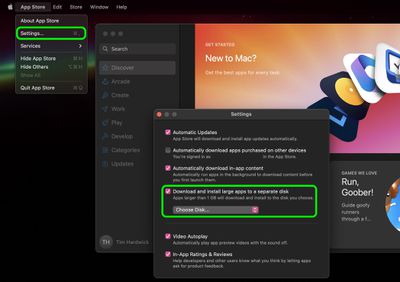
Some considerations to keep in mind: The feature only works with apps larger than 1GB, and your external drive must be connected when enabling the setting. (Make sure the drive you connect is APFS formatted.) Additionally, while apps will install to your external drive, bear in mind that, depending on the app, some app data may still be stored on your main drive.
It's also worth noting that you can't choose installation locations using this method on a per-app basis – it's an all-or-nothing setting for qualifying apps. Lastly, for the best experience, use a fast external SSD (or an internal SSD in an external enclosure) to ensure optimal app performance.




















Top Rated Comments
:confused: