How to Unlock Your iPhone If You Forget Your New Passcode - MacRumorsOpen MenuShow RoundupsShow Forums menuVisit ForumsOpen Sidebar
Skip to Content

How to Unlock Your iPhone If You Forget Your New Passcode

by

In iOS 17, if you change your iPhone's passcode and forget it soon after, Apple offers you a 72-hour grace period to fix it without getting locked out of your device. Here's how it works.
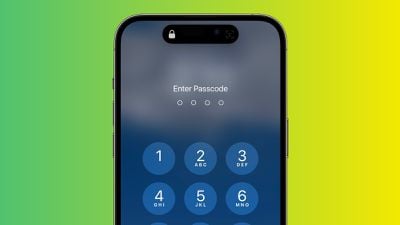
iphone passcode green
In iOS 17 and iPadOS 17, it is now possible to reset an iPhone or iPad's new passcode with the previous passcode you used for up to three days after the change is made. In other words, Apple lets you use your old passcode within 72 hours of setting a new one, which is handy if you're someone who is likely to forget a newly created passcode.

When you enter an incorrect passcode on a device running iOS 17 after making a change, simply tap on the Forgot Passcode? option at the bottom of the display to use the Try Passcode Reset option. Tapping it allows you to use your old passcode to create yet another new passcode.
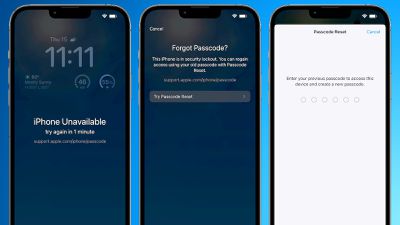
iOS 17 Passcode Reset Feature
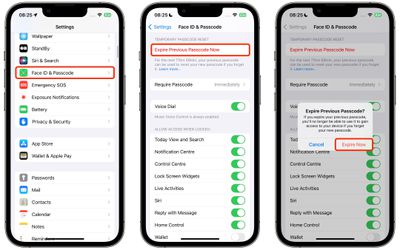
For protection in case someone has learned your passcode, there is also an "Expire Previous Passcode Now" setting that you can make use of. (Note that if you use this option, you'll no longer be able to use your old passcode to gain access to your device if you forget your new passcode.) To use the new option in iOS 17, follow these steps:

  1. Open Settings.
  2. Scroll down and select Face ID/Touch ID & Passcode.
  3. Under "Temporary Passcode Reset," tap Expire Previous Passcode Now.
  4. Tap Expire Now to confirm.

settings

It is still possible to change an Apple ID account's password with an iPhone's passcode, despite a Wall Street Journal report in February highlighting instances of thieves spying on iPhone users in public when they enter their passcode, and then stealing the device in order to gain widespread access to the device.

Apple's software engineering chief Craig Federighi in June 2023 said Apple has continued to "look at other ways to address this," but no changes have been made as of yet. To make theft harder, Apple recommends that users switch from a four-digit passcode to an alphanumeric passcode, which would be more difficult for thieves to spy on. This can also be done in Settings under Face ID & Passcode -> Change Passcode.


Top Rated Comments

35 months ago

It is still possible to change an Apple ID account's password with an iPhone's passcode, despite a Wall Street Journal report in February highlighting instances of thieves spying on iPhone users in public ('https://www.macrumors.com/2023/02/24/iphone-stolen-passcodes-report/') when they enter their passcode, and then stealing the device in order to gain widespread access to the device.

Apple's software engineering chief Craig Federighi in June 2023 said ('https://www.macrumors.com/2023/06/10/the-talk-show-live-from-wwdc-2023/') Apple has continued to "look at other ways to address this," but no changes have been made as of yet. To make theft harder, Apple recommends that users switch from a four-digit passcode to an alphanumeric passcode, which would be more difficult for thieves to spy on. This can also be done in Settings under Face ID & Passcode -> Change Passcode.

Article Link: iOS 17: How to Change a New iPhone Passcode If You Forget It ('https://www.macrumors.com/how-to/ios-change-your-new-passcode-if-you-forget-it/')
The biggest mistake is 4/6-digit passcode required to change the iCloud password... WTF. Current iCloud password should be provided to change the password. We can remember and/or store such password in some other place than Settings > Passwords and voila. Thief is no longer able to log us out from our iCloud by changing the password.
Score: 11 Votes (Like | Disagree)
35 months ago

The biggest mistake is 4/6-digit passcode required to change the iCloud password... WTF. Current iCloud password should be provided to change the password. We can remember and/or store such password in some other place than Settings > Passwords and voila. Thief is no longer able to log us out from our iCloud by changing the password.
This! It's crazy you don't have to enter the current password to change it. That is just basic security.
Score: 8 Votes (Like | Disagree)
iFishishh Avatar
35 months ago
They should add ways to see your phone screen on other devices. That way if you get the black screen of death from say water damage or the like, you can back up your data if you haven’t previously.
Score: 8 Votes (Like | Disagree)
35 months ago

This seems like an issue which was solved before it became an actual problem. If I'm changing my passcode, there is a reason, I don't need the increased security risk of having two passcodes for a few days.
Do people not actually read the article? You can cancel using the expired password.


For protection in case someone has learned your passcode, there is also an "Expire Previous Passcode Now" setting that you can make use of. (Note that if you use this option, you'll no longer be able to use your old passcode to gain access to your device if you forget your new passcode.) To use the new option in iOS 17, follow these steps:
[LIST=1]
* Open Settings.
* Scroll down and select Face ID/Touch ID & Passcode.
* Under "Temporary Passcode Reset," tap Expire Previous Passcode Now.
* Tap Expire Now to confirm.

Score: 5 Votes (Like | Disagree)
Jackbequickly Avatar
35 months ago
You should never use your passcode in public! FaceID is way better.
Score: 5 Votes (Like | Disagree)
jlc1978 Avatar
35 months ago
I went with an alpha numeric passcode for heightened security. I’ve at least been able to convince family members to go to 6 digit and not use 000000. I suspect most folks do not realize the potential dangers from a lost phone and easily guessed passcode.


They should add ways to see your phone screen on other devices. That way if you get the black screen of death from say water damage or the like, you can back up your data if you haven’t previously.
I suspect most damage that causes a black screen would mean an external connection would not work either. Would be useful for cracked or damaged but powered on screens.

I am surprised by how many people simply never backup their phones; yet their entire lives a run on it. If you don’t trust the cloud at least backup to a computer. What would be nice is Time Machine for iOS/iPadOS.
Score: 5 Votes (Like | Disagree)

Popular Stories

apple lock security bug vulnerability fix privacy

Apple Warns Canada's Bill C-22 Could Force Encryption Backdoors

Friday May 8, 2026 4:22 am PDT by
Apple and Meta have opposed a Canadian bill that the companies say could force them to create backdoor access to encrypted user data, should it pass through the country's parliament. Proposed by Canada's ruling Liberal Party, Bill C-22 contains provisions that could be similar ​to a UK data access provision order sent to Apple last year, depending on how they are implemented. Back in Feb...
macOS Tahoe and iPhone

Apple Alerted to macOS Security Vulnerability Uncovered With AI Tool

Thursday May 14, 2026 9:04 am PDT by
Anthropic recently announced Project Glasswing, an initiative that enables tech companies like Apple to use its new frontier AI model Claude Mythos Preview to find security vulnerabilities across operating systems and web browsers. The Wall Street Journal today reported that researchers at cybersecurity firm Calif used Claude Mythos Preview to uncover a new macOS security vulnerability last...
Apple Card iPhone 16 Pro Feature

Apple Card Promo to Offer Free AirPods Pro 3

Friday May 15, 2026 8:59 am PDT by
Starting as early as next week, customers who sign up for an Apple Card at Apple's retail stores in the U.S. will receive $249 cash back when they purchase AirPods Pro 3, according to Bloomberg's Mark Gurman. The promotion has yet to be officially announced by Apple, so exact terms and conditions are not available at this time. AirPods Pro 3 are priced at $249 in the U.S., so customers who...