iOS 26: Keep iPhone Camera Lens Clean With This Smart Setting - MacRumorsOpen MenuShow RoundupsShow Forums menuVisit ForumsOpen Sidebar
Skip to Content

iOS 26: Keep iPhone Camera Lens Clean With This Smart Setting

by

In iOS 26, Apple has a helpful new feature that notifies you when your iPhone's camera lens needs cleaning – something Android devices have offered for years. Here's how to turn on this smart notification system.
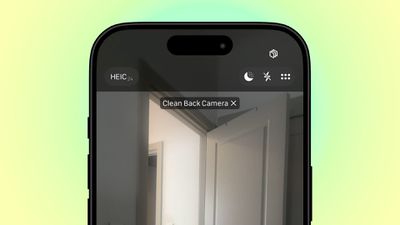
clean back camera hint
Whenever your iPhone's camera is active, iOS 26 monitors the incoming light for signs of reduced clarity or smudging that could indicate a dirty lens. When triggered, you'll see a discrete alert suggesting you clean your camera lens to improve image quality.

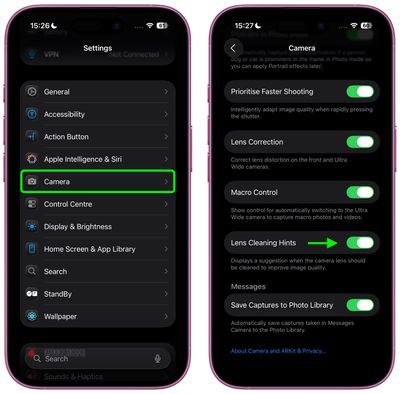
To benefit from the feature, you'll need an iPhone running iOS 26 (currently in beta). It's currently unclear which models support Lens Cleaning Hints, but you can check by looking for the following toggle:

  1. Open Settings on your iPhone.
  2. Scroll down and tap Camera.
  3. Toggle on Lens Cleaning Hints.

settings
Once enabled, your iPhone will analyze image quality and display a notification in the Camera app when it detects your rear camera lens could benefit from cleaning.

This feature joins another camera-related change in iOS 26 – a completely redesigned Camera app interface that includes a new minimalist navigation bar. If you don't have the beta software installed, you shouldn't have long to wait: Apple is expected to officially release iOS 26 in September.


Top Rated Comments

turbineseaplane Avatar
8 months ago

Doesn't look like it's supported on the 13 Pro. I don't see the option.
Lens Cleaning Hints require the latest Neural Engine, Apple Intelligence and a special co-processor.

Please upgrade to a new iPhone.
We'd also be happy to sustainably recycle your 13 Pro for you at an Apple Store.

-TC


Attachment Image
Score: 15 Votes (Like | Disagree)
Timpetus Avatar
8 months ago
Discreet, not discrete. Discreet means unobtrusive, discrete means separate.
Score: 9 Votes (Like | Disagree)
mattopotamus Avatar
8 months ago

Seems like a feature that would be ON by default, but you have to turn it on?
It is on by default. Just checked, running the beta, and it was on.
Score: 8 Votes (Like | Disagree)
8 months ago

Whenever your iPhone's camera is active, iOS 26 monitors the incoming light for signs of reduced clarity or smudging that could indicate a dirty lens. When triggered, you'll see a discrete alert suggesting you clean your camera lens to improve image quality.
* discreet

Discrete means separate. Discreet means subtle, unobtrusive.
Score: 7 Votes (Like | Disagree)
8 months ago
Seems like a feature that would be ON by default, but you have to turn it on?
Score: 7 Votes (Like | Disagree)
UliBaer Avatar
8 months ago
Remember: ONLY use Apple™ Polishing Cloth ('https://www.apple.com/shop/product/MW693AM/A/polishing-cloth?fnode=7f1c5256de9169520f0ca07c5dc4c2b7f121d7daad61666f958524c72135352a86676d3a69d6f2f8f555b207da559214bdddc92477c41a047b9dd09f60718cd9745f01a09ea3bf48c6e7c50f888291e6fa11bbd5aa5508c3f66b45669338baf2')!
Score: 5 Votes (Like | Disagree)