iOS 16: How to Lift Subjects From Images on the Web - MacRumorsOpen MenuShow RoundupsShow Forums menuVisit ForumsOpen Sidebar
Skip to Content

iOS 16: How to Lift Subjects From Images on the Web

by

In iOS 16, Apple has made it possible to isolate the subject of a picture from its background so that you can copy it to the clipboard for use elsewhere. This feature also works for images on the web. Keep reading to learn how it works.

iOS 16 Safari Guide Feature
With iOS 16, Apple has enhanced its Visual Look Up capability for photos to such an extent you can now drag subjects right out of images, and it works not only in the Photos app, but also Safari. That means you can isolate subjects from images you found on the web and then share them in another app.

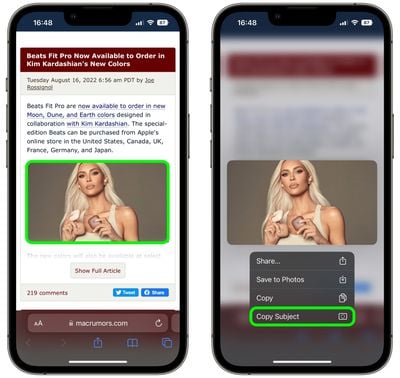
  1. In Safari, find a webpage with an image that contains a clearly-defined subject.
  2. Long press on the image and select Copy Subject from the popover menu.
    safari

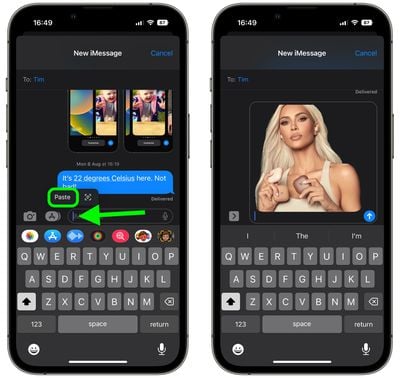
  3. Now, exit Safari and then launch Messages, Mail, Notes, or another app that accepts images.
  4. In the chosen app, long press on the input field and tap Paste in the popover menu to insert your isolated subject.
    safari

Note that this feature doesn't work in third-party browsers like Chrome or Firefox. Also, it uses advanced machine learning and image analysis, therefore it is only available on phones with the A12 Bionic or newer chip.

The A12 Bionic processor debuted in 2018 in the iPhone XS, ‌iPhone‌ XS Max, and the ‌iPhone‌ XR, so you need to be using one of these iPhones or a later model for it to work.

Tag: Safari

Popular Stories

MacBook Pro Low Angle Wide Lens

macOS 27: Two More Changes Leaked Ahead of WWDC Next Month

Sunday May 10, 2026 9:45 am PDT by
macOS 27 will have a "slight redesign" compared to macOS Tahoe, according to the latest word from Bloomberg's Mark Gurman. In his Power On newsletter today, Gurman said the design changes will help to improve the readability of macOS Tahoe's Liquid Glass interface:If you've used Tahoe, you're likely familiar with some of the quirks — particularly the transparency effects and shadows that...
Apple Card iPhone 16 Pro Feature

Apple Card Promo to Offer Free AirPods Pro 3

Friday May 15, 2026 8:59 am PDT by
Starting as early as next week, customers who sign up for an Apple Card at Apple's retail stores in the U.S. will receive $249 cash back when they purchase AirPods Pro 3, according to Bloomberg's Mark Gurman. The promotion has yet to be officially announced by Apple, so exact terms and conditions are not available at this time. AirPods Pro 3 are priced at $249 in the U.S., so customers who...
Apple WWDC25 iOS 26 CarPlay Light mode 250609

Six Popular iPhone Apps Now Available on CarPlay

Thursday May 14, 2026 9:10 am PDT by
Apple's CarPlay system for accessing iPhone apps on a vehicle's dashboard screen has received six popular apps in recent weeks: ChatGPT, Perplexity, Grok, Google Meet, WhatsApp, and the indie artist streaming platform Audiomack. Make sure you have the latest version of each app and they will automatically appear on CarPlay. ChatGPT Starting with iOS 26.4, CarPlay supports voice-based...