

How to Opt-in to Apple Developer Beta Software on iPhone and iPad - MacRumorsOpen MenuShow RoundupsShow Forums menuVisit ForumsOpen Sidebar
Skip to Content

How to Opt-in to Apple Developer Beta Software on iPhone and iPad

by

In iOS 16.4 and iPadOS 16.4, Apple has changed the way users opt-in to developer and public beta updates on iPhone and iPad. Keep reading to learn why the change was made and how to turn it on.
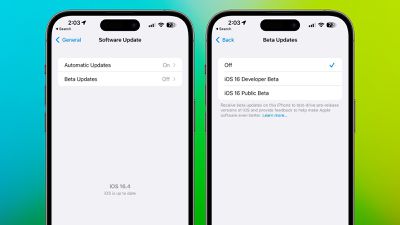
iOS 16 4 Beta Updates Menu
Going forward, Apple is changing things up so that developers no longer need to install a profile from the Developer Center in order to get developer betas.

Instead, users who are enrolled in Apple's developer program are able to turn on developer betas directly from the Software Update section in the Settings app.

The presence of a toggle in Settings makes it quicker and easier to install betas. The only downside from a user perspective is that the change prevents non-developers from being able to install the developer beta, since each installation needs to be linked to an Apple ID associated with a developer profile.

This effectively puts an end to the public sharing of developer beta configuration profiles because they will no longer grant access. On the other hand, now developers and public beta testers can select a different ‌Apple ID‌ than their main ‌‌Apple ID‌‌ to download beta software.

The following steps show you how to turn on iOS beta updates in iOS 16.4 and later and iPadOS 16.4 and later.

  1. Open the Settings app on your iPhone or ‌iPad‌.
  2. Tap General -> Software Update.
  3. Tap the new Beta Updates button when it appears.
  4. Choose the Developer Beta or Public Beta.
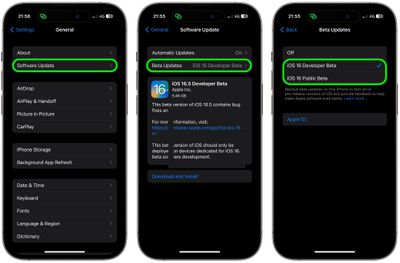
settings

Note that you can change the ‌Apple ID‌ associated with the beta by tapping the Apple ID field at the bottom of the last screen.

Popular Stories

WWDC26 Stickers Feature

Apple Developer App Gets Liquid Glass Makeover and New WWDC 2026 Stickers

Monday May 11, 2026 10:47 am PDT by
Apple today updated its Apple Developer app, introducing a Liquid Glass redesign and giving developers some WWDC-themed stickers that can be used in the Messages app. The Apple Developer app has a revamped Liquid Glass icon that reintroduces some older design elements while adopting the translucent Liquid Glass aesthetic. The icon has a pencil, paintbrush, and ruler that form the "A" shape,...
Apple Card iPhone 16 Pro Feature

Apple Card Promo to Offer Free AirPods Pro 3

Friday May 15, 2026 8:59 am PDT by
Starting as early as next week, customers who sign up for an Apple Card at Apple's retail stores in the U.S. will receive $249 cash back when they purchase AirPods Pro 3, according to Bloomberg's Mark Gurman. The promotion has yet to be officially announced by Apple, so exact terms and conditions are not available at this time. AirPods Pro 3 are priced at $249 in the U.S., so customers who...
Apple WWDC25 iOS 26 CarPlay Light mode 250609

Six Popular iPhone Apps Now Available on CarPlay

Thursday May 14, 2026 9:10 am PDT by
Apple's CarPlay system for accessing iPhone apps on a vehicle's dashboard screen has received six popular apps in recent weeks: ChatGPT, Perplexity, Grok, Google Meet, WhatsApp, and the indie artist streaming platform Audiomack. Make sure you have the latest version of each app and they will automatically appear on CarPlay. ChatGPT Starting with iOS 26.4, CarPlay supports voice-based...
















