How to Perform an Ear Tip Fit Test on AirPods Pro - MacRumorsOpen MenuShow RoundupsShow Forums menuVisit ForumsOpen Sidebar
Skip to Content

How to Perform an Ear Tip Fit Test on AirPods Pro

by

This article shows you how to perform an AirPods Pro Ear Tip Fit Test, which checks the fit of your AirPods ear tips to determine which size provides the best seal and acoustic performance.
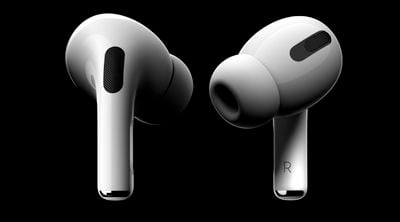
AirPods Pro

How Does the AirPods Ear Tip Fit Test Work?

Unlike previous generation AirPods, AirPods Pro come with three sizes of silicone tips for a customizable fit. These tips help to form a seal appropriate for optimizing the audio experience and the noise cancelling and Transparency modes, so it's important that you choose the right size tip for your ears.

The Ear Tip Fit Test is designed to help you with that, by testing the quality of the seal and identifying the best ear tip size for you. After placing AirPods Pro in each ear and running the test, algorithms work together with the microphones in each AirPod to measure the sound level in the ear and compare it to what's coming from the speaker driver.
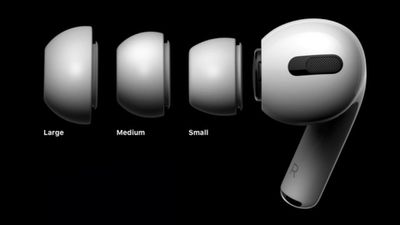
AirPods Pro
The algorithm detects whether the ear tip is the right size and has a good fit, or should be adjusted to create a better seal. Here's how to perform the test.

How to Run the AirPods Pro Ear Tip Fit Test

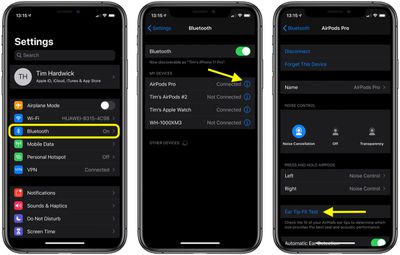
  1. Allow your AirPods to connect to your iPhone or iPad in the usual way, by opening the case next to your device and inserting the buds in your ears.
  2. Launch the Settings app on your iOS device.
  3. Tap Bluetooth.
  4. Under My Devices, tap the information icon (the circled "i") next to AirPods Pro in the list.
    AirPods Pro tip test

  5. Tap Ear Tip Fit Test.
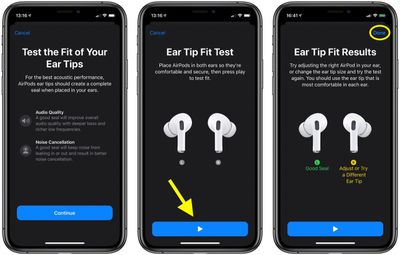
  6. Tap Continue.
     ear tip fit test

  7. Make sure you're wearing both AirPods, then press the blue Play button at the bottom of the screen.
  8. Check your Ear Tip Fit results under the corresponding left and right AirPod images. A good seal is shown in green, while a sub-optimal seal shows up in yellow.
  9. Tap Done.

If you get a yellow result for an AirPod, adjust the earbud or try a different ear tip, then run the test again to see if it's been fixed.
Related Roundup: AirPods Pro 3
Buyer's Guide: AirPods Pro (Neutral)
Related Forum: AirPods

Top Rated Comments

Mac Rules Avatar
87 months ago

At 300 USD, these are the idiots EarPods. Ofcourse a tutorial is neccesary.
Feel free to crawl back under whatever rock you came from
Score: 7 Votes (Like | Disagree)
brushlee Avatar
87 months ago

Am I supposed to hear anything I don’t hear anything and nothing happens 🤷‍♂️
You suppose to hear Siri whispers "two hundred fifty-y-y-y" - left ear, then right one.....

🤣
Score: 2 Votes (Like | Disagree)
87 months ago
At 300 USD, these are the idiots EarPods. Ofcourse a tutorial is neccesary.
Score: 1 Votes (Like | Disagree)

Popular Stories

airpods eq

Apple to Bring Custom EQ to AirPods

Monday June 8, 2026 10:29 am PDT by
Apple today announced that AirPods will gain a custom EQ (equalizer) feature, allowing users to further personalize how their AirPods sound. The new capability is part of Apple's next-generation software platform updates, which the company unveiled today. Custom EQ lets listeners adjust audio output to match their personal preferences, going beyond the fixed audio profiles AirPods have...
AirPods Pro 3 Heart Rate Tracking Feature

Apple Expands GymKit to iPhone and AirPods Pro 3

Tuesday June 9, 2026 2:26 am PDT by
Apple expands GymKit support to the iPhone and AirPods Pro 3 with iOS 27, extending the gym equipment connectivity feature beyond Apple Watch for the first time. GymKit originally launched in 2017 and has, until now, been exclusive to the Apple Watch feature, requiring users to wear the watch and tap it against compatible equipment to pair. The expansion means that iPhone and AirPods Pro 3...
AirPods Pro Beta Firmware 2

Apple Releases New AirPods Beta Firmware With iOS 27 Features

Tuesday June 9, 2026 11:31 am PDT by
Apple today released new beta firmware for the AirPods 4, AirPods Pro 2, and AirPods Pro 3. The firmware is limited to developers at the current time, and it has a build number of 9A5292e. In iOS 27, iPadOS 27, and macOS Golden Gate, Apple is adding a new AirPods interface and support for custom EQ. AirPods are also compatible with the new Siri AI. With iOS 26, iPadOS 26, and macOS Tahoe, ...