How To Play and Control Podcasts on HomePod With Siri - MacRumorsOpen MenuShow RoundupsShow Forums menuVisit ForumsOpen Sidebar
Skip to Content

How To Play and Control Podcasts on HomePod With Siri

by

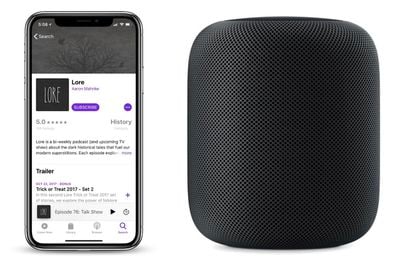
Siri on HomePod lets you listen to any show found in Apple's Podcasts catalog with a few voice controls that are similar to those for Apple Music playback. In this guide, we've listed some of the most useful ‌Siri‌ controls for Podcasts, along with basic commands that will help you do things like pause and rewind parts of a Podcast you might have missed, subscribe to a podcast, change the volume, and more.
podcasts homepod how to

Podcast Commands

  • "Hey ‌Siri‌, play the Game Scoop podcast."
  • "Hey ‌Siri‌, play the newest episode of Lore."
  • "Hey ‌Siri‌, play the first episode of Anna Faris is Unqualified."
  • "Hey ‌Siri‌, play my newest podcasts."
  • "Hey ‌Siri‌, what podcast is this?"
  • "Hey ‌Siri‌, subscribe to this podcast."
  • "Hey ‌Siri‌, subscribe to NPR News Now."

Controls

  • "Hey ‌Siri‌, pause."
  • "Hey ‌Siri‌, jump back 10 seconds."
  • "Hey ‌Siri‌, skip forward one minute."
  • "Hey ‌Siri‌, raise/lower the volume."
  • "Hey ‌Siri‌, play it twice as fast."

As with ‌Apple Music‌, ‌HomePod‌ will source the Podcast data you ask for from the Podcasts app on iPhone or iPad, or the Podcasts section of iTunes. Using the app, you can listen to podcasts directly on your iOS device, browse deeper into your library, and look for new shows.

Related Roundup: HomePod
Buyer's Guide: HomePod (Caution)

Top Rated Comments

108 months ago
Well if only Apple's Podcast app actually worked. It has gradually gotten worse and worse and worse. I kept getting played episodes again and again. Deleted podcasts would turn up again - sync between devices would foul everything up and suddenly present me with 30 random podcasts from last year that are suddenly un-played again. Mark something as played - and on next sync it might have forgotten.

So now i'm experimenting with "other" podcast software.

(and don't get me started on the TV' app and the absolutely too small PLAY icons... Who ever thought that was a great idea?)
Score: 2 Votes (Like | Disagree)
108 months ago
“Hey Siri, can you get HomePod it’s own website and get the articles about it off MacRumors?”
If you don't want to read about the HomePod, then do not click on the article. Simple as that. As for a lot of others, myself included, we enjoy learning more about this great Apple product.

Thanks MacRumors for everything you bring us!
Score: 1 Votes (Like | Disagree)
108 months ago
My most common use case would be to resume whatever Podcast I'm listening to on my iPhone or iPad. Unfortunately I don't think there's a way to do this.
Score: 1 Votes (Like | Disagree)

Popular Stories

wwdc 2026 horizontal

WWDC 2026 Graphic Teases Major iOS 27 Feature

Sunday April 19, 2026 3:02 pm PDT by
Apple's WWDC 2026 graphic provides "a glimpse of the revamped Siri interface coming in iOS 27," according to Bloomberg's Mark Gurman. In his Power On newsletter today, Gurman said iOS 27 will include a new Siri interface in the Dynamic Island. When you trigger Siri, he said the Dynamic Island will show a "Search or Ask" prompt, and this will apparently be accompanied by a "glowing cursor"...
Gemini Siri Feature

Google Confirms Gemini-Powered Siri Coming Later This Year

Wednesday April 22, 2026 11:08 am PDT by
Google today commented on its partnership with Apple, confirming that Gemini will power a new, more personalized version of Siri that's set to be released later in 2026. Google Cloud chief Thomas Kurian mentioned the Apple partnership during Google Cloud Next 2026, a conference that's taking place in Las Vegas, Nevada today. Earlier this year, we announced a monumental partnership with one...
iOS 27 Mock Quick

iOS 27 Camera App to Get 'Siri' Mode With Nutrition Label Scanning

Wednesday April 29, 2026 9:54 am PDT by
Apple is planning to integrate Apple Intelligence and Siri into more of its apps in iOS 27, including the Camera app, reports Bloomberg. The iOS 27 Camera app will have a dedicated Siri mode that will be available alongside the existing Photo, Video, Portrait, and Panorama modes. When in Siri mode, the existing Camera app shutter button will feature the Apple Intelligence logo, letting users know ...