

Starting with macOS Sierra in 2016, Apple introduced support for Siri on the Mac, allowing you to access the personal assistant across all of your Apple devices for the first time.
Siri on Mac can actually do quite a few useful things that aren't available on iOS devices, and because the technology is still rather new on Apple's desktop and laptop machines, we thought we'd highlight some of the most useful Siri commands on the Mac.
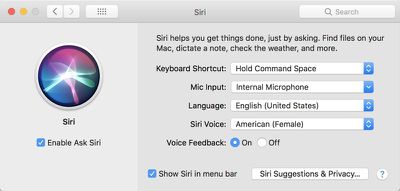
Siri on Mac can be accessed from the menu bar, the dedicated Siri app that can be added to the dock, or through a keyboard shortcut like Command + Space. You can manage your Siri preferences and options by opening up System Preferences and choosing "Siri" from the options at the bottom of the window.
One of the simplest and most useful ways to use Siri is to open apps without accessing the dock or finding the app in the applications folder. You can ask Siri to "open the Calendar app" or "open Evernote."
Open works with any app on your Mac, and it also works with websites and files. Some sample commands:
- Open MacRumors.com
- Open Google.com
- Open the Applications Folder
- Open the iCloud Drive folder
Siri's "Show Me" command on macOS works hand in hand with the series of open commands. You can ask Siri to show you all kinds of files stored on your Mac, which makes it easier to search for specific content. You can also ask for files within apps like Photos. Some sample commands:
- Show me my most recent files
- Show me files from June 2017
- Show me photos from April 2017
- Show me photos from last week
- Show me files from today
- Show me privacy settings
- Show me network settings
Siri is also interactive and can be used to turn settings on your Mac on and off, just like on iOS devices. Siri can turn on Night Shift, activate Bluetooth, turn off Wi-Fi, and more. Some sample commands:
- Turn off Wi-Fi
- Turn on Bluetooth
- Activate the screensaver
- Turn up the volume
- Turn down the brightness
- Go to sleep
- Change my wallpaper
Another useful way to use Siri on the Mac is to get information about the Mac itself. You can ask Siri questions about the hardware installed on your Mac. Some sample commands:
- How fast is my Mac?
- What processor does my Mac have?
- Tell me about my Mac
- What is my Mac's serial number?
- How much RAM does my Mac have?
- How much storage do I have?
Siri can, of course, answer simple queries and provide information, just like you can do on iOS. Commands like "What time is it?" and "What's the weather?" are available, as are more complicated requests like "Find me a good restaurant nearby" or "Get me directions to the mall."
Do you use Siri for Mac? What are the most useful commands you've found? Let us know if we've missed any in the comments below.















Top Rated Comments
settings > siri > disable
The ONLY device I actually use voice commands on is the new Apple TV (easier than typing in search terms with that little remote)
I can hit ⌘-space and open those URLs in Alfred or even Spotlight faster than you can say them and wait for them to be recognized (especially assuming Siri's less than stellar recognition rate). Hell, Alfred lets you just type a word and start a custom search immediately on any site you have it set up with.
Also, in the Finder ⌘⇧A opens the Applications folder and ⌘⇧I opens the iCloud Drive folder -- both way faster and less irritating than trying to say all that and hope it's recognized.
I guess they don't consider dictation part of Siri, but it can be pretty useful. It's gotten a lot better than it used to be. Again, on a full size keyboard it always seems a little more cumbersome than just typing but I suppose if you're a slow typist or just don't feel like it or have carpel tunnel or something then it's nice to have. (I just dictated this last paragraph and didn't make any manual correctons. Not bad!)