iOS 17: How to Get Follow Up and Critical Medication Reminders - MacRumorsOpen MenuShow RoundupsShow Forums menuVisit ForumsOpen Sidebar
Skip to Content

iOS 17: How to Get Follow Up and Critical Medication Reminders

by

In iOS 17, Apple has improved the Health app in several ways, including the way medication notifications work. If you miss a medication at the prescribed time, you can now get follow-up reminders to get you back on track. Here's how it works.
iOS 17 Health Feature
Since iOS 16, Apple has allowed you to enter all of your prescription medications, over the counter medications, and vitamins so that you can get reminders to take medication, check for interactions, and more.

In iOS 17, Apple has taken the feature further by adding Follow Up Reminders for any medications that you track using the Health app. If you don't log a medication within 30 minutes after you receive an official notification, you can opt into getting a second notification so you don't miss taking your medication.

Not only can you get Follow Up Reminders, you can enable Critical Alerts, which appear on your iPhone screen and play a sound even if a Focus mode is enabled or a device is muted.

If you log medications using the Health app, here's how to enable Follow Up Medications in iOS 17.

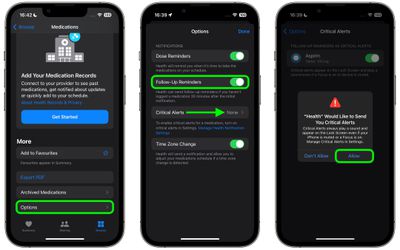
  1. In the Health app, select the Browse tab and tap Medications.
  2. Scroll to the bottom of the section and tap Options.
  3. Toggle on the switch next to Follow Up Reminders.
  4. Tap Critical Alerts if you want to enable them for some or all of your medications.
  5. Toggle on the switches next to the medications you want critical alerts for, and tap Allow in the prompt if you're sure.
    health

That's all you have to do. If you haven't taken your medication at the prescribed time, your ‌‌iPhone‌‌ will send you a follow-up notification, and if you don't log that you took it, a later critical alert.


Tag: Health

Popular Stories

Apple Wallet

iOS 27 Will Add Two New Apple Wallet Features to Your iPhone

Monday June 1, 2026 12:15 pm PDT by
Apple is set to unveil iOS 27 during its WWDC 2026 keynote on Monday, June 8, and the update will reportedly include two new Apple Wallet features. First, iOS 27 will reportedly let users create their own digital passes by scanning items like movie tickets, concert passes, and gym membership cards. Many apps already offer Apple Wallet passes, but now users will be able to create a custom...
Dynamic Island iPhone 18 Pro Feature

iPhone 18 Pro Battery Capacities Allegedly Leaked

Tuesday June 2, 2026 1:54 am PDT by
Battery capacities for Apple's upcoming iPhone 18 Pro have allegedly surfaced, and the numbers suggest only a modest increase over the iPhone 17 Pro. According to prolific Weibo-based leaker Digital Chat Station, Apple is testing the iPhone 18 Pro with different battery capacities for the China and U.S. versions of the device, similar to last year's iPhone 17 Pro models. The Chinese model is ...
macOS 27 on MacBook Pro

Apple Says macOS 27 Won't Be Compatible With These Macs

Wednesday June 3, 2026 8:29 am PDT by
During WWDC 2025, Apple revealed that macOS 26 Tahoe would be the final major macOS version for Intel-based Macs. macOS 27 will be compatible with Apple silicon Macs only, meaning that you will need a Mac with an M-series chip or a MacBook Neo with an A18 Pro chip in order to install the software update. Apple will unveil macOS 27 during its WWDC 2026 keynote this Monday, June 8, and the...