

In iOS 16, Apple lets you add vitamins and prescription medications to the Health app, allowing you to get reminders to take them. Keep reading to learn how it works.

Do you find it a challenge keeping track of your medications and making sure that you take the right doses at the correct time? Your iPhone can help you with that, because Apple in iOS 16 added a new medication management feature to the Health app.
In a new section of the app called "Medications," you can enter all of your prescription medications, over the counter medications, and vitamins that you take so you can get reminders to take medication, check for interactions, and more.
The following steps explain how to add a medication to the Health app in iOS 16.
- Open the Health app on your iPhone.
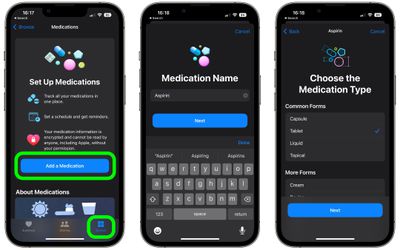
- Select the Browse section, and then select Medications or type "Medications" into the Health app search bar and select it from the results.
- Tap Add a Medication.
- Input the name of the medicine or vitamin and tap Next.
- Choose the medication type (capsule, liquid, cream, etc.) from the list, then tap Next.

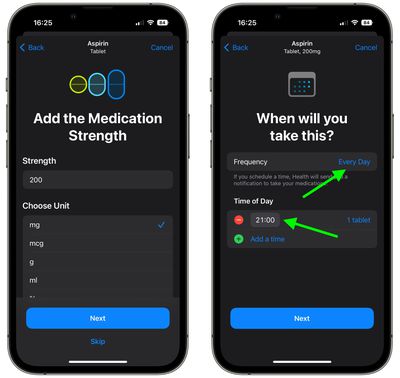
- Add the medication strength and choose a unit from the list, then tap Next. Alternatively, tap Skip.
- Using the frequency and interval options, enter how often you will take the medicine or vitamin, select a Time of Day, then tap Next.
- Choose the shape of your medication (the icon that will represent it), then tap Next. Alternatively, tap Skip.
- Choose the colors to indicate the medication, then tap Next.
- Review the entered details and ad any useful notes on the last screen, then tap Done.
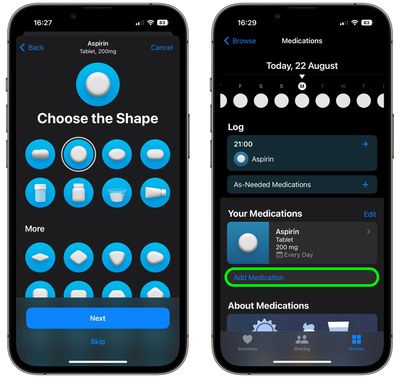
Your medication or vitamin is now logged in the Health app, your iPhone will send you a notification when it's time to take it. You can add another by tapping Add Medication. Note that you can also remove medications from the Health app at any time if they no longer apply to you.















