


Stop WhatsApp Auto-Saving Media to iPhone Photos App - MacRumorsOpen MenuShow RoundupsShow Forums menuVisit ForumsOpen Sidebar
Skip to Content

Stop WhatsApp Auto-Saving Media to iPhone Photos App

by

whatsappBillions of messages are sent over the WhatsApp chat platform every day. One of the reasons for the service's massive popularity is that it lets users send and receive as many media-rich messages as they want, which – as long as they've limited WhatsApp's use of their cellular data plan – costs them next to nothing.

That's great news for senders, but one of the drawbacks of receiving multiple images and video clips from your WhatsApp contacts is that they're automatically saved to your iPhone's Photos app. Apart from being an unwelcome sight in your personal photos, they can start to take up valuable storage space. Fortunately, you can easily prevent this default behavior by following the steps below.

How to Stop WhatsApp Saving to Photos

  1. Launch the WhatsApp app on your iPhone.

  2. Tap the Settings icon (the small cog wheel) at the bottom right of the screen.

  3. Tap Chats.
  4. Toggle off the Save to Photos option so that it no longer shows as green.
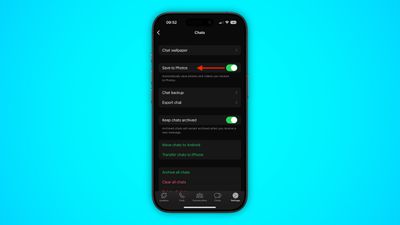
whatsapp

Once you've turned off the above setting in WhatsApp, you can still manually opt to save individual media files that you receive in a chat thread. Simply long press on the photo or video clip in question and choose the Save option.

How to Limit WhatsApp Media Downloads to Wi-Fi

If receiving images or video over WhatsApp is sapping your cellular data when you're out and about, you can prevent them from downloading to your iPhone until you're safely back in range of a Wi-Fi connection.
whatsapp
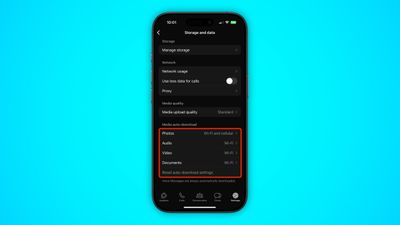
To do so, return to WhatsApp's Settings tab and tap Storage and data. The options under the "Media Auto-Download" section let you dictate which types of media can be downloaded and under what circumstances. Make sure that the media types you're happy to wait for are set to Wi-Fi.


Top Rated Comments

Infinite Vortex Avatar
105 months ago
And use what?
Signal.

If you read the Terms of Use WhatsApp, and Facebook, can grab the full contents of your Contacts app any time they want to. And they want to quite a bit. Not just names and phone numbers, the whole damn lot! WhatsApp won't work without access to Contacts either to ensure they get that data from you… Signal will work with or without your contact data.
Score: 4 Votes (Like | Disagree)
105 months ago
Whatsapp should let send and receive pics at full resolution, without compressing them.
Score: 3 Votes (Like | Disagree)
RightMACatU Avatar
105 months ago
How to Stop WhatsApp Auto-Saving Images and Video to Your iPhone's Camera Roll
By not installing the app? :p
Score: 3 Votes (Like | Disagree)
arkitect Avatar
105 months ago
iMessage of course remember you are on apples turf
I'll be sure to tell my Android using family and friends I want them all to switch to Apple. For my convenience, of course. ;)
Score: 2 Votes (Like | Disagree)
105 months ago
Signal.

If you read the Terms of Use WhatsApp, and Facebook, can grab the full contents of your Contacts app any time they want to. And they want to quite a bit. Not just names and phone numbers, the whole damn lot! WhatsApp won't work without access to Contacts either to ensure they get that data from you… Signal will work with or without your contact data.
Any alternative IM service sounds good, until you realize where all your friends are. And at this point, everybody is too lazy to install/set up yet another messaging service after Whatsapp, Line, Wechat, Telegram, Facebook messenger, etc. Even Google couldn't penetrate the messaging market. Add on the region complexity if you have international friends. Telling your friends of yet another app to install (just to communicate with you) will be greeted with an eye-roll.
Score: 2 Votes (Like | Disagree)
n-evo Avatar
105 months ago
Thank god 99% of my family and friends are on iOS so this isn’t necessary. But my question is...why wouldn’t you just SMS your Android friends? Most plans have unlimited texting these days.
SMS doesn't allow for sending video's, photos, voice memo's, location (with map), live location for a set time, group chat among other things. Also not all plans allow for free unlimited MMS, while SMS is unlimited without extra charges.
Score: 1 Votes (Like | Disagree)

Popular Stories

Whatsapp Feature

These Older iPhones Will Need an Update to Keep Running WhatsApp

Thursday June 11, 2026 3:36 am PDT by
Some older iPhone models will need a software update to keep running WhatsApp from the end of November 2026, after Meta confirmed it is raising the app's minimum system requirements. From November 30, WhatsApp will require iOS 15.5 or later, up from the current requirement of iOS 15.1. The models affected are the iPhone 6s, iPhone 6s Plus, iPhone SE (1st generation), iPhone 7, and iPhone...
Whatsapp Feature

WhatsApp Working on View-Once Text Messages for iPhone

Wednesday June 17, 2026 1:48 am PDT by
WhatsApp is working on a way to let users send text messages that can only be viewed once, similar to the feature already available for photos, videos, and voice notes. According to WABetaInfo, after typing a message in the chat bar, users will be able to select a new "Send as view once" option by long-pressing the Send button. When the message is sent, the recipient will be able to open the ...
Whatsapp Feature

WhatsApp Now Lets You Reserve a Username

Monday June 29, 2026 4:01 pm PDT by
Popular messaging app WhatsApp is now allowing users to reserve usernames ahead of plans to launch username-based messaging. Right now, WhatsApp uses a person's phone number as an identifier, but usernames will allow people to interact without having to exchange personal information. Username reservations are rolling out starting this week, and not all users will have access to the...













