

Most iPhone users are familiar with Apple's Live Photos, which capture 1.5 seconds of video before and after you take a picture, with the aim of adding a little bit of life and movement to still images. What some users might not know is that you can also make a Live Photo bounce back and forth like a boomerang.

If you're familiar with Instagram, you probably know what a boomerang is. Since introducing Live Photos in 2015, Apple has added some effects to its Photos app that let you turn them into fun animated clips, and the Bounce effect is basically the same thing as a boomerang. It rewinds the action backward and forward. Here's how to make one of your own on iPhone.
- Open the Photos app and select a Live Photo. (If you look under "Media Types" in the Albums section, you'll find all of your Live Photos collated in a folder of the same name.)
- With the Live Photo open, tap the LIVE icon in the top-left corner of the interface.
- From the dropdown menu that appears, choose Bounce.
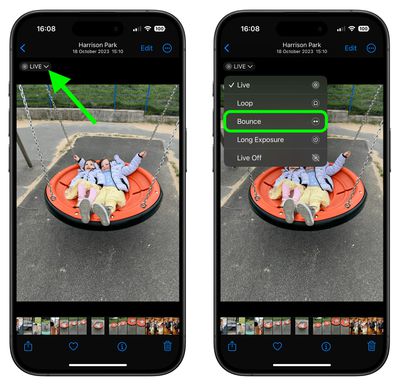
The effect you choose will be applied immediately, ready for you to share it using the Share icon in the bottom-left corner of the screen. Note that there are two other effects that you can try in Photos: Loop repeats the action in a continuous looping video, and Long Exposure simulates a DSLR-like long exposure effect by blurring motion.
Did you know that it you get a blurry Live Photo image, you can open it up and see if other frames you captured are clearer, and then select a replacement "key photo" for it. Click the link to learn how it's done.




















Top Rated Comments
The fact that Apple included this feature and clearly has it set to keep using more storage space despite the user's expectation is a clear consequence of them charging money for storage space. It gives them incentives to do shady things like this so storage gets used unexpectedly.
The fact that disabling this requires digging into the Camera settings and then another level deep to find a completely counter-intuitive setting is just more proof of this, and is not at all reasonable "solution" to this.