

watchOS is the operating system that runs on the Apple Watch, powering its fitness tracking capabilities, apps, communication features, time-keeping abilities, and more. Apple plans to push regular updates to fix watchOS bugs, refine performance, and introduce new features, and the release of watchOS 2 alongside iOS 9 later today is a major uprade for the platform. (Update: Apple has delayed the public release of watchOS 2.)
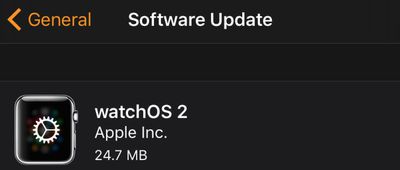
watchOS updates are installed in a unique way that differs from how we install iPhone and Mac updates, so we've crafted a quick tutorial to remind users how to get the latest version of watchOS on their Apple Watches so they're ready for watchOS 2.
Before You Start
Before you try to download and install the new version of watchOS, make sure of the following:
- Your iPhone has been updated to iOS 9.
- Your iPhone and Apple Watch are within range of each other.
- Your Apple Watch has at least a 50 percent charge.
- Your Apple Watch is connected to its charger.
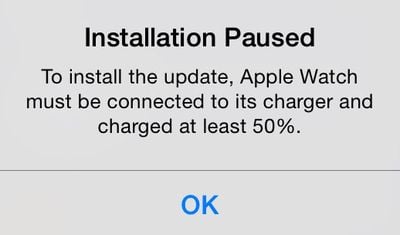
The last two requirements are important. You will be able to download the new version of watchOS without a 50 percent charge or Apple Watch resting on its charger, but you won't be able to install it. During the installation step, you will instead see a message that the installation is paused and won't continue until Apple Watch is connected to the charger with at least a 50 percent charge.
Downloading and Installing the Update
- Open the Apple Watch app on your iPhone and select the My Watch tab if necessary.
- Tap General, then tap Software Update.
- Tap Download and Install to begin the process.
- Enter your four-digit passcode on Apple Watch when prompted.
- The Apple logo and progress bar will appear when the software is installing. When finished, Apple Watch will restart.
If Something Goes Wrong
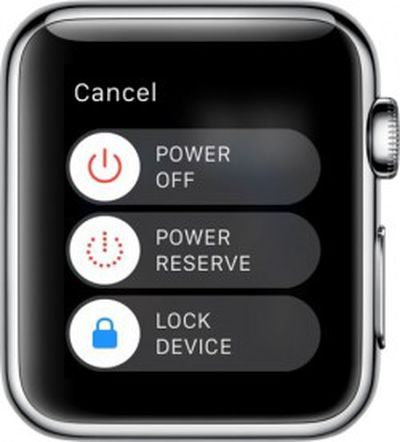 If, for some reason, the download freezes up or you can't get the software to install on Apple Watch, you can try restarting the device.
Restarting
- Hold down the Side button until the Power Off slider appears.
- Slide the bar to shut off Apple Watch.
- Hold down the Side button until the Apple logo appears.
- Wait for Apple Watch to restart.
- Enter your passcode when prompted.
Hard Reset
If powering down Apple Watch does not work, you can also try a hard reset. This forces the device to shut off. It usually takes a bit longer to restart Apple Watch when you perform a hard reset.
- Hold both the Side button and Digital Crown down at the same time.
- The screen will go blank, and then the Apple logo will appear.
- Wait for Apple Watch to restart.
- Enter your passcode when prompted.
Apple is rapidly iterating on watchOS, so don't be surprised if we continue to see frequent updates. watchOS arrives just five months after the Apple Watch's debut and brings a host of new features including native third-party apps, so most Apple Watch owners will want to upgrade as soon as possible and begin exploring what's new.
















Top Rated Comments
Edit: Ouch, bet you wish you didn't order that pizza so soon. No software update for the Watch today. :(