

During the beta phase of iOS 15, Apple added a new Safari design element that moves the URL and tab interface to the bottom of the screen, a decision that was immediately controversial with iPhone users.
After listening to a chorus of feedback from users who didn't like the change, Apple eventually added a toggle that sent the address bar to the top of the iPhone screen instead of the bottom, allowing users to return Safari to a more iOS 14-like experience if they wished.
If you can't get on with the address bar living at the bottom of the screen and would prefer to have it in its original position at the top, like it was in iOS 14, follow these steps.
- Launch Safari on your iPhone.
- Tap the "aA" icon in the left side of the address bar.
- Tap Show Top Address Bar in the popup menu.
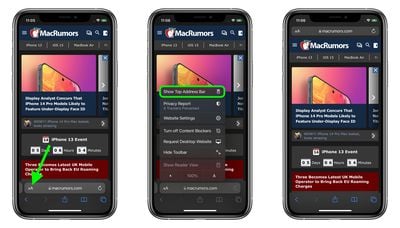
You can also control this design change in Settings -> Safari, under the "Tabs" section. To take the URL bar to the top of the Safari interface, select Single Tab.




















