Though designed for iOS devices, Apple's Beats-branded Powerbeats Pro are also compatible with Android smartphones and tablets, so you can take advantage of Apple's wire-free tech even if you're an Android user or have both Android and Apple devices.
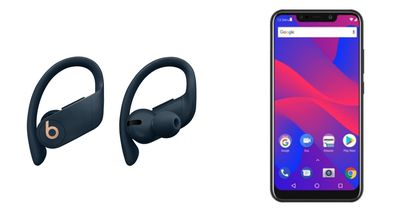
The downside to using Powerbeats Pro with Android is that you do lose some functions, like Apple's unique H1 chip pairing features and its Siri handsfree virtual assistant. Powerbeats Pro do, however, work like any other Bluetooth headphones on an Android device.
Pairing Powerbeats Pro to an Android Device
Powerbeats Pro pair to an Android smartphone like any other Bluetooth device, but there are some specific steps to follow.
- Open up the Powerbeats Pro case (with the earbuds inside) next to your Android device.
- Go to the Bluetooth settings on your Android device.
- Tap Powerbeats Pro in the Bluetooth devices list to connect them.
If you don't see the Powerbeats Pro appear in the list of available Bluetooth devices, try resetting the earbuds. Open the Powerbeats Pro charging case and press the case's button until the little white LED starts to blink. Wait a few moments, then refresh your available devices list and it should appear.
Powerbeats Pro Features That Don't Work on Android
When paired with an iPhone, iPad, Apple Watch, or Mac, Powerbeats Pro offer a rich set of features thanks to the integrated H1 chip, the accelerometer and other sensors, as well as deep integration with Apple's devices.
Here's a list of AirPods features you lose out on when using the Powerbeats Pro with Android:
- Siri. On iPhone, you can say "Hey Siri" or press the Play/Pause button to activate Siri, for doing things like changing songs, adjusting volume, or just asking simple questions.
- Automatic switching. Powerbeats Pro are linked to an iCloud account for Apple users, which allows them to easily switch between using the earbuds with an iPad, iPhone, Apple Watch, and Mac.
- Simple setup. Pairing with an iOS device only requires opening the Powerbeats Pro case near said device and following the quick setup steps.
- Checking Powerbeats Pro battery. On the iPhone and Apple Watch, you can ask Siri about Powerbeats Pro battery life or check it from the Today center on iPhone or the Control Center on Apple Watch. Luckily, there is a way to replace this functionality on Android with the AirBattery app or Assistant Trigger.
- Automatic ear detection. On iPhone, when you remove an Powerbeats Pro earbud from your ear, it pauses whatever you're listening to until you put it back into your ear.
- Single earbud listening. Listening to music with a single Powerbeats Pro earbud is limited to iOS devices because it uses ear detection functionality. On Android, you need to have both Powerbeats Pro earbuds out of the case for them to connect.
- Live Listen.
On iOS, Powerbeats Pro can make use of Apple's Live Listen feature for using the earbuds as a directional microphone.
Despite the loss of functionality, even if you use Android devices exclusively, Powerbeats Pro are a great wire-free earbud option that outperform many other Bluetooth earbuds available for Android devices.