

How to Use the Virtual Trackpad on iPhone 11, iPhone 11 Pro, and iPhone 11 Pro Max - MacRumorsOpen MenuShow RoundupsShow Forums menuVisit ForumsOpen Sidebar
Skip to Content

How to Use the Virtual Trackpad on iPhone 11, iPhone 11 Pro, and iPhone 11 Pro Max

by

One of the more useful actions that 3D Touch makes possible is pressing an iPhone's onscreen keyboard to turn it into a virtual trackpad. If you ‌3D Touch‌, the keyboard turns blank and morphs into a trackpad that allows you to quickly move the cursor on the screen through the text you've written.
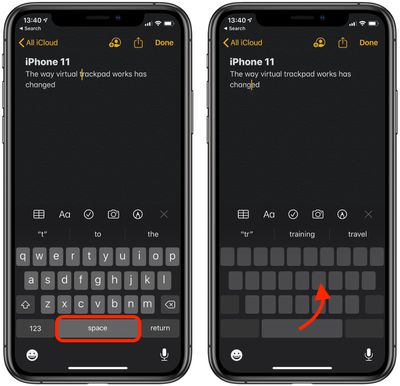
virtual trackpad on iphone 11
This popular gesture is useful because it allows you to make quick edits without having to reach up and tap the display. However, in its latest crop of devices, Apple has replaced ‌3D Touch‌ with Haptic Touch, and the way the virtual trackpad activates has changed slightly.

On iPhone 11, iPhone 11 Pro, and iPhone 11 Pro Max, you have to press and hold on the spacebar to bring up the trackpad. In other words, pressing just anywhere on the keyboard no longer works.

It's a small adjustment, but it's worth highlighting in case you tried to activate the virtual trackpad on your new iPhone in the traditional way and wondered why it wasn't working. Note that the gesture functions similarly on all Apple devices that lack ‌3D Touch‌, including the iPhone XR and all models of iPad.

Related Forum: iPhone

Top Rated Comments

840quadra Avatar
85 months ago
A big step backwards for many of us. Just have to use the iPad muscle memory for this feature. Practicing on my max, this is a far slower way to do a quick edit or highlight.
Score: 8 Votes (Like | Disagree)
Wide opeN Avatar
85 months ago

RIP 3D Touch. But hello beautiful new iPhone 11 Pro!
I fear this is the logic that encourages Apple to make these moves without reservation.
Score: 7 Votes (Like | Disagree)
85 months ago
FYI, if you tap with another finger on the "trackpad" while doing this you can also select text.
Score: 7 Votes (Like | Disagree)
85 months ago
A real shame — gestures like this showed the potential 3D Touch had.

I guess the talking point an Apple exec gave a couple years ago about 3D Touch being a long term investment and something they really believe in was just a bunch of baloney.


FYI, if you tap with another finger on the "trackpad" while doing this you can also select text.
Thank you! This answered my biggest question.
Score: 4 Votes (Like | Disagree)
haruhiko Avatar
85 months ago
The only one 3D Touch gesture I'm going miss for a long long time.
Score: 4 Votes (Like | Disagree)
tennisproha Avatar
85 months ago
So basically it’s an inferior 3D Touch. The beauty of 3D Touch is that it allows for more function options in addition to press-and-hold. You can have 3D Touch do one thing and press-hold do another.
Score: 3 Votes (Like | Disagree)
















