

iOS 7 Beta 5 Tidbits: Icon Settings Redesign, New Control Center Options - MacRumorsOpen MenuShow RoundupsShow Forums menuVisit ForumsOpen Sidebar
Skip to Content

iOS 7 Beta 5 Tidbits: Icon Settings Redesign, New Control Center Options

Apple today released the fifth beta of iOS 7, which brings a number of improvements, changes, and bug fixes to the operating system, including newly redesigned Settings icons and a Control Center option that allows the feature to be disabled within apps.

iOS 7 beta 5 also offers a slew of minor interface tweaks and improvements that continue to make iOS 7 feel both faster and more polished. Our forum members have noted multiple enhancements that have been bundled into the release:

Settings - The icons in the Settings menu have seen a complete design, going from standard blue icons to a variety of square icons in various colors.
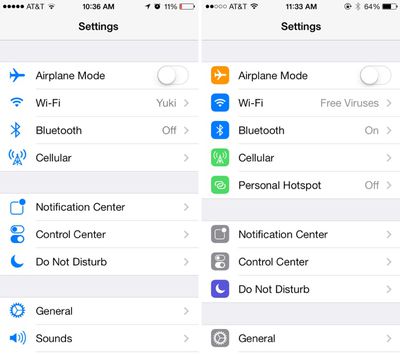
settings
Control Center - Control Center’s settings now allow the function to be turned off while in apps, preventing Control Center from being accessed from the bottom of the screen while playing games or otherwise using apps.
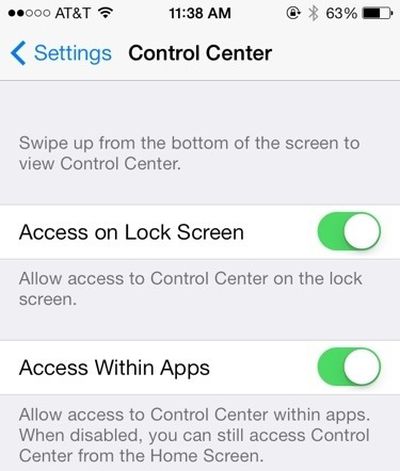
controlcenteroptions
Power Off - The slider bar that displays when the iPhone is being powered off has been slightly altered.

Twitter - The Twitter icon has been redesigned. Rather than a white bird on a blue background, it now depicts a blue bird on a white background.
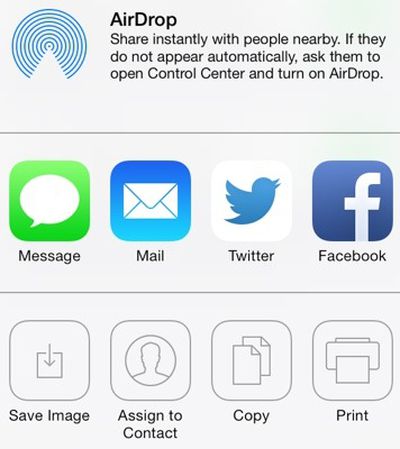
twitternew
Notifications - Banner notifications can now be pulled down to access additional information.

Phone - The icons that are displayed while a user is in a call have been slightly altered with the addition of circles around the icons. They also appear to be larger.
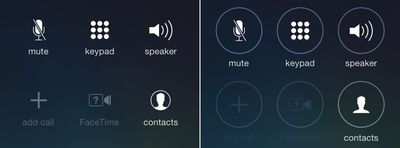
phone
Accessibility Options - There are now On/Off toggle options under the Accessibility menu.

Boot Screen - When installing iOS 7 beta 5, many iPhone 5 users noted that the color of the boot screen matched their devices, with a white screen used for white phones and a black screen used for black phones. This differentiation appears to be limited to the iPhone 5 at this point in time as iPad owners and older iPhone users have not noticed the change.

Messages - In iOS 7 beta 4, Apple changed Messages to default to displaying the first name and last initial of a contact in a conversation. With beta 5, only the first name is displayed by default, though other options can be selected in the Mail settings menu (which is linked to Messages). To access the feature, go to Settings / Mail Contacts and Calendars / Short Name (under Contacts).

Additional features in iOS 7 beta 5 will be added here as they are discovered. Apple is likely to continue pushing regular updates for iOS 7, bringing minor performance boosts and changes ahead of the operating system’s public release, which is expected to come in the fall.


Related Forum: iOS 7

Popular Stories

Apple Card iPhone 16 Pro Feature

Apple Card Promo to Offer Free AirPods Pro 3

Friday May 15, 2026 8:59 am PDT by
Starting as early as next week, customers who sign up for an Apple Card at Apple's retail stores in the U.S. will receive $249 cash back when they purchase AirPods Pro 3, according to Bloomberg's Mark Gurman. The promotion has yet to be officially announced by Apple, so exact terms and conditions are not available at this time. AirPods Pro 3 are priced at $249 in the U.S., so customers who...
Apple WWDC25 iOS 26 CarPlay Light mode 250609

Six Popular iPhone Apps Now Available on CarPlay

Thursday May 14, 2026 9:10 am PDT by
Apple's CarPlay system for accessing iPhone apps on a vehicle's dashboard screen has received six popular apps in recent weeks: ChatGPT, Perplexity, Grok, Google Meet, WhatsApp, and the indie artist streaming platform Audiomack. Make sure you have the latest version of each app and they will automatically appear on CarPlay. ChatGPT Starting with iOS 26.4, CarPlay supports voice-based...
ipad mini 7 blue

OLED iPad Mini: Release Date, Pricing, and What to Expect

Thursday May 14, 2026 5:08 am PDT by
According to the latest rumors, Apple is close to launching its next-generation iPad mini. So what should we expect from the successor to the iPad mini 7 that Apple released over a year ago? Read on to find out. Processor and Performance Apple is working on a next-generation version of the iPad mini (codename J510/J511) that features the A19 Pro chip, according to information found in code...

Top Rated Comments

167 months ago
Nice WiFi name on the right.
Score: 67 Votes (Like | Disagree)
JoshBoy Avatar
167 months ago
Much prefer the minimal look icons
Score: 42 Votes (Like | Disagree)
167 months ago
I'm not sure how, but Apple took the iOS personality and snuffed it. The UI is ultra-boring, just like bauhaus architecture: it looks great, but you wouldn't want to live in it.

Um, many people, including myself, would LOVE to live in a Bauhaus style home.

MacRumors content image
Score: 39 Votes (Like | Disagree)
ZacNicholson Avatar
167 months ago
I'm glad they are slowing adding color back into iOS 7. it has too much white
Score: 36 Votes (Like | Disagree)
167 months ago
boring

I'm not sure how, but Apple took the iOS personality and snuffed it. The UI is ultra-boring, just like bauhaus architecture: it looks great, but you wouldn't want to live in it.

The UI has moved from delightful to cool. Using it makes me want to throw my phone away. It's like Apple has sucked all the joy out of the UI and replaced it with futura.
Score: 34 Votes (Like | Disagree)
167 months ago
The settings icons are much better now. Having them all blue made it to hard to easily distinguish which was which. They almost melded into each other. This is a great change!
Score: 31 Votes (Like | Disagree)















