

Adobe Launches Lightroom 5.7 with Built-In Migration Tool for Aperture and iPhoto - MacRumorsOpen MenuShow RoundupsShow Forums menuVisit ForumsOpen Sidebar
Skip to Content

Adobe Launches Lightroom 5.7 with Built-In Migration Tool for Aperture and iPhoto

by

Adobe today updated Lightroom to version 5.7, bringing a number of new features including a built-in importer tool for users migrating their content from Aperture and iPhoto. The update follows the release of a separate plugin last month which contained similar functionality. The update also allows users to view comments and feedback from collections on Lightroom's web interface and contains bug fixes.
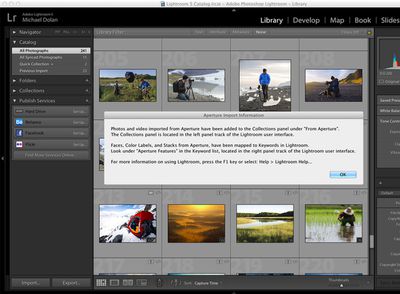
lightroom572
Adobe has also updated its Camera Raw plugin to version 8.7, bringing RAW file format support in Photoshop and Lightroom for cameras like the Canon EOS 7D Mark II, Fujifilm X100T, and the Samsung NX1. The update also adds new lens profiles for Apple's iPhone 6 and iPhone 6 Plus.

Adobe Lightroom 5.7 is a free update for existing users and can be downloaded through the "Help" section in Lightroom. Adobe Camera Raw 8.7 can be downloaded through the "Help" section in Photoshop.


Top Rated Comments

Chupa Chupa Avatar
152 months ago
Lightroom is a standalone product. Nobody can say if or how long that remains, not even Adobe at this point, but not using one of the best post-processing softwares currently available because of what may potentially eventually happen in the future is just plain silly. Just like Aperture users getting their pants in a knot because they have to switch now is. As if Aperture all of a sudden stops working now.

There are a lot of programs that have their pro's and con's. But you may want to hurry up and make a choice, or get over your aversion to subscriptions because C1Pro is going subscription too. Still offered as standalone as well (like Lightroom), but the fact they offer a subscription now too is writing on the wall.


Well it's not all that silly for us hobbyists. From my own perspective changing to another app IS a big deal because conversions are never 100% without issues. It's neither something to be taken lightly considering all the work that goes into editing and cataloging photos nor something most want to do multiple times in as many months or years.

As you say, it's unknown how long LR will remain stand-alone which is a consideration for me because spending $120 is a non-starter. And Apple has pretty much said, while it will build in compatibility into 10.10 it won't for 10.11. So then the choice becomes staying with Aperture and 10.10 or moving forward. So while it's true Aperture won't suddenly stop working, that's only realistic as long as you stick with 10.10 and never buy a new Mac as soon as this Fall when, presumably Macs with 10.11 ship.

The unanswered question for me is where on the feature spectrum does Photos for OS X fall. If it's more Aperture-like, with iCloud options great. Problem solved. If it's a refreshed, mostly iCloud dependent, version of iPhoto then Houston, we have a problem.

So I will wait and see what Photos for OS X brings, but that alternatives are fairly daunting and worrisome for those of us hobbyists who don't have unlimited funds to rent software infinitum just to have proper access to our edits.
Score: 7 Votes (Like | Disagree)
John.B Avatar
152 months ago
Add my voice to the chorus wishing for a decent forward-looking solution.

Frankly, the current options suck.

For now, I'm on LR 5.x (perpetual license) but have no desire to sign up for their forever-subscription model required for new features or iOS integrations. They have yet to publish a roadmap for the perpetual use version, and given the way they are pushing CC everywhere else, I'm not holding my breath. Also, Lr web galleries still require Flash (not happening, Shantanu) and Adobe has flatly refused to update this to generate HTML5-based galleries viewable on mobile devices (iOS or Android).

Before that I was on Aperture, which had a far better workflow, not locked in to one methodology like Lr, but as we all know any meaningful work was abandoned years ago and Tim killed the product in favor of (currently vaporware) "Photos", which doesn't have a release date or even a published feature set.

The future is looking pretty grim for photographers on the Mac platform. :(
Score: 5 Votes (Like | Disagree)
ginkobiloba Avatar
152 months ago
I'm unfamiliar with Lightroom. Some people say the software is better but what about actual results using a range of common editing tools? Is there any difference or is it so minor as to be insignificant and impossible to detect?

As long as Aperture does what I need I can't see too much need to move over and pay Adobe for the priviledge but then I tend to only use the basic tools in Aperture.
Lightroom's editing tools are more powerful, but ( like most Adobe's products ) I find it much less untuitive to use than Aperture. I've been using Aperture without ever looking at the manual, but I had to go through quite a few video tutorials to even start using Lightroom.
The ergonomy of most Adobe's tools is terrible.
Score: 5 Votes (Like | Disagree)
152 months ago
Personally I am going to stick with Aperture for now and see what the new photos app has to offer when it arrives.

I'm not risking going the Adobe route so that they can fleece me for monthly rental of software when they decide they have got enough former Aperture users locked in enough to pull that stunt.
Score: 3 Votes (Like | Disagree)
152 months ago
I'm unfamiliar with Lightroom. Some people say the software is better but what about actual results using a range of common editing tools? Is there any difference or is it so minor as to be insignificant and impossible to detect?

As long as Aperture does what I need I can't see too much need to move over and pay Adobe for the priviledge but then I tend to only use the basic tools in Aperture.

Wait and see what arrives in Photos.

I can’t believe Apple is willing to sacrifice their Pro and Prosumer customers to Adobe.
Score: 3 Votes (Like | Disagree)
AppleInLVX Avatar
152 months ago
My primary concern has always been getting roped into some stupid Adobe subscription model. Nothing is worth that for me.

I'm waiting to see what Apple actually does with its photo strategy. I honestly don't have high hopes, as it seems impossible today to create a good cloud-based photos option that'll serve professionals. That said, photos are one of the main things that people do with their Macs, and Apple knows it. Maybe they have a rabbit in the hat yet. I'm waiting to find out.
Score: 3 Votes (Like | Disagree)

Popular Stories

iCloud iPhone 17 Pro

iPhone Users Who Pay for iCloud Storage Get Two New Perks on iOS 27

Thursday July 2, 2026 6:10 am PDT by
If you pay for certain iCloud+ storage plans beyond the 5GB that Apple offers for free, you will receive two more perks on iOS 27 at no additional cost. A summary of the two new iCloud+ perks on iOS 27:Increased daily usage limits for some new Apple Intelligence features, including image generation in the revamped Image Playground app. HomeKit Secure Video cameras receive generated video...
iPhone 4 on Black Feature

Apple Facing One of Its Worst Leaks Since the iPhone 4

Thursday July 2, 2026 9:53 am PDT by
Apple supplier Tata Electronics recently suffered a cyberattack that resulted in thousands of confidential files being published on the dark web, and this reportedly included some photos and documents related to the upcoming iPhone 18 Pro. We have elected not to share any of the leaked photos in this story due to the illegal nature in which they were obtained, but they can easily be found...
American Express Gold Apple Pay Feature

American Express Announces New Apple Pay Feature

Tuesday June 30, 2026 10:27 am PDT by
American Express today announced that you can now redeem Membership Rewards points when checking out with Apple Pay on the web and in apps on the iPhone and iPad. When checking out with Apple Pay on iOS 18 or iPadOS 18 or later, tap on your eligible American Express card (Platinum, Gold, Green, and others) and select the Membership Rewards points option. You can use points to cover all or...














