Redesigned Version of Microsoft OneNote Now Available on Mac and iOS - MacRumorsOpen MenuShow RoundupsShow Forums menuVisit ForumsOpen Sidebar
Skip to Content

Redesigned Version of Microsoft OneNote Now Available on Mac and iOS

by

This week, Microsoft took the unusual step of pushing out a redesigned version of OneNote for Mac and iOS ahead of its release on Windows and Android. The update to the note-taking platform introduces a new interface that aims to enhance usability for users of assistive technologies, simplify navigation controls, and create consistency across devices, according to the company.

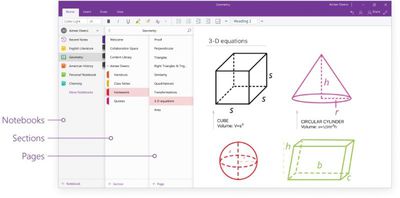
Microsoft said it has listened to user feedback to learn how it could improve the navigational layout of the note-taking apps, especially for larger digital notebooks with more sections. As a result, the new interface places all navigation panes in one collapsible area on the left-hand side of the app, instead of having menus for notebooks and sections/pages on either side of the window.
Redesigning OneNote 1

This allows users to easily switch between their notes and dramatically improves usability with assistive technologies. With the new consolidated and simplified design, screen readers can easily navigate through the app to help those with disabilities. In addition, content is front and center—helping students to focus and avoid distractions.

To switch to any other page or section, users can click its name in the navigation panes, or Control-click the name of any page or section and then choose from more options. To open a different notebook, users can click the Show Notebooks button and select it in the list, while options for creating new notebooks/sections/pages now appear at the bottom of the associated navigation panes. On Mac, each pane can also be resized by moving the mouse pointer over the vertical edge and click-dragging it.
Redesigning OneNote
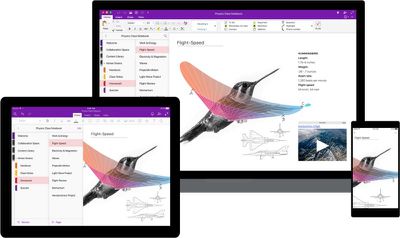
The new design philosophy also brings greater interface consistency across Mac, iPhone, and iPad, enabling users to transition between devices quickly and easily, which Microsoft hopes will benefit those with visual impairments and also help in learning environments where device variety is increasingly common.

OneNote for Mac is freely available on the Mac App Store [Direct Link]; likewise OneNote for iOS is a free download on the App Store [Direct Link] The overhauled interface has also been applied to Microsoft's web app. Windows and Android versions are expected to roll out in the coming weeks.


Tag: OneNote

Top Rated Comments

119 months ago
Nice. Just graduated from Law School on Sunday. Used OneNote for all three years. Figures they would release an update right when my usage pretty much stops. lol.
Score: 5 Votes (Like | Disagree)
marvz Avatar
119 months ago
Looks way better and easier to use but before I really make the switch from Evernote they need to make their freaking web clipper usable.
Score: 4 Votes (Like | Disagree)
Santabean2000 Avatar
119 months ago
Pretty sweet for a free app. I always find syncing slow though...

iCloud, Google Drive, DropBox - all much, much faster.
Score: 3 Votes (Like | Disagree)
119 months ago
What about local network onenotes?

It's available on windows but not Mac.

Cloud-based notes are worthless in a corporate environment. I cannot collaborate with my colleagues being the only one on the team with a mac.
Score: 2 Votes (Like | Disagree)
119 months ago
This is the most used app on my Mac... which is weird since I'm a designer and pretty much live in CC...
Its the best thing to come out of MS since... forever I think.

But having a huge navigation on the left side... sort of feels off to me... Where my eyes start to read, I want my content to be. The Nav is a secondairy item of importance and should be on the right I think.
Score: 2 Votes (Like | Disagree)
119 months ago
Guys Ive grown to be ok with it... You can actually hide all navigation panes which help a lot. You actually get more space freed up in you notebooks when you do this... It does take an extra click to get somwhere... So its still a MS way of 'improving things' , but its not the worst.
Score: 1 Votes (Like | Disagree)

Popular Stories

iCloud iPhone 17 Pro

iPhone Users Who Pay for iCloud Storage Get Two New Perks on iOS 27

Thursday July 2, 2026 6:10 am PDT by
If you pay for certain iCloud+ storage plans beyond the 5GB that Apple offers for free, you will receive two more perks on iOS 27 at no additional cost. A summary of the two new iCloud+ perks on iOS 27:Increased daily usage limits for some new Apple Intelligence features, including image generation in the revamped Image Playground app. HomeKit Secure Video cameras receive generated video...
iPhone 4 on Black Feature

Apple Facing One of Its Worst Leaks Since the iPhone 4

Thursday July 2, 2026 9:53 am PDT by
Apple supplier Tata Electronics recently suffered a cyberattack that resulted in thousands of confidential files being published on the dark web, and this reportedly included some photos and documents related to the upcoming iPhone 18 Pro. We have elected not to share any of the leaked photos in this story due to the illegal nature in which they were obtained, but they can easily be found...
American Express Gold Apple Pay Feature

American Express Announces New Apple Pay Feature

Tuesday June 30, 2026 10:27 am PDT by
American Express today announced that you can now redeem Membership Rewards points when checking out with Apple Pay on the web and in apps on the iPhone and iPad. When checking out with Apple Pay on iOS 18 or iPadOS 18 or later, tap on your eligible American Express card (Platinum, Gold, Green, and others) and select the Membership Rewards points option. You can use points to cover all or...