

 Vivaldi web browser for Mac, the spiritual successor to Opera 12, released version 1.14 on Wednesday, introducing an innovative new vertical reader mode, Markdown support, and other notable improvements.
Vivaldi's Reader View works similar to reading modes in other browsers, allowing users to view content in a clutter-free reading environment where they can change the font, adjust line height, column width and switch to dark or light background.
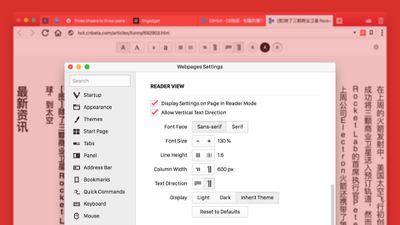
With the latest update, however, a new vertical reading option can be found in the Reader View settings, allowing Chinese, Japanese and Korean users to read online text in a vertical direction with no distracting page elements.
Moving on, Vivaldi has improved its notes feature, accessed in the browser's side bar, which lets users annotate websites and attach screenshots while they browse. In 1.14, Markdown support has been introduced, making it possible to easily format note text on the fly while surfing the web.
Elsewhere, the location of individual quick-access Web Panels can now be customized in the browser sidebar, while users are also able to rearrange search engines in the list layout using drag and drop for the most convenient order.

As well as the above updates, newcomers to Vivaldi should check out the app's in-depth browsing habits overview, which is backed by statistics and visual data, along with its tab stacking and tab tiling features, not to mention an exhaustive set of browser customization options. Vivaldi browser is a free download for Mac available directly from the Vivaldi website.




















Top Rated Comments
Noteworthy, the original Firefox engine would bleed small amounts of memory throughout the day (small amounts of memory that aren't freed after you close all the tabs) - most browsers do this to some extent actually, while the new doesn't seem to bleed it as much.
For a short time you can still see the difference, actually. Firefox has what they call Firefox ESR (extended support release) - which is basically a version that keeps the architecture stable for a year or something but ports in all the security fixes that happen over time. Targeted at companies (cause they were being shutout in the corporate world to Chrome). So the current Firefox ESR still has the original Firefox engine (not the updated memory eating one). You can download it and run it to see the lower amounts of startup and tab memory buildup:
https://www.mozilla.org/en-US/firefox/organizations/
In small memory situations its significant...and makes Firefox ESR worth installing. That said it'll switch over to the newer memory eating architecture in August 2018. ;-) All the old plugins and UI customizations work in it, so nice...
Just checked it out on my machine, the 32bit Firefox ESR starts up using 1/2 the memory of the newer architecture 64bit Firefox v58 about 2/3rds of the memory of the 32bit v58.
Just hard to make a commitment to a new browser and make it my daily driver
I swear that there’s so far no such thing as a “good” browser. Chrome and Firefox eat resources. Safari tabs go inactive after sitting idle (not good for some work I do). Brave has key functions that don’t work on certain pages. And on and on we go.
I just want a simple, speedy browser that supports extensions and won’t use 6-8GB.