watchOS 5 Beta Adds 'Edit' Button to Control Center for Adjusting Icon Layout
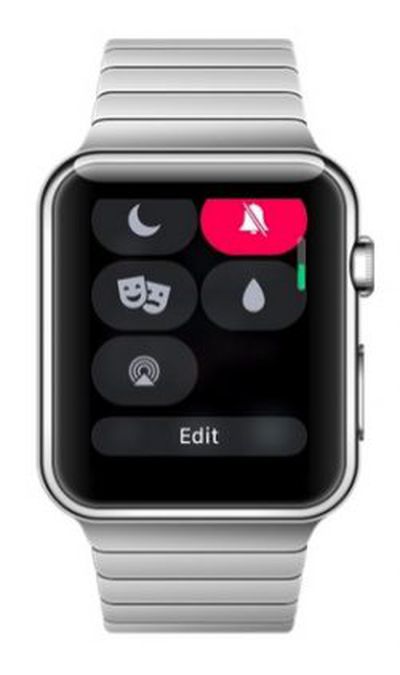 Testers of the new watchOS 5 Beta that Apple released yesterday have discovered a new function that allows Apple Watch users to change the arrangement of icons in the Control Center menu, which is accessed by swiping up on a watch face.
As shown in this image shared by Reddit user brooksdbrewer, the option appears as an Edit button when you scroll down to the bottom of the Control Center menu. Tapping the button then allows you to drag the icons around into a new arrangement – placing the icons you most often use up to the top of the menu, for instance.
So for example, if you use Theater Mode frequently, you could locate the associated icon next to the battery percentage icon at the top, and move the Ping iPhone icon to the bottom of the menu to prevent accidental taps. Likewise, you could drop the Expel Water icon right to the bottom of the screen if you never use it.
Whether or not the Control Center's new Edit function makes it to the final public release of watchOS 5, due in the fall, remains to be seen. However, there are plenty of other features to look forward to, including Activity Competitions so you can compete on workouts with friends, Automatic Workout Detection and new Workout types, a new Walkie-Talkie app, and more.
Popular Stories
Bloomberg's Mark Gurman has high expectations for Apple's first foldable iPhone.
In his Power On newsletter today, he said the foldable iPhone will be "the most significant overhaul in the iPhone's history."
"iPhone 4, iPhone 6 and iPhone X were clearly a big deal, but this is a whole new design," he said.
Like Samsung's Galaxy Z Fold 7, the foldable iPhone will reportedly open up like ...
iOS 26.5 is now available for developers, and while it doesn't include any new Siri capabilities, there are some major changes for the European Union, and smaller tweaks for features available worldwide.
Suggested Places
In the Maps app, there's a new "Suggested Places" feature that recommends locations to visit based on trending places nearby and recent searches. When Apple launches ads in ...
Apple today added the MacBook Air (13-inch, 2017) to its "vintage" products list, meaning the device is now only eligible for repairs at Apple Stores and Apple Authorized Service Providers if parts remain available.
The MacBook Air (13-inch, 2017) was the final MacBook Air model released before Apple redesigned the laptop and gave it a Retina display in 2018.
Apple also added all iPad...
Popular Stories
Apple is hoping to 3D-print aluminum device enclosures in the future, according to Bloomberg's Mark Gurman.
In today's "Power On" newsletter, Gurman revealed that Apple is pushing to move to 3D-printed aluminum enclosures for for future devices. The MacBook Neo relies on a new aluminum manufacturing process that saves as much metal as possible to drive down costs and speed up production....
Apple today launched its atrial fibrillation history feature for Apple Watch in mainland China.
Since 2022, Apple Watch in the U.S. has supported AFib History, which allows users diagnosed with atrial fibrillation to view an estimate of how frequently their heart is in this type of irregular rhythm.
The feature analyzes pulse rate data collected by a photoplethysmography (PPG) sensor to...
Apple's current blood oxygen sensing implementation in the U.S. does not infringe on patents owned by Masimo and Apple will not face a revived import ban, a U.S. International Trade Commission judge said this week (via Reuters).
After Apple was found to have violated Masimo's patents related to blood oxygen sensing, the Apple Watch faced a U.S. import ban that caused Apple to briefly pause...