Apple Says Scanner Permission Error Fixed in macOS 11.6
In an updated support document, Apple has indicated that a permission-related error when using a scanner on a Mac has been fixed as of macOS 11.6.
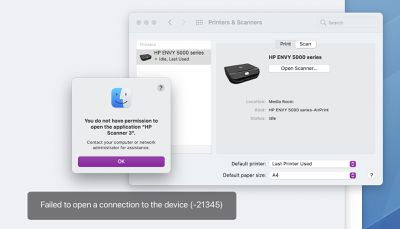
When attempting to use a scanner with a Mac, Apple said users might have received an error message indicating they did not have permission to open the application. The error message said to contact a computer or network administrator for assistance, or indicated that the Mac failed to open a connection to the device.
Users may have encountered the error in the Image Capture app, Preview app, or the Printers & Scanners section of System Preferences, according to Apple.
For users who elect not to update to macOS 11.6 at this time, Apple previously shared step-by-step instructions on how to temporarily resolve the issue:
- Quit any apps that are open.
- From the menu bar in the Finder, choose Go > Go to Folder.
- Type /Library/Image Capture/Devices, then press Return.
- In the window that opens, double-click the app named in the error message. It's the name of your scanner driver. Nothing should happen when you open it.
- Close the window and open the app you were using to scan. A new scan should proceed normally. If you later choose to scan from a different app and get the same error, repeat these steps.
The issue has presumably also been fixed in the latest macOS Monterey beta.
Popular Stories
Bloomberg's Mark Gurman has high expectations for Apple's first foldable iPhone.
In his Power On newsletter today, he said the foldable iPhone will be "the most significant overhaul in the iPhone's history."
"iPhone 4, iPhone 6 and iPhone X were clearly a big deal, but this is a whole new design," he said.
Like Samsung's Galaxy Z Fold 7, the foldable iPhone will reportedly open up like ...
iOS 26.5 is now available for developers, and while it doesn't include any new Siri capabilities, there are some major changes for the European Union, and smaller tweaks for features available worldwide.
Suggested Places
In the Maps app, there's a new "Suggested Places" feature that recommends locations to visit based on trending places nearby and recent searches. When Apple launches ads in ...
Apple has been celebrating its upcoming 50th anniversary by hosting surprise performances and other events around the world over the past few weeks, and now Bloomberg's Mark Gurman has revealed details about the company's grand finale.
In a social media post, Gurman said Apple's celebrations will conclude this week with a finale at its Apple Park headquarters for employees.
A special...
Popular Stories
Bloomberg's Mark Gurman has high expectations for Apple's first foldable iPhone.
In his Power On newsletter today, he said the foldable iPhone will be "the most significant overhaul in the iPhone's history."
"iPhone 4, iPhone 6 and iPhone X were clearly a big deal, but this is a whole new design," he said.
Like Samsung's Galaxy Z Fold 7, the foldable iPhone will reportedly open up like ...
iOS 26.5 is now available for developers, and while it doesn't include any new Siri capabilities, there are some major changes for the European Union, and smaller tweaks for features available worldwide.
Suggested Places
In the Maps app, there's a new "Suggested Places" feature that recommends locations to visit based on trending places nearby and recent searches. When Apple launches ads in ...
Apple has been celebrating its upcoming 50th anniversary by hosting surprise performances and other events around the world over the past few weeks, and now Bloomberg's Mark Gurman has revealed details about the company's grand finale.
In a social media post, Gurman said Apple's celebrations will conclude this week with a finale at its Apple Park headquarters for employees.
A special...
























