

Apple Says Fix Planned for 'You Do Not Have Permission to Open the Application' Error When Using a Scanner on Mac [Updated] - MacRumorsOpen MenuShow RoundupsShow Forums menuVisit ForumsOpen Sidebar
Skip to Content

Apple Says Fix Planned for 'You Do Not Have Permission to Open the Application' Error When Using a Scanner on Mac [Updated]

Update 23/9: Apple has updated its support document indicating that this issue can be resolved by installing the latest macOS Big Sur 11.6 update.


In a newly published support document on its website, Apple has acknowledged an error that some users may receive when they try to use a scanner with a Mac in the Image Capture app, Preview app, or the Printers & Scanners section of System Preferences.
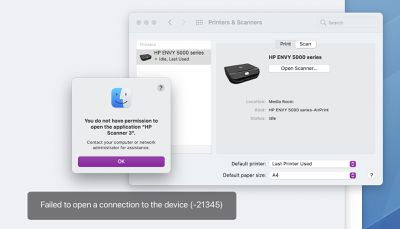
mac scanner permission error

A screenshot of the error message from the HP Support Community

When attempting to use a scanner with a Mac, Apple said users might get an error message indicating they do not have permission to open the application, followed by the name of the scanner driver. The message says to contact a computer or network administrator for assistance, or indicates that the Mac failed to open a connection to the device.

The error message starts with: "You do not have permission to open the application."

Affected users have shared complaints about this issue across the Apple Support Communities, Reddit, HP Support Community, and elsewhere. The error message appears to be affecting users on multiple versions of macOS Big Sur.

Apple said this issue is expected to be resolved in a future software update, but no timeframe was given. In the meantime, the support document provides step-by-step instructions on how to temporarily resolve the issue:

  1. Quit any apps that are open.
  2. From the menu bar in the Finder, choose Go > Go to Folder.
  3. Type /Library/Image Capture/Devices, then press Return.
  4. In the window that opens, double-click the app named in the error message. It's the name of your scanner driver. Nothing should happen when you open it.
  5. Close the window and open the app you were using to scan. A new scan should proceed normally. If you later choose to scan from a different app and get the same error, repeat these steps.

This article will be updated when Apple releases a macOS update with a permanent fix.

Related Forum: macOS Big Sur

Popular Stories

Apple Card iPhone 16 Pro Feature

Apple Card Promo to Offer Free AirPods Pro 3

Friday May 15, 2026 8:59 am PDT by
Starting as early as next week, customers who sign up for an Apple Card at Apple's retail stores in the U.S. will receive $249 cash back when they purchase AirPods Pro 3, according to Bloomberg's Mark Gurman. The promotion has yet to be officially announced by Apple, so exact terms and conditions are not available at this time. AirPods Pro 3 are priced at $249 in the U.S., so customers who...
Apple WWDC25 iOS 26 CarPlay Light mode 250609

Six Popular iPhone Apps Now Available on CarPlay

Thursday May 14, 2026 9:10 am PDT by
Apple's CarPlay system for accessing iPhone apps on a vehicle's dashboard screen has received six popular apps in recent weeks: ChatGPT, Perplexity, Grok, Google Meet, WhatsApp, and the indie artist streaming platform Audiomack. Make sure you have the latest version of each app and they will automatically appear on CarPlay. ChatGPT Starting with iOS 26.4, CarPlay supports voice-based...
ipad mini 7 blue

OLED iPad Mini: Release Date, Pricing, and What to Expect

Thursday May 14, 2026 5:08 am PDT by
According to the latest rumors, Apple is close to launching its next-generation iPad mini. So what should we expect from the successor to the iPad mini 7 that Apple released over a year ago? Read on to find out. Processor and Performance Apple is working on a next-generation version of the iPad mini (codename J510/J511) that features the A19 Pro chip, according to information found in code...

Top Rated Comments

62 months ago
The beauty of the apple ecosystem used to be simplicity and privacy. Now, not so much. Simple things like printing, scanning and, yes, storing, are all now problematic with apple.
Score: 25 Votes (Like | Disagree)
62 months ago
My computer in 1997 scanned things with no issue. just LOL dude.
Score: 22 Votes (Like | Disagree)
ArtOfWarfare Avatar
62 months ago

Image Capture/Preview/Photos is why I am moving to Android/Windows. This forum has been my life for the last four years with my iPhones:

https://forums.macrumors.com/threads/image-capture-not-seeing-photos-on-iphone.2144651/

I cannot get *any* Mac to see my iPhones, from macOS 10.12 through 11.

I was finally able to get my photos off of my phones using a Chromebook!

Apple's only solution was to use iCloud Photos.
Yeah... Apple's offerings have turned to absolute garbage over the years.

Obviously the software Apple acquired from NeXT was great, but I think they also got a lot of great engineers and managers out of that. In the time since, they've lost all the talent. Now it seems like they're run by business people who are more interested in pumping stuff out than actually having it be any good.

Meanwhile, Microsoft had the opposite happen. They had been run by business people, and now they're full of technical leadership. As a result, the quality of Windows has massively improved over the past 5 years.
Score: 19 Votes (Like | Disagree)
Expos of 1969 Avatar
62 months ago
Things are just getting worse daily.
Score: 18 Votes (Like | Disagree)
opeter Avatar
62 months ago
Apple: so who is using scanners nowadays?
...
Apple: Anyone?
...
Apple: OK, we wont bother fixing this, not worth the time and money. Let's make new emojis.
Score: 16 Votes (Like | Disagree)
62 months ago
"but no timeframe was given" then, after some time, this problem will be solved like this one:

https://www.macrumors.com/2020/12/23/apple-to-fix-ultrawide-display-m1-mac-issue/

Apple solution: just make the support document vanish.
Score: 9 Votes (Like | Disagree)















