Apple Watch Ultra Display Too Dim in Low Light, Say Some Users - MacRumorsOpen MenuShow RoundupsShow Forums menuVisit ForumsOpen Sidebar
Skip to Content

Apple Watch Ultra Display Too Dim in Low Light, Say Some Users

The Apple Watch Ultra display is too difficult to read in low light conditions, report some users, an ambient light sensor issue that is likely linked to Apple's watchOS 10 software update last month.
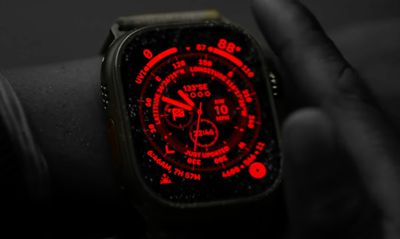
apple watch ultra night mode
There are multiple complaints from MacRumors readers (1, 2), Reddit users (1, 2, 3, 4), and Apple Community users who say that they are unable to read information on the Apple Watch Ultra display in dark environments because the screen is too dim, suggesting the device's ambient light sensor has not been properly calibrated to increase brightness to an adequate level.

Launched last month, the Apple Watch Ultra 2 pushes the maximum screen brightness to 3,000 nits, making it the brightest Apple Watch ever, according to Apple. The display is also capable of reducing brightness to as low as 1 nits.

Some Ultra 2 owners have pinned the blame on this new hardware specification, however the recent uptick in reports also includes users of the first-generation Apple Watch Ultra, suggesting it is an issue with Apple's watchOS 10 software update, which was released in September.

Users say the issue is particularly pronounced when quickly moving from a bright room to a dark area, and when the Wayfinder and Ultra Modular watch face is set to Night mode, which puts a red filter on the display. Legibility issues persist despite manual adjustments to the brightness level in the watch's Settings. Both Ultra and Ultra 2 owners say the problem is evident on models updated with watchOS 10.0.1 and the latest watchOS 10.0.2 update.

Apple is reportedly aware of the issue, so hopefully a future software update will remedy the situation. Have you experienced difficulty reading information on the Apple Watch Ultra's screen in low light? Let us know in the comments.

(Thanks, Joshua!)

Related Forum: Apple Watch

Top Rated Comments

klasma Avatar
33 months ago
This should really be user-configurable, because one size (brightness curve) does not fit all.
Score: 42 Votes (Like | Disagree)
jclardy Avatar
33 months ago

Users say the issue is particularly pronounced when quickly moving from a bright room to a dark area, and when the Wayfinder and Ultra Modular watch face is set to Night mode, which puts a red filter on the display.
Not to discount this issue...but do people know how eyes work? If you move from a bright room to a dark room, you aren't going to see dim lights for a few seconds/minutes as your eyes acclimate to the new brightness levels. I also suspect people could be looking at max brightness iPhones or a TV in dark rooms, then looking at a 1/2 nit watch display.

Just don't want these people to force apple to ruin my 2 nit night mode which is one of my favorite ultra features.

Add an accessibility setting to force a minimum brightness level, problem solved.
Score: 18 Votes (Like | Disagree)
33 months ago
It’s an ultra low light display.
Score: 16 Votes (Like | Disagree)
33 months ago
I totally agree with this. It’s too dark for me to make out at night and I’d really like them to fix it.
Score: 16 Votes (Like | Disagree)
Rychiar Avatar
33 months ago
Why is this article just about the ultra 2? The series 9 is just as bad. I was excited about having a brighter always on display coming from a series 5 and now I can barely see my screen in a dark room unless all the colors are white and even then it’s dim
Score: 15 Votes (Like | Disagree)
33 months ago
Same issue on the Series 9 as well. :(
Score: 11 Votes (Like | Disagree)