

Apple's newest iPhones, the iPhone 11, iPhone 11 Pro, and iPhone 11 Pro Max, are equipped with a new feature called Night mode, which is designed to take crisp, clear photos even when lighting conditions are poor, such as at night.
Unfortunately, Night mode is not supported on the iPhone SE or iPhone XR. It remains an exclusive feature for the iPhone 11 line of phones.
Night mode, as the name suggests, lets you take photos in the evening, with lighting that has never before been possible on an iPhone thanks to new hardware and new machine learning algorithms. Though Night mode brightens photos, it also preserves the night time feeling, balancing the light and dark elements of an image.
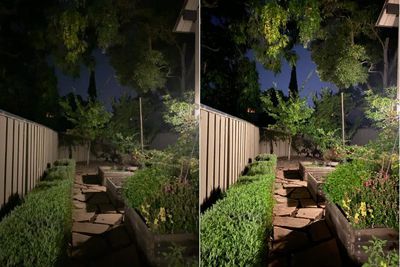
Android smartphone makers like Google and Samsung have had special modes for brightening up evening shots for a while now, and with the 2019 iPhones, Apple is on equal footing with these other smartphone cameras.
What is Night Mode?
Night mode is an automatic setting which takes advantage of the new wide-angle camera that's in the iPhone 11 and 11 Pro models. It's equipped with a larger sensor that is able to let in more light, allowing for brighter photos when the light is low.
Night mode uses the new sensor along with machine learning and the Neural Engine in the A13 processor to create Night mode shots.
When Night mode is engaged, the cameras in the iPhone analyze the available amount of light and then the iPhone chooses the number of frames needed to create a suitable image. The camera then takes a series of images for a set amount of time, such as one second, three seconds, five seconds, or in some situations, even longer.

The images are taken at different exposures, some with longer exposures and some with shorter exposures, similar to what's done when the iPhone composes an HDR image. This lets the iPhone pull out the best parts of the scene, highlighting what's important.
You'll need to hold the camera steady when using Night mode, and optical image stabilization also works to reduce shake as you take the photos. After the set amount of time, the A13 chip in the iPhone analyzes each photo that was taken, aligns them to account for movement, tosses out the images that are too blurry, and then fuses all the sharpest images of the bunch.
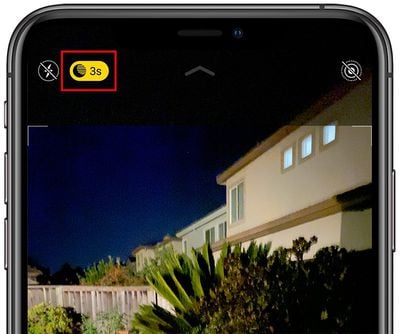
The resulting photo is the end image that you get when using Night mode, with Apple's software algorithms adjusting color, eliminating noise, and enhancing details to create a night time shot that preserves an impressive amount of detail.
Taking and combining several images allows Night mode to pick up more light than would be available in a single shot, which is why you can see so much more detail than the lighting conditions would normally allow for.
All of the Night mode calculations are done behind the scenes -- you'll only see the final shot, rather than being able to choose from a series of images as you can do in Burst mode even though it's a similar concept.
In a nutshell, Night mode is the result of a better camera sensor and some behind the scenes magic from Apple's A13 processor.
How to Turn on Night Mode
Night mode turns on automatically when the lighting conditions call for it, so there's no need to enable it. Tapping the moon icon at the top of the Camera app will let you access the Night mode settings, though, allowing for the time length of photos to be adjusted in some situations.
How to Turn Off Night Mode
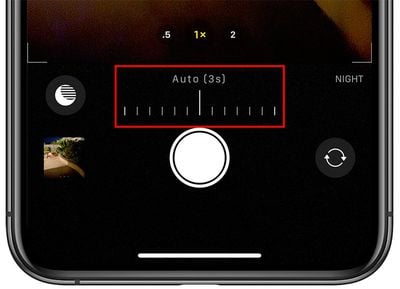
To turn off Night mode, tap on the moon icon at the top of the Camera app interface to open up the Night mode slider and then slide it all the way to the left to turn the feature off entirely for a photo.
Night mode will need to be turned off on a photo by photo basis, as it is meant to come on automatically. There is no setting to disable it permanently.
Night Mode Lenses
On the iPhone 11, Night mode is limited to the wide-angle camera as it is the only camera with optical image stabilization and because Night mode requires a camera with 100 percent focus pixels to analyze and align images.
On the iPhone 11 Pro and Pro Max, Night mode can be used with either the wide-angle camera or the telephoto camera because both of these lenses support optical image stabilization and the other necessary features for Night mode to work.
Night mode images look best with the wide-angle camera as it is the better lens, but the telephoto is an option when needed. The ultra wide-angle camera in the iPhone 11 and 11 Pro models doesn't work with Night mode.
Using Night Mode's Time Intervals
The iPhone 11 and 11 Pro are able to analyze the lighting in a situation and will provide a recommended interval for Night mode, which is usually somewhere between one and five seconds, though it can vary based on how much ambient lighting is available.
You can tap on the moon icon at the top of the Camera interface to get to the Night mode settings, where you can change the interval from the recommended level to a longer level if desired, which can alter the look of the photo that you're capturing.

The darker the photo subject, the longer time period options your iPhone will offer up. At sunset where there's still a decent amount of light, your exposure options might max out at around 3 to 5 seconds.
In full darkness, when taking a photo of the night sky, as an example, you might see longer time intervals available, and selecting a longer time interval in this situation may allow you to see more of the night sky in the resulting image than you might have been able to capture with a shorter exposure. For maximum time, a tripod is required.
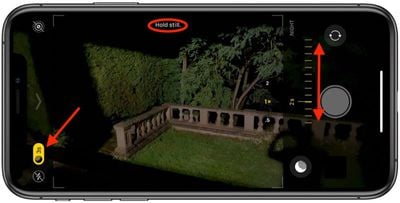
The different time intervals are worth experimenting with to get the specific look that you want for a particular image, but Apple's default shot length is calculated using a multitude of factors and almost always results in a nice looking low light shot.
How to Get the Best Night Mode Shots
Night mode takes a series of shots and is similar to a long exposure photo, so techniques used for long exposures can also be useful for Night mode.
Apple uses optical image stabilization and software to cut down on blur, but for the absolute best Night mode shots, it's a good idea to use a tripod. A tripod means there won't be any shake when capturing the multiple images that are used for a Night mode shot.
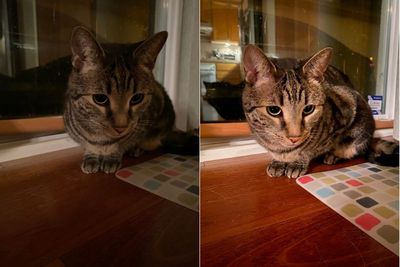
A tripod isn't needed, but when the iPhone is stable and detects that it's being held steady, it will offer longer exposure times than you can get when holding the iPhone yourself. If you want a 30 second Night mode shot of the night sky, for example, you're going to need a tripod to do it. Night mode works in 1 to 30 second intervals depending on conditions like steadiness and ambient lighting.
Even with shorter time intervals, Night mode can result in blur, so if you don't have a tripod, do your best to hold the iPhone as steady as possible. Stabilizing your arms can help.
Night mode shots work best on images where there aren't moving people, pets, or objects. Since the iPhone is taking multiple shots of a subject and stitching them together, there needs to be minimal movement. A pet that's running around or an active child isn't going to make for a good night mode shot, but you can get good night time portraits of people and pets if your subject can stay still.

Night mode isn't going to work for every photo because it can result in dramatic colors, high contrast (especially in situations where the ambient lighting is an odd color like the yellow of a street light), excessive shadows, and issues with light reflection, but more often than not, it produces incredible images and allows iPhone users to capture scenes that simply couldn't be captured with an older iPhone.
What Devices is Night Mode Available On?
Night mode is a feature on the new 2019 iPhone 11, iPhone 11 Pro, and iPhone 11 Pro Max. It isn't available on earlier iPhones, but like other camera additions, will continue to be a feature for future iPhones and is likely to see improvements over the years.
Night Mode vs. Earlier iPhones
Night mode is a feature that's unmatched by earlier iPhones, as can be seen in comparison photos between the iPhone 11 Pro Max and the iPhone XS Max. The iPhone 11 models can get a whole new level of detail in lower lighting conditions that just wasn't possible before. It's a major step forward in camera technology and is going to result in much better photos than were possible with the iPhone XS line and earlier.
Comparisons With Android Smartphones
Night mode isn't new -- and in fact, it's something that Google popularized last year with its Pixel 3 smartphones. Google introduced a feature called Night Sight in the Pixel 3 that blew people away.

Other Android smartphone manufacturers have also added similar features to their smartphones too, so this isn't a feature that originated with Apple. Below, we've shared some comparison videos and photos between Night mode in the iPhone and other Android phones with a similar feature.


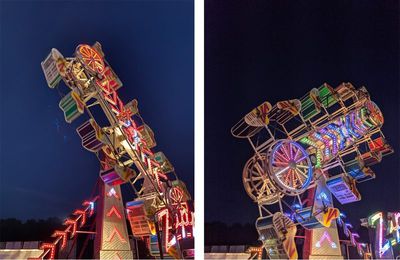
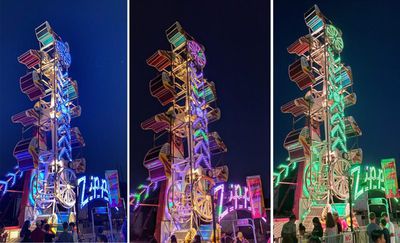
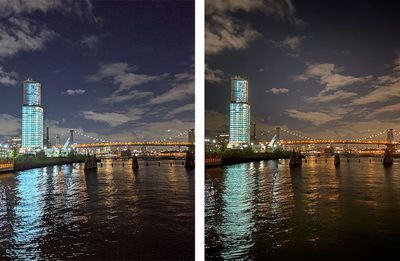
Apple's technology isn't too far off from the technology used by other smartphone makers, and as with any camera setup, image preference is going to vary from person to person.
Guide Feedback
Have questions about Night mode, know of a feature we left out, or want to offer feedback on this guide? Send us an email here.













































