Apple Explains How iOS 18 Genmoji Work - MacRumorsOpen MenuShow RoundupsShow Forums menuVisit ForumsOpen Sidebar
Skip to Content

Apple Explains How iOS 18 Genmoji Work

One of the Apple Intelligence features coming in iOS 18 is Genmoji, which will allow iPhone users to use AI to generate all-new emoji characters based on text input. The ‌Genmoji‌ will look similar to emoji, but are custom created, according to an iOS 18 WWDC session focused on Genmoji.
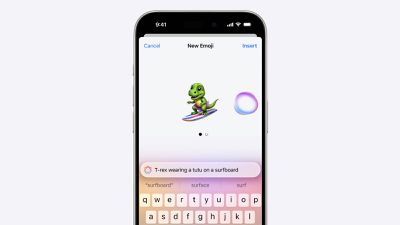
Genmoji iOS 18
Emoji are not images, but are instead pictographs that are encoded in the Unicode Standard and rendered by each platform. Emoji are added by the Unicode Consortium, which raised some questions about how Apple's ‌Genmoji‌ solution will work.

As it turns out, Apple has designed an NSAdaptiveImageGlyph API for ‌Genmoji‌ and also other images like stickers and Memoji, and this API makes them behave like emoji. It is powered by a standard image format in a square aspect ratio with support for multiple resolutions, and it is augmented with metadata. This setup means that ‌Genmoji‌ and other content using NSAdaptiveImageGlyph can be used with and formatted alongside regular text, similar to emoji.

‌Genmoji‌ can be used alone, copied, pasted, and sent as stickers. They can be used inline with text, and they respect line height and text formatting. Anywhere that can support rich text can support ‌Genmoji‌, according to Apple.

‌Genmoji‌ are not Unicode and may not be appropriate for some data such as identifiers, phone numbers, email addresses, and will not be supported as widely as emoji. Prior versions of iOS, iPadOS, and macOS, as well as apps that do not support rich text will denote ‌Genmoji‌ with a text description.

‌Apple Intelligence‌ features like ‌Genmoji‌ are not yet in the iOS 18 developer beta, but Apple plans to let developers begin testing ‌Apple Intelligence‌ sometime this summer. ‌Genmoji‌ and ‌Apple Intelligence‌ will be available to the public this fall, but they will be limited to iPhone 15 Pro models and iPads and Macs with M-series chips.


Related Forums: iOS 18, iPadOS 18

Popular Stories

iCloud iPhone 17 Pro

iPhone Users Who Pay for iCloud Storage Get Two New Perks on iOS 27

Thursday July 2, 2026 6:10 am PDT by
If you pay for certain iCloud+ storage plans beyond the 5GB that Apple offers for free, you will receive two more perks on iOS 27 at no additional cost. A summary of the two new iCloud+ perks on iOS 27:Increased daily usage limits for some new Apple Intelligence features, including image generation in the revamped Image Playground app. HomeKit Secure Video cameras receive generated video...
American Express Gold Apple Pay Feature

American Express Announces New Apple Pay Feature

Tuesday June 30, 2026 10:27 am PDT by
American Express today announced that you can now redeem Membership Rewards points when checking out with Apple Pay on the web and in apps on the iPhone and iPad. When checking out with Apple Pay on iOS 18 or iPadOS 18 or later, tap on your eligible American Express card (Platinum, Gold, Green, and others) and select the Membership Rewards points option. You can use points to cover all or...
series 10 apple watch titanium digital crown

Report: Apple Watch Redesign Coming Next Year With New Band System

Tuesday June 30, 2026 8:45 am PDT by
A "major overhaul" of the Apple Watch's design is due to arrive next year with a new system for connecting bands, according to a known Weibo leaker. In a set of recent posts, the leaker known as "Instant Digital" linked the new claim to older rumors about an "Apple Watch X" model, which was said to introduce a fresh design and break compatibility with the existing watch band system. Citing...

Top Rated Comments

Drs247 Avatar
27 months ago
Couldn't care less but I know that this is gonna be a HIT.
Says loads about the world we live in.
Score: 16 Votes (Like | Disagree)
27 months ago
Emojis, Memojis, Genmojis, lawd, at my super old-ass age of 47, it all gives me tired-head.
Score: 10 Votes (Like | Disagree)
Surf Monkey Avatar
27 months ago

Would be an interesting statistic to see how many of us have disabled Memoji setting. :rolleyes:
Used it once when it came out. Never again. Too stupid. It’s a feature for kids, not adults.
Score: 7 Votes (Like | Disagree)
Populus Avatar
27 months ago

Would be an interesting statistic to see how many of us have disabled Memoji setting. :rolleyes:
It’s on my list of “settings to disable when restoring or setting up a new device”, right below disabling iCloud Photo.


care to share how to do that?
At least in my case, what I do is disable the Memoji stickers on the Emoji keyboard. It’s under Keyboard settings.
Score: 7 Votes (Like | Disagree)
JosephAW Avatar
27 months ago
Would be an interesting statistic to see how many of us have disabled Memoji setting. :rolleyes:
Score: 7 Votes (Like | Disagree)
mrat93 Avatar
27 months ago

Couldn't care less but I know that this is gonna be a HIT.
Says loads about the world we live in.
It is going to be a scandal that only 15 Pros and 16 models can generate them.
Score: 7 Votes (Like | Disagree)