iOS 26 Will Let You Match Your Home Screen Icons to Your iPhone Case
The release candidate version of iOS 26 includes a new feature that lets you set an icon tint color that matches your iPhone case or your iPhone.
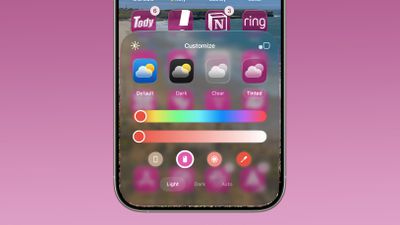
When you long press on the Home Screen and then choose the customize option, there's a new iPhone case icon at the bottom of the "Tinted" menu. Tapping it will automatically change the color of Home Screen icons to the color of the case that you're using.
Of course, this requires a MagSafe case that the iPhone recognizes, so it is essentially a feature designed to work with Apple cases. If you don't see a colorful MagSafe ring that matches your case color when you put your case on your iPhone, it's probably not going to work with icon tinting. You can also opt to change your icon colors to the color of your iPhone by tapping on the iPhone icon.
Tinted icons in iOS 26 have a new Liquid Glass look with added translucency. Tints are applied to all icons and widgets on the Home Screen.
You can still manually change the color of the tint, or choose a color from your wallpaper. iOS 26 is set to come out on Monday, September 15.
Popular Stories
Update 10:04 a.m.: iOS 27 is rolling out now, though it may take a bit for all users to see it, so keep checking!
Apple is about to release iOS 27, which will finally deliver more advanced Siri AI capabilities as well as a variety of other refinements, improvements, and new features to iPhones. It's Apple's biggest software update of the year, and Apple announced at Wednesday's iPhone event...
Update — 10 a.m. Pacific Time: Apple has released iOS 27.
During its iPhone 18 Pro and iPhone Duo event last week, Apple announced that iOS 27 will be released widely on Monday, September 14.
iOS 27 should be available around 10 a.m. Pacific Time / 1 p.m. Eastern Time today via the Settings app, under General → Software Update.
Below, we have highlighted eight new features and...
Apple today announced a new subscription initiative that turns paid iCloud+ subscriptions into a broader services bundle in more than 100 countries.
In select countries, Apple says every paid iCloud+ plan, including the cheapest 50GB tier, now includes Apple TV and Apple Arcade "at no additional cost," while family sharing extends the storage, TV and Arcade access to up to five people....



















