

Apple Details Terminal Anti-Scam Warning in macOS - MacRumorsOpen MenuShow RoundupsShow Forums menuVisit ForumsOpen Sidebar
Skip to Content

Apple Details Terminal Anti-Scam Warning in macOS

Back in March with the release of macOS Tahoe 26.4, Apple introduced a new security popup that warns Mac users when they paste a command into the Terminal app that could be harmful. Apple has now published a support document explaining why the popup warning appears.
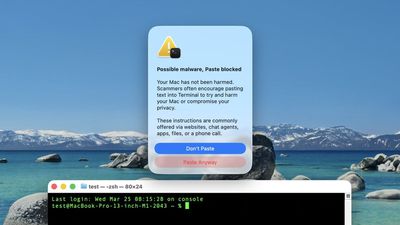
macOS Tahoe 26 4 Terminal Warning

Screenshot via "Mr. Macintosh"

The warning says the following when it appears:

Possible malware, Paste blocked

Your Mac has not been harmed.

Scammers often encourage pasting text into Terminal to try and harm your Mac or compromise your privacy.

These instructions are commonly offered via websites, chat agents, apps, files, or a phone call.

There is a "Paste Anyway" option for users to proceed if they wish.

In a document titled "If your Mac blocks a Terminal command paste or script," spotted by 9to5Mac, Apple explains that the alert appears if you don't regularly use Terminal and you copied the command from somewhere like a website, chat agent, or messaging or email app.

"Scammers use these channels to instruct people to paste malicious commands into Terminal to harm your Mac or compromise your privacy," says Apple. "This alert helps make sure that you aren't tricked into running a command that you didn't expect."

The document also mentions two other types of Terminal-related alerts that are more proactive. If a "Malware Detected, Paste Blocked" or "Malicious Script Blocked" alert appears, macOS has detected a command or script that contains known malware and has blocked it, according to Apple. In such cases, no "Paste Anyway" option is provided.

Apple says that if you believe the command or script was mistakenly blocked, it could be because a website that it tries to access was incorrectly reported as deceptive. In that case, users can report the error.


Popular Stories

Chase Sapphire Reserve Apple Perk Feature

Chase Sapphire Preferred Card Introduces New Perk for Apple Customers

Monday June 15, 2026 12:07 pm PDT by
Chase this week announced new perks for its Sapphire Preferred credit card, and one of them is a complimentary one-year Apple TV streaming subscription. To get the free year of Apple TV, which typically costs $12.99 per month in the U.S., you must activate the card by December 31, 2026. If you are already subscribed to Apple TV directly through Apple, the complimentary subscription from...
iCloud iPhone 17 Pro

iPhone Users Who Pay for iCloud Storage Get Two New Perks on iOS 27

Tuesday June 9, 2026 11:29 am PDT by
If you pay for extra iCloud storage on your iPhone, beyond the 5GB included for free, you might receive two more perks on iOS 27 at no additional cost. First, Apple said there will be daily usage limits for some of the new and enhanced Apple Intelligence features on iOS 27, including image generation. However, the company noted that "increased access" is available with "most" iCloud+ storage ...
iphone 17 models

No iPhone 18 This Year, Apple Supplier Comments Seemingly Confirm

Monday June 15, 2026 10:51 am PDT by
Apple's standard iPhone 18 model will launch in early 2027, based on comments from a partner in the company's supply chain that appear to corroborate rumors of a delayed spring release for the base model. Apple typically works on an annual smartphone launch cycle where it releases the entirety of its latest flagship iPhone series in the fall, usually around mid-September. That appears set to ...

Top Rated Comments

turbineseaplane Avatar
1 day ago at 06:33 am
If you’re doing any interactions with the terminal, you need to know what you’re doing.
Score: 17 Votes (Like | Disagree)
pigeonguy Avatar
1 day ago at 06:20 am
Very nice feature. Seems well thought out.
Score: 16 Votes (Like | Disagree)
jchap Avatar
1 day ago at 06:25 am
Sites asking to use the Command Prompt utility on Windows to paste and execute code are getting to be an infamously popular scam. Too bad that scammers are also getting savvy to how to do the same with Mac users.

Any site that asks for command prompt or Terminal access should be avoided like the plague. I'm glad that Apple is seeing this trend and responding with verification as well.
Score: 10 Votes (Like | Disagree)
23 hours ago at 07:07 am

Maybe it would be a good idea to just not ship the Terminal.app as part of the OS distribution. Advanced users will know how to get one, and there are many alternatives that are much better.
Saying this as someone who uses Terminal several times a week: Ship it but disable it by default. It would create an extra pain point for scammers to have to get through. 99.9% of users don’t need Terminal.
Score: 6 Votes (Like | Disagree)
963852741 Avatar
23 hours ago at 07:08 am
Can I turn it off to paste unbothered?
Score: 5 Votes (Like | Disagree)
1 day ago at 06:37 am
An older relative of mine got taken in by a pop up that came up on her Mac from “Apple Security” with an 800 number to call. She called, and some very nice people took down her credit card details. She was able to reverse the charge, and I swept her machine for viruses and we reset all her bank passwords.

For all of us here, our radar would be up when we saw the pop-up, but for some people, everything on the computer is weird and confusing, so a janky pop up just seems par for the course. A warning like this with specific wording pertaining to the situation might well save a few people.
Score: 5 Votes (Like | Disagree)














