How to Add an AirDrop Shortcut to Your Mac's Dock - MacRumorsOpen MenuShow RoundupsShow Forums menuVisit ForumsOpen Sidebar
Skip to Content

How to Add an AirDrop Shortcut to Your Mac's Dock

by

airdropApple's AirDrop feature lets you wirelessly send and receive files between nearby Macs as well as to and from local iOS devices. It's usually accessed from the sidebar of an open Finder Window (or using the Command + Shift + R keyboard shortcut within Finder), but here we're going to share with you a trick that enables you to launch AirDrop straight from your Mac's Dock.

Having the AirDrop shortcut in your Dock will allow you to access it from any screen, regardless of the application you're using, and without having to open a Finder window first. Regular AirDrop users in particular should appreciate the convenience it provides.

How to Add AirDrop to Your Mac's Dock

  1. Open a Finder window or click the Desktop.

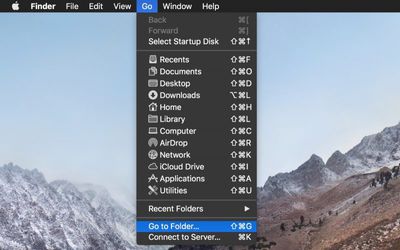
  2. In the Finder menu bar, select Go -> Go to Folder.
    Finder go to folder

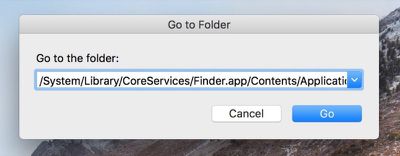
  3. Paste the following directory path into the dialog and press Enter: /System/Library/CoreServices/Finder.app/Contents/Applications/
    Finder go to folder dialog

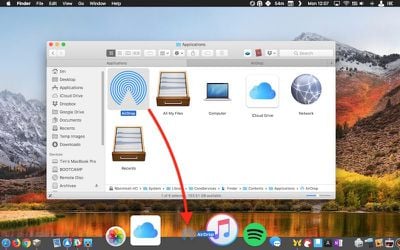
  4. The Contents/Applications folder within the Finder.app package will appear. Using your mouse, drag the AirDrop app to the desired location in your Dock.
    drag airdrop to dock

  5. Close the Finder window.

Next time you want to open the AirDrop window to share something, simply click the app icon in your Mac's Dock. Note that you can also drag the iCloud Drive app from the Finder package in the same way, for quick one-click access to the files and folders in your cloud storage.


Tag: AirDrop

Top Rated Comments

Gorms Avatar
104 months ago
This is actually really useful for me. Thank you for this tip!

AirDrop is one of macOS’ best features... (when it works)
Score: 8 Votes (Like | Disagree)
Saipher Avatar
104 months ago
Thank you MacRumors, these tips articles are very helpful. :)
Score: 5 Votes (Like | Disagree)
Chupa Chupa Avatar
104 months ago
Not sure I understand how this streamlines workflow. Dragging a file to the dock seems like more work than just ctrl+click -> share -> airdrop. What am I missing?
Score: 4 Votes (Like | Disagree)
unsharptooth Avatar
104 months ago
[doublepost=1527258466][/doublepost]This would be really useful if you could just drop your file there and a pop up asked you who you wanted to send it to. And maybe a pop up after it's finished sending too. Hopefully they improve upon that with 10.14.
Yu can select the files, right click > share > Airdrop. You’ll get a pop up listing nearby devices and progress when sending.
Score: 2 Votes (Like | Disagree)
104 months ago
Thanks for the tip. I share files back and forth with my iPad all the time.
Score: 2 Votes (Like | Disagree)
rhoydotp Avatar
104 months ago
Receiving files.
100% agree with this! Most people just probably send and not receive files so it may not be that useful to them.
Score: 1 Votes (Like | Disagree)

Popular Stories

android iphone airdrop quickshare

Here's Every Android Phone Getting AirDrop Support

Wednesday May 13, 2026 4:09 am PDT by
Quick Share is already compatible with Apple's AirDrop feature on select Android devices, but Google says the feature will expand to Samsung, OPPO, OnePlus, Vivo, Xiaomi, and HONOR devices in 2026. Here are the devices that currently support AirDrop: Samsung Galaxy S26 series Google Pixel 10 series, 9 series, 8a OPPO Find X9 series, Find N6 Vivo X300 Ultra Google says the following...
Apple Card iPhone 16 Pro Feature

Apple Card Promo to Offer Free AirPods Pro 3

Friday May 15, 2026 8:59 am PDT by
Starting as early as next week, customers who sign up for an Apple Card at Apple's retail stores in the U.S. will receive $249 cash back when they purchase AirPods Pro 3, according to Bloomberg's Mark Gurman. The promotion has yet to be officially announced by Apple, so exact terms and conditions are not available at this time. AirPods Pro 3 are priced at $249 in the U.S., so customers who...
Apple WWDC25 iOS 26 CarPlay Light mode 250609

Six Popular iPhone Apps Now Available on CarPlay

Thursday May 14, 2026 9:10 am PDT by
Apple's CarPlay system for accessing iPhone apps on a vehicle's dashboard screen has received six popular apps in recent weeks: ChatGPT, Perplexity, Grok, Google Meet, WhatsApp, and the indie artist streaming platform Audiomack. Make sure you have the latest version of each app and they will automatically appear on CarPlay. ChatGPT Starting with iOS 26.4, CarPlay supports voice-based...