

 Apple News is the built-in news app for iOS 11 that aggregates and curates stories and topics from a variety of third-party news sources. The service is only available in the U.S., Australia, and the U.K. at the time of writing, so not all new iPhones and iPads will come with the stock app installed.
Apple News aims to offer a cleanly presented and personalized news service that caters to your tastes and interests, although one of its default behaviors is to spit out alerts from sources that you may or may not be interested in. Apple News refers to news sources in the app as "channels", and here we are going to run through two ways to control the alerts you receive from them.
How to Control News Alerts From Specific Channels
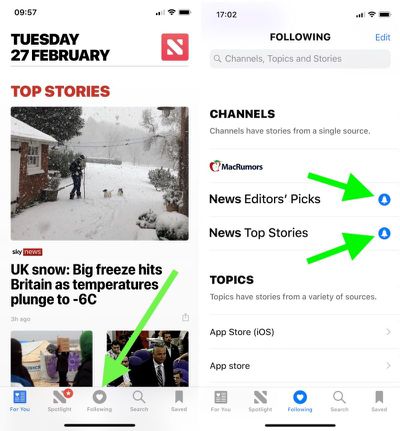
- Launch the News app on your iOS device.
- Tap the Following button at the bottom of the screen.
- Under the Channels list, look for any news sources that you didn't sign up for, and tap the blue bell icon next to them. If the bell icon next to a channel is greyed out, alerts from it are already disabled; if there's no bell icon beside a channel, it doesn't send alerts at all.

- To remove a source from your channels so that it no longer shows up anywhere in Apple News, tap the Edit button in the upper right of the screen, and then tap the red minus icon next to the source in question.
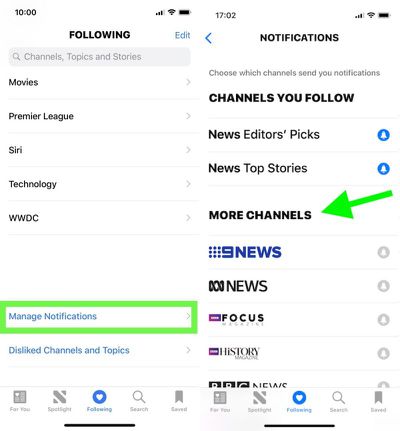
Tip: Scroll all the way to the bottom of the "Following" screen and you'll find another option to Manage Notifications. Tapping this opens a dedicated Notifications screen, where you'll see the channels you follow that offer news alerts as well as other channels with alert options that you don't currently follow.
How to Disable Apple News Alerts Completely
If you'd rather disable all alerts for Apple News in one fell swoop, follow these steps.
- Launch the Settings app on your iOS device.
- Scroll down the main list and tap News.
- Tap Notifications. (Tip: From this screen, you can prevent stories by channels you don't follow from appearing in the News app's "For You" section. Simply toggle on Restrict Stories in For You.)
- Toggle off Allow Notifications.
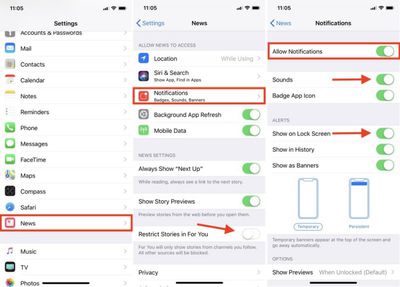
If later you decide that you don't want to kill off News alerts altogether, this last screen is the one to return to, as it also offers additional options for controlling the behavior of notifications when they're enabled. You could simply stop new alerts from making an audible sound, for example, or just prevent them from showing up on the Lock Screen.
















Top Rated Comments
So for News, like just about everything else for me, Off is the only sane option.
Resolved: You have to go into one of their articles, touch 'share', and then can 'dislike channel'. Seems a lot less intuitive than just swiping right (or left?) and clicking 'dislike channel'. But I'm finally free of their bullhockey 'news'.:D
This is like when people complain about recommendations in Apple Music. The curation is only as good as you make it based on reading habits and likes/dislikes.