How to Change the Background Color of Notes on iPhone and iPad - MacRumorsOpen MenuShow RoundupsShow Forums menuVisit ForumsOpen Sidebar
Skip to Content

How to Change the Background Color of Notes on iPhone and iPad

by

In iOS, you can set the system appearance to Dark or Light Mode, which changes the look of every native app on your Apple device, including Notes. If you set your iPhone or iPad to Dark Mode, for example, each note in the Notes app appears by default as white text on a black background.
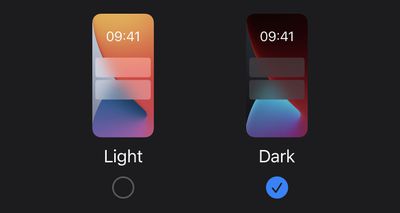
light-dark-mode
However, Apple Notes also allows you to switch the background color of individual notes or all of your notes when you're using ‌Dark Mode‌. This means you can make notes appear as black text on a white background, regardless of what system appearance mode you're using. Keep reading to learn how it's done.

How to Change the Background Color of a Specific Note on iPhone and iPad

  1. Launch the Notes app on your iOS device.
  2. Create a note and start typing your note, or select an existing one from the list. (Bear in mind that you won't see the option to change the background for a note unless you type something in it.)
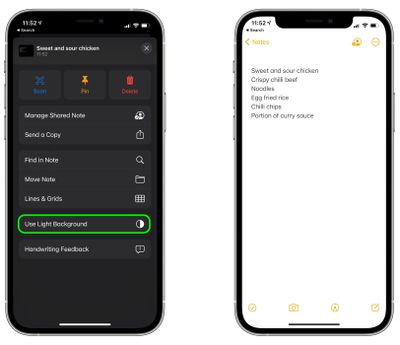
  3. Tap the icon showing three encircled dots in the top-right corner of the note.
    notes

  4. Scroll down the actions menu that appears, then tap Use Light Background.

    notes

How to Change the Background Color of All Notes on iPhone and iPad

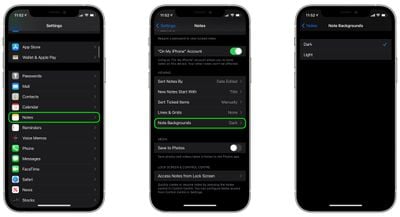
  1. Launch the Settings app on your iPhone or ‌iPad‌.
  2. Scroll down and tap Notes.
  3. Scroll down and tap Note Backgrounds.
  4. Select Dark or Light.
    settings

Bear in mind that the Note app's main menu will continue to use your system-wide appearance setting, despite what background you choose for your notes.

Popular Stories

iOS 27 and Notes Feature

iOS 27 Adds Four New Features to Notes App, Including Markdown Copy-and-Paste

Wednesday June 17, 2026 10:11 am PDT by
The upcoming iOS 27 update that Apple unveiled last week includes some new features and enhancements for Apple's Notes app on the iPhone. iOS 27 is currently available as a developer beta, with a public beta to follow in July. The update is expected to be released to all users in September. Below, we have outlined four additions to Apple's Notes app on iOS 27. Siri AI On the iPhone...
iCloud iPhone 17 Pro

iPhone Users Who Pay for iCloud Storage Get Two New Perks on iOS 27

Thursday July 2, 2026 6:10 am PDT by
If you pay for certain iCloud+ storage plans beyond the 5GB that Apple offers for free, you will receive two more perks on iOS 27 at no additional cost. A summary of the two new iCloud+ perks on iOS 27:Increased daily usage limits for some new Apple Intelligence features, including image generation in the revamped Image Playground app. HomeKit Secure Video cameras receive generated video...
iPhone 4 on Black Feature

Apple Facing One of Its Worst Leaks Since the iPhone 4

Thursday July 2, 2026 9:53 am PDT by
Apple supplier Tata Electronics recently suffered a cyberattack that resulted in thousands of confidential files being published on the dark web, and this reportedly included some photos and documents related to the upcoming iPhone 18 Pro. We have elected not to share any of the leaked photos in this story due to the illegal nature in which they were obtained, but they can easily be found...