iOS 27 Adds Four New Features to Notes App, Including Markdown Copy-and-Paste - MacRumorsOpen MenuShow RoundupsShow Forums menuVisit ForumsOpen Sidebar
Skip to Content

iOS 27 Adds Four New Features to Notes App, Including Markdown Copy-and-Paste

The upcoming iOS 27 update that Apple unveiled last week includes some new features and enhancements for Apple's Notes app on the iPhone.

iOS 27 and Notes Feature
iOS 27 is currently available as a developer beta, with a public beta to follow in July. The update is expected to be released to all users in September.

Below, we have outlined four additions to Apple's Notes app on iOS 27.

Siri AI

iOS 27 Adds Four New Features to Apples Notes App Article 4
On the iPhone 15 Pro and newer, the more intelligent and personal version of Siri known as "Siri AI" can create notes with generated content. For example, you can ask Siri AI to create a note with a list of all iPhone models that are compatible with iOS 27, and it will do so after retrieving this information from the internet.

On iOS 26 and earlier, Siri can only create notes based on the words you actually say.

In addition, Siri AI will intelligently show an "Add to Notes" shortcut below certain messages in the Messages app based on the context of the conversation.

iOS 27 Messages Notes Suggestion

Copy and Paste in Markdown

iOS 27 Adds Four New Features to Apples Notes App Article 3
iOS 27 introduces the ability to copy and paste text that is formatted in the Markdown language, created by well-known Apple commentator John Gruber.

Markdown lets you add formatting to text without using HTML:

  • Bold text: **bold**
  • Italic text: *italic*
  • Linked text: [Apple](https://apple.com)
  • List item: - Example

For example, if you paste "Apple's next CEO is **John Ternus**" into the Notes app on iOS 27, "John Ternus" will appear in bold text.

In reverse, if you select formatted text in the Notes app and tap on the right arrow in the Cut/Copy/Paste menu that pops open, there is a new "Copy as Markdown" option on iOS 27. If you tap on this option, any rich text formatting in your selection will automatically be converted to Markdown that can be pasted elsewhere.

Apple Notes already gained support for importing and exporting Markdown files on iOS 26.

Divider Lines
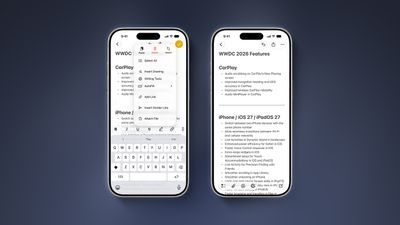
iOS 27 Adds Four New Features to Apples Notes App Article 2
iOS 27 lets you organize notes with divider lines. Simply place the text cursor where you want the line to be inserted, tap on the right arrow in the Cut/Copy/Paste menu that pops open, and tap on the new "Insert Divider Line" option.

Section Links

iOS 27 Adds Four New Features to Apples Notes App Article 1
You can now add a link to a specific section of a note. When you tap on the link, the Notes app automatically jumps to that section of text.

For example, you could create a new note that links back to a section of a previous note.

Related Roundups: iOS 27, iPadOS 27
Related Forum: iOS 27

Popular Stories

iOS 27 Next to iPhone

Here's When iOS 27 Rolls Out Today in Every Time Zone [Update: It's Out]

Sunday September 13, 2026 3:00 am PDT by
Update 10:04 a.m.: iOS 27 is rolling out now, though it may take a bit for all users to see it, so keep checking! Apple is about to release iOS 27, which will finally deliver more advanced Siri AI capabilities as well as a variety of other refinements, improvements, and new features to iPhones. It's Apple's biggest software update of the year, and Apple announced at Wednesday's iPhone event...
iPhone Handoff Feature

iOS 27 Introduces New 'iPhone Handoff' Feature

Wednesday September 2, 2026 12:35 pm PDT by
Apple has added a new "iPhone Handoff" feature to iOS 27 that will allow you to switch between two iPhones while using the same phone number on each device. This functionality was briefly mentioned during the WWDC 2026 keynote in June, on a slide that listed hundreds of new features coming in iOS 27 and corresponding software updates, but Apple never shared any further details at the time. ...
iOS 27 Icon iPhone

iOS 27 Available Now With These 8 New Features

Monday September 14, 2026 9:00 am PDT by
Update — 10 a.m. Pacific Time: Apple has released iOS 27. During its iPhone 18 Pro and iPhone Duo event last week, Apple announced that iOS 27 will be released widely on Monday, September 14. iOS 27 should be available around 10 a.m. Pacific Time / 1 p.m. Eastern Time today via the Settings app, under General → Software Update. Below, we have highlighted eight new features and...

Top Rated Comments

Apple Knowledge Navigator Avatar
13 weeks ago
Never in my life have I thanked the Lord for divider lines!
Score: 18 Votes (Like | Disagree)
13 weeks ago
Those divider lines! - solid update, Notes is such a great app
Score: 12 Votes (Like | Disagree)
repoman016 Avatar
13 weeks ago
As someone who shares grocery lists via notes the divider lines will be welcomed when having to go to more than 1 store/location
Score: 9 Votes (Like | Disagree)
rchaser Avatar
13 weeks ago

As someone who shares grocery lists via notes the divider lines will be welcomed when having to go to more than 1 store/location
"As someone who uses the notes app for grocery lists instead of using the reminders app..."

😘

I mean, come on my guy. You pull your grocery list up on your watch and check off each item you get as you shop...why would you make it more difficult?

Do you keep your calendar in Numbers...??
Score: 8 Votes (Like | Disagree)
freedomlinux Avatar
13 weeks ago

Do you keep your calendar in Numbers...??
Wha? Of course not, that would be ridiculous.

My page-a-day calendar is a HyperCard Keynote deck!
Score: 3 Votes (Like | Disagree)
13 weeks ago
It's the little things that make all the difference in life, like… divider lines.
Score: 3 Votes (Like | Disagree)