

iOS 26: Import and Export Markdown Files in Apple Notes - MacRumorsOpen MenuShow RoundupsShow Forums menuVisit ForumsOpen Sidebar
Skip to Content

iOS 26: Import and Export Markdown Files in Apple Notes

by

In iOS 26, currently in beta, Apple Notes has gained new Markdown support, letting you seamlessly import and export files in the popular plain-text formatting language. Whether you're a developer, writer, or content creator, this long-awaited feature should bridge the gap between your existing Markdown workflow and Apple's native note-taking app.
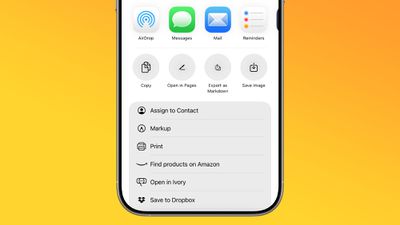
ios 26 notes app markdown
For those unfamiliar with Markdown, it's a simple way of writing that uses plain text symbols (like ** for bold or # for headings) to format documents without complicated menus. It's popular because the same text works both as easy-to-read notes and as polished, styled content when exported.

In Apple's Notes app, the new functionality works both ways: you can bring existing Markdown files into Notes while preserving formatting like headings, links, and lists, or export your Notes content as Markdown for use in other apps. The following steps show you how to do both.

Bear in mind that Notes doesn't display Markdown syntax while you're writing – it continues to show rich text formatting as usual. The Markdown conversion happens during the import and export process, so you'll see the plain text formatting only when viewing the file outside of Notes.

Import Markdown Files into Notes

  1. Locate your Markdown (.md) file on your iPhone (e.g., in Files or your writing app).
  2. Open the file, tap Share, then choose Notes.
  3. Tap Import at the prompt to save the file to an Imported Notes folder.
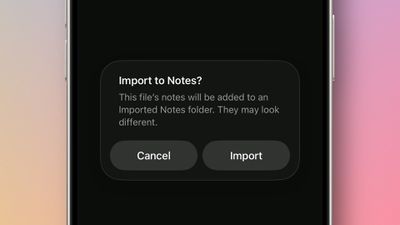
import markdown notes ios

If you're working in the Notes app on an iPad running iPadOS 26, you can also choose File ➝ Import to Notes… from the Notes menu bar (accessed with a swipe down from the top of the screen). Select your Markdown file from the files interface, then tap Import to confirm the import.

Once the note is imported, look for the Imported Notes folder where your note will be saved. Then you can verify that key formatting has been preserved in the note. When you import a Markdown file, Notes automatically converts the plain text formatting into rich text, preserving headings, links, bulleted lists, and text styling like bold and italics.

Export Notes in Markdown Format

  1. In Notes, open the note you want to export.
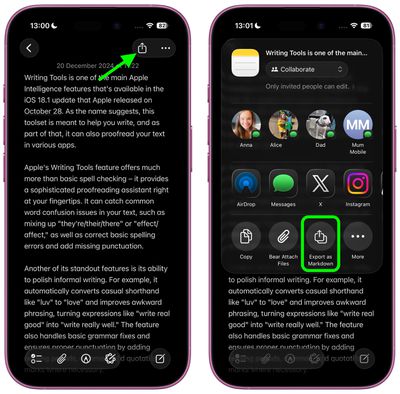
  2. Tap the Share icon in the top-right corner.
  3. Select Export as Markdown.
  4. Choose where to share or save the markdown file from the share sheet options.
settings

The exported file retains the note's structure and formatting as standard Markdown syntax, making it compatible with text editors, documentation tools, and publishing platforms that support the format.

Apple is expected to officially release iOS 26 in September.

Top Rated Comments

TheDailyApple Avatar
11 months ago

I'm glad they're doing this for interoperability, but on a practical level I only care to use Markdown when I can hide the cluttery _formatting_ *characters* as much as possible. Conceptually, I think Markdown is very elegant, but I don't want to have the "how the sausage is made" part in my face all the time. I use Ulysses a lot and it does let me dial down the color of the Markdown so it's not visible, but it still junks up the spacing and flow of text. I have used another app (forgetting the name) which optionally will entirely hide Markdown tags, and I think that's the best way to go IMO.
I highly recommend Obsidian. It completely hides the markdown formatting characters, and is generally one of the more elegant applications I've used. It's also free.
Score: 6 Votes (Like | Disagree)
11 months ago

Can we finally bulk export notes?
Just tested this. In the Tahoe beta, you can multiple select notes and export to PDF or Markdown. The individual exported notes appear as separate files within a folder.
Score: 5 Votes (Like | Disagree)
MakeAppleAwesomeAgain Avatar
11 months ago
Quite funny that this is the year they added Markdown support but ditched John Gruber as interviewer 🤣
Score: 4 Votes (Like | Disagree)
11 months ago

Here's what I get:


BTW, I'm finding running the beta in a virtual machine is a nice way to play around with it without subjecting my Mac to potential bugs. VirtualBuddy is very easy for this (and free).
Maybe my input didn’t have the spaces, thank you!! I will try this later. Much appreciated. :)

edit: works great. Huge time saver, this might be my favorite iOS26 feature.
Score: 1 Votes (Like | Disagree)
11 months ago

Can you import checkboxes? I couldn't get that to work via Markdown and it's sorely needed, but hopefully I'm missing something.

I have a ton of markdown iterations of shopping lists and recipes etc. and it's a pain to convert each sub-list to checkboxes when they are separated by headings or instructions since it just double indents with the, basically ascii equivalent import it does now.
Here's what I get:


BTW, I'm finding running the beta in a virtual machine is a nice way to play around with it without subjecting my Mac to potential bugs. VirtualBuddy is very easy for this (and free).

Attachment Image

Attachment Image
Score: 1 Votes (Like | Disagree)
11 months ago
Much needed. Glad that it is finally available. Will definitely be using it once I update my iPad.
Score: 1 Votes (Like | Disagree)

Popular Stories

iOS 27 and Notes Feature

iOS 27 Adds Four New Features to Notes App, Including Markdown Copy-and-Paste

Wednesday June 17, 2026 10:11 am PDT by
The upcoming iOS 27 update that Apple unveiled last week includes some new features and enhancements for Apple's Notes app on the iPhone. iOS 27 is currently available as a developer beta, with a public beta to follow in July. The update is expected to be released to all users in September. Below, we have outlined four additions to Apple's Notes app on iOS 27. Siri AI On the iPhone...
iCloud iPhone 17 Pro

iPhone Users Who Pay for iCloud Storage Get Two New Perks on iOS 27

Thursday July 2, 2026 6:10 am PDT by
If you pay for certain iCloud+ storage plans beyond the 5GB that Apple offers for free, you will receive two more perks on iOS 27 at no additional cost. A summary of the two new iCloud+ perks on iOS 27:Increased daily usage limits for some new Apple Intelligence features, including image generation in the revamped Image Playground app. HomeKit Secure Video cameras receive generated video...
Apple Event Logo

Apple Just Released a New Product

Thursday July 2, 2026 8:04 am PDT by
Apple's first product release of summer 2026 occurred this week, but do not get too excited, as it is merely the Beats Solo Buds in a new color. Beats Solo Buds are now offered in orange through Best Buy in the U.S., with availability set to expand to 7-Eleven stores in Japan on July 4. Apple already offered orange Solo Buds in India for free with the purchase of an iPhone 15 or iPhone 15 ...
















