iOS 17: How to Choose Which App Siri Uses to Send a Message - MacRumorsOpen MenuShow RoundupsShow Forums menuVisit ForumsOpen Sidebar
Skip to Content

iOS 17: How to Choose Which App Siri Uses to Send a Message

by

In iOS 17, Siri has learned a few more useful features worth knowing about. One is the ability to use Siri to send messages to friends and family over compatible third-party apps. Keep reading to learn how it's done.
iOS 17 Siri Feature
When you ask ‌Siri‌ to send a message in iOS 17, you can now tap to select which app on your iPhone that you want to send it from. This allows you to send messages not just from Apple's built-in Messages app, but also third-party apps like Telegram and WhatsApp.

The feature is compatible with any third-party app whose settings include the "Use with Ask ‌Siri‌" option. To check if an app has the option, or to enable/disable it, follow these steps.

  1. Open the Settings app on your iPhone.
  2. Tap Siri & Search.
  3. Scroll down to the apps list and tap the app in question.
  4. Toggle the switch next to Use with Ask Siri.
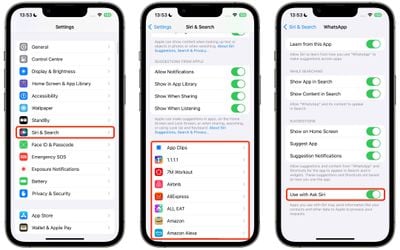
settings

If "Use with Ask Siri" is enabled for a particular app, you can manually choose it each time you ask the voice assistant to send a message. Here's how.

  1. Activate Siri by saying "Hey Siri" or just "Siri," or by pressing and holding the Side button on your iPhone until the Siri orb appears on the screen.
  2. Ask Siri to send a message to one of your contacts.
  3. In the message card that appears at the top of the screen, tap the Messages icon next to the person's name.
  4. Tap another compatible messaging app in the dropdown to select it.
  5. Type your message in the input field, then tap Send.
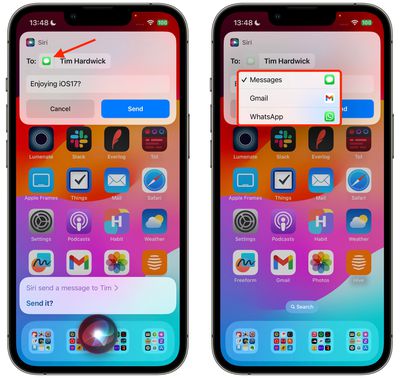
siri

There's nothing more to it. ‌In iOS 17, Siri‌ is also able to recognize and respond to multiple back-to-back requests without needing to be reactivated.

You can, for example, ask ‌Siri‌ to tell you the time, and then follow that up with a request to text your friend that you're going to be late all in the same ‌Siri‌ request. For more details on what's new for Siri in iOS 17, check out our dedicated guide.

Top Rated Comments

Leon Ze Professional Avatar
37 months ago
Me Speaking: Siri, send my messages to WhatsApp!
Siri Speaking: What's an app? 😏
Score: 7 Votes (Like | Disagree)
Gnomeo86 Avatar
37 months ago
The whole point of using Siri is that you can do stuff without holding your phone, e.g., in the car. Therefore it would seem from this article that this new drop-down menu is totally useless.

However, I just tried it out and surprise – when I asked Siri to send a message to my partner, Siri said something like "It seems that you usually use WhatsApp to send messages to X, so I'll use that app." Nice change :)
Score: 5 Votes (Like | Disagree)
NightFox Avatar
37 months ago
Maybe I missed something, but it seems a bit pointless being able to ask Siri to do something if you've then got to tap away at the screen to do it. Does it not support 'Siri, send John Smith a message on WhatsApp'?
Score: 5 Votes (Like | Disagree)
37 months ago
Good article. But hopefully Siri gets better in the future
Score: 4 Votes (Like | Disagree)
repoman016 Avatar
37 months ago

People really use Siri?
lol I thought the same thing. The only time I ever use it is to set a random alarm if im taking a nap or cooking. Otherwise anytime I ask it something it just says "here's what we found on the web" and I might as well have just searched it from the beginning
Score: 2 Votes (Like | Disagree)
37 months ago

Yes, many do. You're missing out, my friend! 😀
Don't think so, my wife tried to use Siri in the car today and it kept getting confused. Took multiple tries just to send a text message hands free. It was very distracting to her driving, let alone the words Siri didn't like.
Score: 1 Votes (Like | Disagree)

Popular Stories

Apple Silicon AI Optimized Feature Siri

Apple's Overhauled Siri Will Reportedly Run on Nvidia's Blackwell Chips

Thursday June 4, 2026 2:38 am PDT by
Apple will rely on Google's fleet of Nvidia chips to power its overhauled version of Siri when it launches in September, according to a new report from The Information. Last week, the outlet reported that Apple plans to highlight the on-device AI capabilities of its devices at WWDC next week, but queries that require cloud-based processing will still fall back on one of Google's large Gemini ...
iOS 27 Ft

iOS 27: New Siri Features Could Be Gated Behind a Waitlist

Friday June 5, 2026 4:24 am PDT by
Bloomberg's Mark Gurman has published his WWDC preview ahead of Monday's keynote, and while almost all of the iOS 27 features he covers have already made the rounds, there are a couple of details worth highlighting. As we've covered previously, Apple is turning Siri into a full chatbot that users can interact with, similar to Claude or ChatGPT. The Siri chatbot will be integrated into...
WWDC26 MR Live Coverage Article

WWDC 2026 Apple Event Live Keynote Coverage: iOS 27, Revamped Siri, and More

Monday June 8, 2026 9:15 am PDT by
Apple's Worldwide Developers Conference (WWDC) starts today with the traditional keynote kicking things off at 10:00 a.m. Pacific Time. MacRumors is on hand for the event and we'll be sharing details and our thoughts throughout the day. We're expecting to see a number of software-related announcements today, headlined by a reset on Apple's push into AI that should see a significant overhaul...