If you're an Apple Music subscriber and own an Apple TV, you have everything you need to host a karaoke party. Thanks to Apple's time-synced lyrics feature, you can sing along as you listen to your favorite songs. This article explains how.
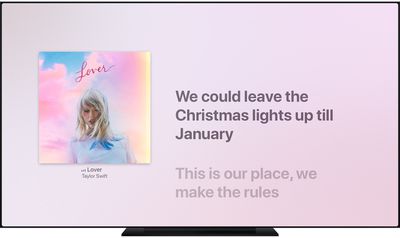
In September of 2020, Apple released the tvOS 14 update, which can be installed on the Apple TV 4K and Apple TV HD. If you own either model, you can follow these steps to listen to songs on Apple Music with perfectly timed lyrics showing on screen.
- Open the Music app on your Apple TV.
- Play a song from the Apple Music catalog.
- Press the Menu/Back button on your Apple TV Remote.
- Select the Lyrics option (the speech bubble icon) in the top-right corner of the screen.
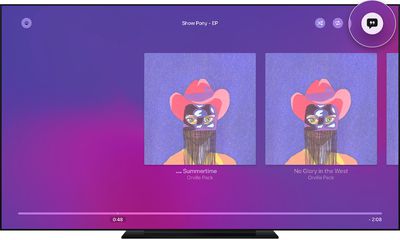
If you don't see time-synced lyrics appear when you select the Lyrics option, then sadly time-synced lyrics aren't available for that particular song. Select another song to play and try again.
You can also see the full lyrics for a song when it's playing by pressing the Menu/Back button on your Apple TV Remote, selecting the More option (the ellipsis icon), then choosing View Full Lyrics.