How to Filter Explicit Content on an Apple Music Family Subscription - MacRumorsOpen MenuShow RoundupsShow Forums menuVisit ForumsOpen Sidebar
Skip to Content

How to Filter Explicit Content on an Apple Music Family Subscription

by

If you've signed up to an Apple Music family subscription and you're concerned about your children accessing explicit content on the streaming service, you can use Apple's Screen Time feature to limit what they can listen to. Here's how it works.
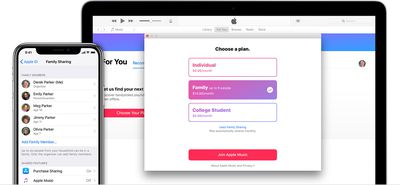
apple music family sharing
When you sign up for an ‌Apple Music‌ Family subscription, Apple's Family Sharing feature is what lets other people in your family access ‌Apple Music‌ on their devices.

As family organizer, you can also configure Screen Time settings for your child's device from your own device. This means you can remotely set content restrictions for their iPhone or iPad and prevent them from playing explicit content in ‌Apple Music‌.

  1. Launch the Settings app on your iOS device.
  2. Tap Screen Time.
  3. Tap Turn On Screen Time, then tap Continue.
  4. Select This is My iPhone/iPad.
  5. Tap your child's name.
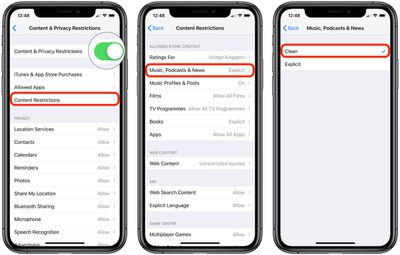
  6. Tap Content & Privacy Restrictions.
  7. Tap the toggle beside Content & Privacy Restrictions to turn it on.
    how to block content apple music

  8. Tap Content Restrictions.
  9. Tap Music, Podcasts & News.
  10. Select Clean.

If you don't see your child's name listed in the main Screen Time menu (step 5 above), tap Set up Screen Time for Family and then follow the onscreen instructions.
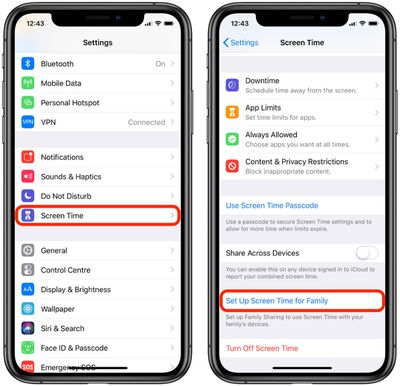
how to block explicit music family plan
Note that you can also set content restrictions directly on your child's device. To do so, go to Settings -> Screen Time, and select This is My Child's iPhone/iPad.

You'll then be asked to create a special four-digit passcode for accessing Screen Time settings on this device, ensuring no-one will be able to change them except for you.


Popular Stories

wigmore hall

Apple Music Classical Announces New Partnership With London's Wigmore Hall

Wednesday June 3, 2026 4:59 am PDT by
Wigmore Hall Live today relaunches as a digital-only platform in partnership with Apple Music Classical, with all recording royalties passed directly to artists, Gramophone reports. Wigmore Hall is a prestigious 550-seat concert hall on Wigmore Street in London's Marylebone, widely regarded as one of the world's foremost venues for chamber music, early music, and vocal recitals. Opened in...
iOS 26 Music Glass Feature

Apple Music Gains AutoMix Upgrades and More in iOS 27

Tuesday June 9, 2026 5:49 am PDT by
Apple yesterday detailed several updates coming to Apple Music in iOS 27, including redesigned artist and album pages, an upgraded AutoMix feature, and a suite of performance improvements. The most immediately visible change is a refreshed artist page, which now features a prominent shuffle play button, a new artist name display, and various other layout adjustments. Apple also says album...
Apple Says iOS 27 Adds These 12 New Features to Your iPhone Feature

Apple Says iOS 27 Adds These 12 New Features to Your iPhone

Tuesday June 9, 2026 9:47 am PDT by
iOS 27's key new feature is a more intelligent and personal version of Siri, but the changes go well beyond that. In a press release, Apple outlined additional enhancements coming across Apple Maps, Find My, Apple Wallet, Apple Music, and more. Apple Maps has gained an enhanced Flyover experience powered by AI, enabling you to view aerial imagery in "stunning detail" for select cities. In ...