Stay Focused or Chill Out With This Hidden iPhone Feature - MacRumorsOpen MenuShow RoundupsShow Forums menuVisit ForumsOpen Sidebar
Skip to Content

Stay Focused or Chill Out With This Hidden iPhone Feature

by

Do you sometimes struggle to maintain focus while you're working, or find it difficult to unwind and relax at the end of the day? Believe it or not, your iPhone could help with that. Keep reading to learn how.

airpods pro adaptive audio
If you are looking to minimize distractions when you focus on something, or just want to zone out after a hard day's work, it's well worth checking out the Background Sounds feature on your iPhone or iPad. Whether you are at home or in a public place, you can play calming sounds with just a few taps on your device to help you concentrate or rest.

In iOS and iPadOS, Apple's Background Sounds include balanced, bright, and dark noise, as well as natural sounds like ocean, rain, and stream. All of the sounds can be set to play in the background to mask unwanted environmental or external noise, and the sounds mix into or duck under other audio and system sounds, so you don't have to drown out what's important to you.

Enable Background Sounds on iPhone and iPad

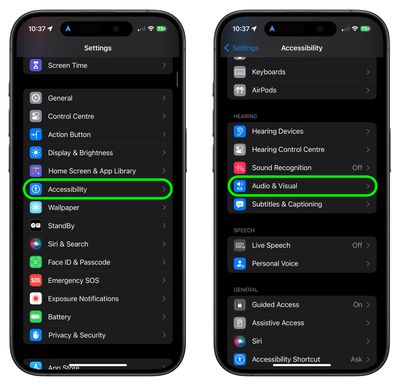
  1. Launch the Settings app on your iPhone or iPad.
  2. Tap Accessibility.
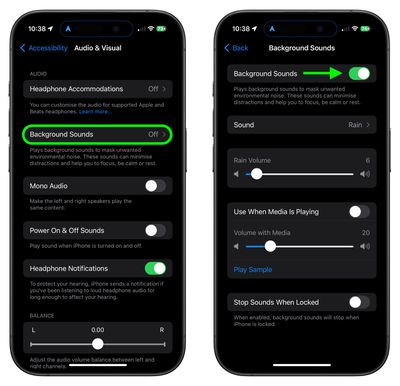
  3. Under "Hearing," tap Audio & Visual.
    accessibility

  4. Tap Background Sounds, then tap the switch to turn on Background Sounds on the next screen.
  5. Tap Sound to choose a sound effect. Choose from Balanced Noise, Bright Noise, Dark Noise, Ocean, Rain, and Stream.
    settings

Your device will need to download individual sound effects when you play them for the first time, so make sure you have an internet connection, but after that you can play the background sound wherever you are.

Note that the last screen in the steps optionally lets you set the volume of the sound, and includes an additional option to automatically stop the sound when you lock your device.

Accessibility Shortcut Access

Once you have downloaded the background sounds, you can quickly start and stop the audio via an Accessibility Shortcut. Here's how to set one up.

Set Up the Accessibility Shortcut

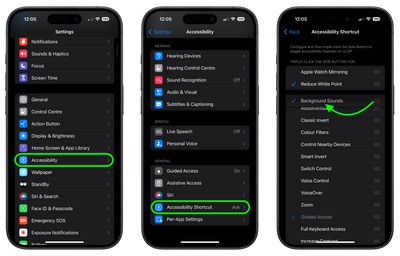
  1. Tap through to Settings ➝ Accessibility.
  2. Select Accessibility Shortcut near the bottom of the menu.
  3. Tap Background Sounds to select it. You can also drag the three lines icon at the far right to change the order in which it appears in the shortcuts menu.
settings

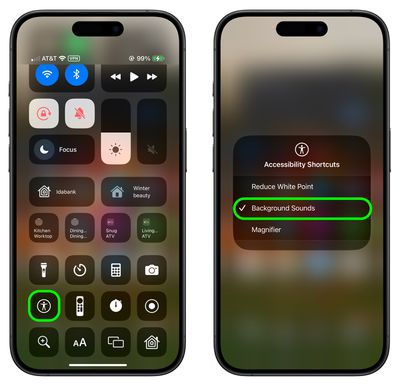
You can triple click your iPhone's Side button to access the Accessibility Shortcut at any time. Alternatively, you can add an Accessibility Shortcut button to your device's Control Center in the following way.

Access Accessibility Shortcut

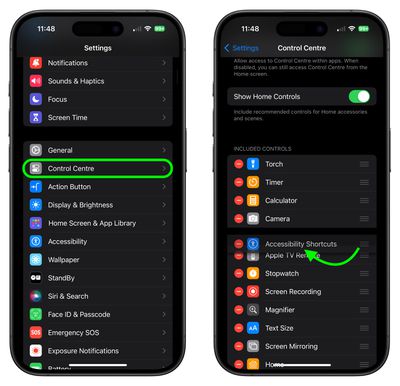
  1. Tap through to Settings ➝ Control Center.
  2. Find Accessibility Shortcuts under the "More Controls" list and then tap the entry to include it in Control Center.
settings
Once that's done, swipe from the top-right corner of your screen to bring up Control Center, then simply tap Accessibility Shortcut button and then tap Background Sounds to turn the audio on or off.
settings

Background sounds are also available on Macs running macOS Ventura or later. Check out our dedicated how-to article for all the details.


Top Rated Comments

diego.caraballo Avatar
27 months ago
Alternatively, you can add the Hearing icon to Control Center and activate the sounds by long pressing it.
Plus, you get the decibel meter to see if you are using a sound volume past recommended levels.


Attachment Image
Score: 27 Votes (Like | Disagree)
klasma Avatar
27 months ago

Do you sometimes struggle to maintain focus while you're working, or find it difficult to unwind and relax at the end of the day?
Yes, and it’s because of the damn phone.


Believe it or not, your iPhone could help with that.
Nah.
Score: 19 Votes (Like | Disagree)
27 months ago
Literally no idea this existed.
Score: 11 Votes (Like | Disagree)
27 months ago
An underrated feature for sure. I bet many have downloaded separate apps providing exactly this.
Score: 10 Votes (Like | Disagree)
iLuddite Avatar
27 months ago
Or just add Hearing to Control Center—I have mine positioned so that it’s right under the volume slider. As an added bonus it also lets you know if your music volume goes over 80 decibels when using headphones.

Attachment Image

Attachment Image

Attachment Image
Score: 7 Votes (Like | Disagree)
Ntombi Avatar
27 months ago
I use background sounds when I’m getting certain medical procedures done. For example, I get infusions at a local cancer center, and, though we’re each in separate areas, the curtains can only do so much to drown out noises. Dark Noise combined with ANC on my AirPods are a godsend.
Score: 7 Votes (Like | Disagree)

Popular Stories

Apple Card iPhone 16 Pro Feature

Apple Card Promo to Offer Free AirPods Pro 3

Friday May 15, 2026 8:59 am PDT by
Starting as early as next week, customers who sign up for an Apple Card at Apple's retail stores in the U.S. will receive $249 cash back when they purchase AirPods Pro 3, according to Bloomberg's Mark Gurman. The promotion has yet to be officially announced by Apple, so exact terms and conditions are not available at this time. AirPods Pro 3 are priced at $249 in the U.S., so customers who...
Apple WWDC25 iOS 26 CarPlay Light mode 250609

Six Popular iPhone Apps Now Available on CarPlay

Thursday May 14, 2026 9:10 am PDT by
Apple's CarPlay system for accessing iPhone apps on a vehicle's dashboard screen has received six popular apps in recent weeks: ChatGPT, Perplexity, Grok, Google Meet, WhatsApp, and the indie artist streaming platform Audiomack. Make sure you have the latest version of each app and they will automatically appear on CarPlay. ChatGPT Starting with iOS 26.4, CarPlay supports voice-based...
ipad mini 7 blue

OLED iPad Mini: Release Date, Pricing, and What to Expect

Thursday May 14, 2026 5:08 am PDT by
According to the latest rumors, Apple is close to launching its next-generation iPad mini. So what should we expect from the successor to the iPad mini 7 that Apple released over a year ago? Read on to find out. Processor and Performance Apple is working on a next-generation version of the iPad mini (codename J510/J511) that features the A19 Pro chip, according to information found in code...