Play Calming Background Sounds on Mac to Stay Focused - MacRumorsOpen MenuShow RoundupsShow Forums menuVisit ForumsOpen Sidebar
Skip to Content

Play Calming Background Sounds on Mac to Stay Focused

by

In macOS Ventura and later, Apple includes an accessibility feature for Mac called Background Sounds. These sounds are designed to help you stay focused at work, promote calm, and minimize distractions. Keep reading to learn how it works.
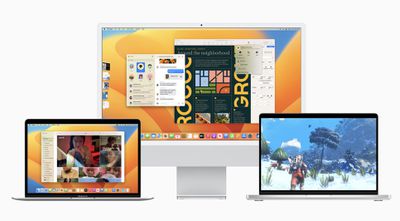
macos ventura 1
Apple first introduced Background Sounds on iPhone, allowing users to play ambient soundscapes in the background. This feature is also available on Macs, so you can play calming sounds in your office or study to mask unwanted environmental noise and help minimize distractions so you can focus or rest.

The Background Sounds on offer include balanced, bright, and dark noise, as well as natural sounds like ocean, rain, and stream. All of the sounds can be set to play in the background to mask unwanted environmental or external noise, and the sounds mix into or duck under other audio and system sounds.

Follow the steps to access the Background Sounds feature in macOS 13 and later.

  1. Click the Apple () symbol in your Mac's menu bar.
  2. Select System Settings... from the dropdown menu.
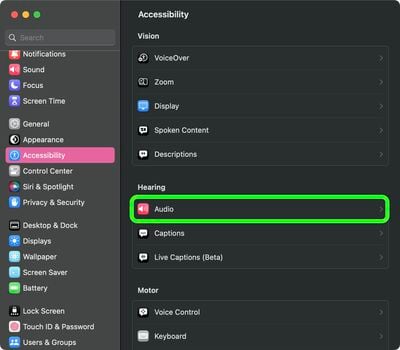
  3. Select Accessibility from the settings sidebar, then click Audio under the "Hearing" sub-menu.
    settings

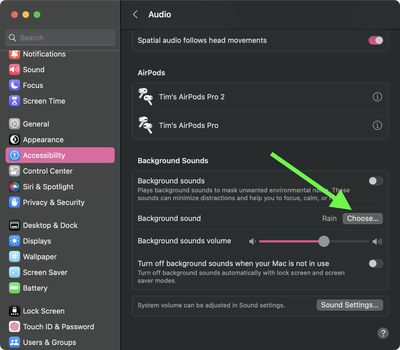
  4. In the section titled "Background Sounds," click the Choose... button.
    settings

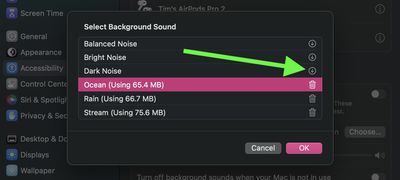
  5. Click the download button next to the sound you want to use.
    settings

  6. Once the audio file has downloaded, click Done.
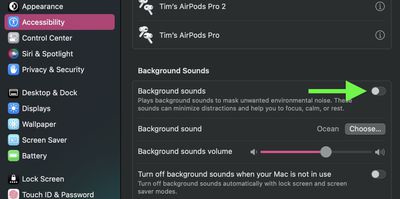
  7. Toggle on the switch next to Background Sounds to begin playing the ambient soundscape.
    settings

You can adjust the volume of the background sound independently using the volume slider in the Background Sounds menu. Note there's also an option to Turn off background sounds when your Mac is not in use – this will automatically turn off the audio when the Lock Screen or screen saver is active.


Popular Stories

iCloud iPhone 17 Pro

iPhone Users Who Pay for iCloud Storage Get Two New Perks on iOS 27

Thursday July 2, 2026 6:10 am PDT by
If you pay for certain iCloud+ storage plans beyond the 5GB that Apple offers for free, you will receive two more perks on iOS 27 at no additional cost. A summary of the two new iCloud+ perks on iOS 27:Increased daily usage limits for some new Apple Intelligence features, including image generation in the revamped Image Playground app. HomeKit Secure Video cameras receive generated video...
Apple Event Logo

Apple Just Released a New Product

Thursday July 2, 2026 8:04 am PDT by
Apple's first product release of summer 2026 occurred this week, but do not get too excited, as it is merely the Beats Solo Buds in a new color. Beats Solo Buds are now offered in orange through Best Buy in the U.S., with availability set to expand to 7-Eleven stores in Japan on July 4. Apple already offered orange Solo Buds in India for free with the purchase of an iPhone 15 or iPhone 15 ...
iPhone 4 on Black Feature

Apple Facing One of Its Worst Leaks Since the iPhone 4

Thursday July 2, 2026 9:53 am PDT by
Apple supplier Tata Electronics recently suffered a cyberattack that resulted in thousands of confidential files being published on the dark web, and this reportedly included some photos and documents related to the upcoming iPhone 18 Pro. We have elected not to share any of the leaked photos in this story due to the illegal nature in which they were obtained, but they can easily be found...