Play Ambient Background Sounds on iPhone to Stay Focused - MacRumorsOpen MenuShow RoundupsShow Forums menuVisit ForumsOpen Sidebar
Skip to Content

Play Ambient Background Sounds on iPhone to Stay Focused

by

On iPhone and iPad, one of several accessibility features that Apple includes is Background Sounds. The sounds are designed to help you stay focused, stay calm, and help you minimize distractions while you are busy with something.
Background Sounds Water Feature
The Background Sounds on offer include balanced, bright, and dark noise, as well as natural sounds like ocean, rain, and stream. All of the sounds can be set to play in the background to mask unwanted environmental or external noise, and the sounds mix into or duck under other audio and system sounds.

Enabling Background Sounds on iPhone and iPad

The following steps explain how to enable Background Sounds on iPhones and iPads running iOS 15/iPadOS 15 and later.

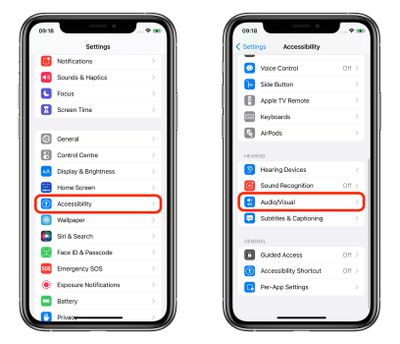
  1. Launch the Settings app on your iPhone or ‌iPad‌.
  2. Tap Accessibility.
  3. Under "Hearing," tap Audio/Visual.
    settings

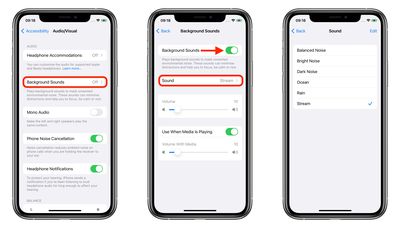
  4. Tap Background Sounds.
  5. Tap the switch to turn on Background Sounds.
  6. Tap Sound to choose a sound effect.
  7. Choose from Balanced Noise, Bright Noise, Dark Noise, Ocean, Rain, and Stream.
    settings

Your device will need to download individual sound effects when you play them for the first time, so make sure you have an internet connection, but after that you can play the background sound whether or not you're online.

Control Center Access

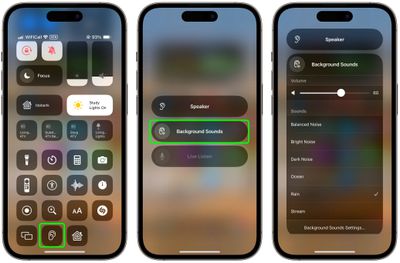
Once you have downloaded the background sounds, you can get fast access them from the Control Center. To do this, you need to have the Hearing item added to Control Center (go to Settings -> Control Center and add Hearing to the included list), then follow these steps.

  1. Open Control Center by dragging down diagonally from the top-right of your device's screen.
  2. Tap the Hearing button, then choose Background Sounds.
  3. Tap the Background Sounds button to start playing.
  4. Tap the name of the current sound to view other sounds, then tap a sound name to listen to a preview. After you choose a sound, tap Background Sounds to go back.
  5. Tap the background to go back to Control Center.
control center

Background sounds are also available on Macs running macOS Ventura or later. Check out our dedicated how-to article for all the details.


Top Rated Comments

66 months ago
It’s actually much simpler to access if you add the ‘Hearing’ shortcut to Control Center. From there, you can access it from within any app.

Attachment Image
Score: 20 Votes (Like | Disagree)
66 months ago
I'm pretty sure it's under Accessibility for a good reason.


I don’t see the point in it
Then you can count yourself lucky. Not everybody can say of themselves that they do not need the Accessibility settings. To be honest, I find your comment a bit tone deaf.
Score: 17 Votes (Like | Disagree)
66 months ago


In iOS 15 and iPadOS 15, one of several new accessibility features that Apple has introduced is Background Sounds, which is designed to minimize distractions and help you stay focused, stay calm, and minimize distractions with the help of your iPhone or iPad.
You're definitely going to need this feature when you see the pricing for the new iPhones in September.
Score: 14 Votes (Like | Disagree)
iDento Avatar
66 months ago
I like this, but I don’t see as an accessibility feature. Dark noise helps me sleep.
Score: 12 Votes (Like | Disagree)
66 months ago

I like this, but I don’t see as an accessibility feature. Dark noise helps me sleep.
filing under Accessibility is odd
Score: 9 Votes (Like | Disagree)
Apple_Robert Avatar
66 months ago
MR is one big daily distraction. :P
Score: 9 Votes (Like | Disagree)

Popular Stories

iCloud iPhone 17 Pro

iPhone Users Who Pay for iCloud Storage Get Two New Perks on iOS 27

Thursday July 2, 2026 6:10 am PDT by
If you pay for certain iCloud+ storage plans beyond the 5GB that Apple offers for free, you will receive two more perks on iOS 27 at no additional cost. A summary of the two new iCloud+ perks on iOS 27:Increased daily usage limits for some new Apple Intelligence features, including image generation in the revamped Image Playground app. HomeKit Secure Video cameras receive generated video...
Apple Event Logo

Apple Just Released a New Product

Thursday July 2, 2026 8:04 am PDT by
Apple's first product release of summer 2026 occurred this week, but do not get too excited, as it is merely the Beats Solo Buds in a new color. Beats Solo Buds are now offered in orange through Best Buy in the U.S., with availability set to expand to 7-Eleven stores in Japan on July 4. Apple already offered orange Solo Buds in India for free with the purchase of an iPhone 15 or iPhone 15 ...
iPhone 4 on Black Feature

Apple Facing One of Its Worst Leaks Since the iPhone 4

Thursday July 2, 2026 9:53 am PDT by
Apple supplier Tata Electronics recently suffered a cyberattack that resulted in thousands of confidential files being published on the dark web, and this reportedly included some photos and documents related to the upcoming iPhone 18 Pro. We have elected not to share any of the leaked photos in this story due to the illegal nature in which they were obtained, but they can easily be found...