

 In the last installment of our regular how-to series, we showed how you can set up an iOS device to get unique alerts when emails are received from your VIP contacts. In this article, we're going to show you how to do the same thing on your Mac.
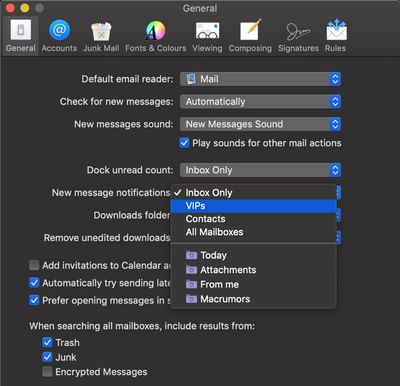
In the native Mail application in macOS, the standard way of ensuring you receive new message notifications from VIPs is to go into Mail's Preferences and select VIPs in the New message notifications dropdown list.
Setting up VIP alerts this way is all well and good, but it prevents you from receiving notifications for all other messages coming into your inbox.
A better solution would be to set up a rule in Mail that plays a specific sound or bounces the Dock icon when a message is received and the sender is in your VIP list. Here's how to do it.
How to Get a Unique Alert for VIP Emails
- Launch the Mail app on your Mac.
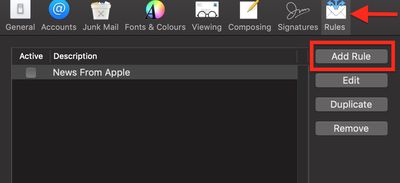
- Select Preferences... from the Mail menu bar.
- Select the Rules tab.

- Click Add Rule.
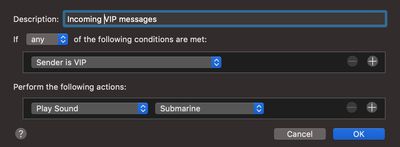
- Give your rule a name in the Description field.
- For If, select Any.
- For the first condition, select Sender is VIP from the first dropdown list.
- Under Perform the following actions: select Play Sound from the first dropdown list. (Another option available here is Bounce Icon in Dock.)
- Under Perform the following actions: choose a sound to play from the second dropdown list.
- Click OK.
- Click Apply.
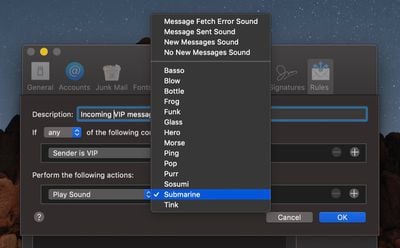
With the rule set up, you'll now get a unique alert for every VIP mail you receive that you'll be able to distinguish from regular new message notifications as they come through.




















Top Rated Comments