How to Receive Unique Alerts for VIP Emails on iPhone and iPad - MacRumorsOpen MenuShow RoundupsShow Forums menuVisit ForumsOpen Sidebar
Skip to Content

How to Receive Unique Alerts for VIP Emails on iPhone and iPad

by

ios 11 mail icon pn e1543485132148If you use the VIP feature in the iOS Mail app then you'll already know how they can help you keep track of important messages from your key contacts amid the daily torrent of incoming emails.

Keeping on top of VIP emails can be made even easier by ensuring you receive a specific sound or vibration alert whenever one comes through on your iPhone or iPad. That way you'll know if a new message justifies your immediate attention before you've even looked at your iOS device. Here's how to set them up.

  1. Launch the Settings app on your iPhone or iPad.
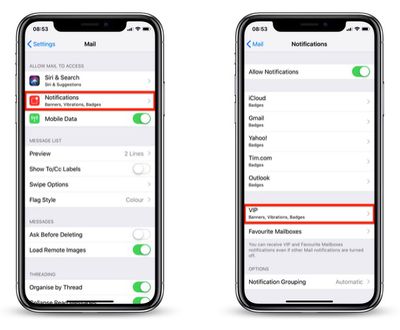
  2. Tap Mail in the list.
    how to assign a sound alert to VIP emails01

  3. Tap Notifications.
  4. Tap VIP.
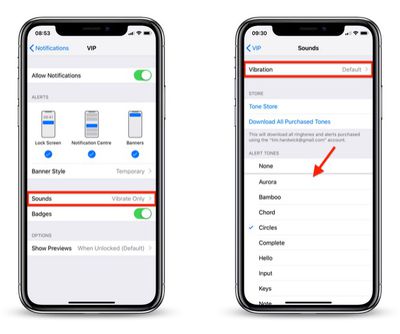
  5. Tap Sounds.
    how to assign a sound alert to VIP emails02

  6. Choose a unique sound from the list or tap Vibration to select a special vibration. The default sound alert is Ding (Classic), so be sure to choose something different.
With that done, the next time you receive an email from one of your VIPs, you'll get the unique notification alert and immediately know it's an important message.


Top Rated Comments

chino-rican Avatar
100 months ago
This assumes the following is activated: Settings > Passwords & Accounts > Fetch New Data > Push > ON; Change the desired email account to Fetch.

Otherwise, you will only get the alert if you open the Mail app and download new emails.
Score: 1 Votes (Like | Disagree)
johnnyturbouk Avatar
100 months ago
This is all very well but I tend to have my phone on silent a lot, as I work with patients. What would be an elegant and really useful feature would be if apple adopted a filter system like sanebox. Using smart machine learning to recognise the difference btwn random crap from group-on and amazon reporting offers, to say receipts. I currently have my gmail as my professional email account, me.com for family and yahoo for signing up with companies that I know willl then spam my email.
Score: 1 Votes (Like | Disagree)

Popular Stories

iPhone 18 Pro Deep Red Feature

iPhone 18 Pro Launching in Two Months With These 12 New Features

Friday July 17, 2026 10:39 am PDT by
It is now mid-July, and that means the iPhone 18 Pro and iPhone 18 Pro Max are now just two months away. The devices are expected to look similar to the iPhone 17 Pro and iPhone 17 Pro Max, but there will still be many year-over-year changes, with rumored features including a smaller Dynamic Island, 5G via satellite, and more. Apple is expected to unveil the iPhone 18 Pro, iPhone 18 Pro Max, ...
iPhone 18 Pro and Pro Max Feature

'Apple Upgrade' Program Reportedly Launching Next Week

Tuesday July 21, 2026 8:30 am PDT by
Apple and Klarna are partnering on a new "Apple Upgrade" program set to launch in the U.S. on Tuesday, July 28, according to Bloomberg's Mark Gurman. The program will allow you to finance most iPhone, iPad, Mac, and Apple Watch models, with a 24-month term for iPhones and Apple Watches and a 36-month term for iPads and Macs. Customers will be able to pay off the device early during the term, ...
iPhone 18 Pro Deep Red Feature

iPhone 18 Pro Launching in Two Months With These 12 New Features

Tuesday July 21, 2026 6:22 am PDT by
It is now mid-July, and that means the iPhone 18 Pro and iPhone 18 Pro Max are now just two months away. The devices are expected to look similar to the iPhone 17 Pro and iPhone 17 Pro Max, but there will still be many year-over-year changes, with rumored features including a smaller Dynamic Island, 5G via satellite, and more. Apple is expected to unveil the iPhone 18 Pro, iPhone 18 Pro Max, ...