With the release of iOS 17 and iPadOS 17, Apple is simplifying the voice command to invoke Siri on iPhone, iPad, and connected AirPods Pro.

Instead of "Hey Siri," you can simply say "Siri" to activate the voice assistant on your device. Not only that, you can now also issue multiple queries and commands in succession without having to say "Siri" again.
On devices that are updated with Apple's latest mobile software, the voice assistant will respond to both "Siri" and "Hey Siri" by default, so you don't have to do anything to shorten the voice command.

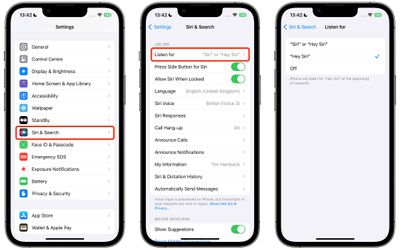
However if the single word "Siri" is unintentionally invoking Siri in your experience where the full phrase does not, you can limit your device to listen only for the full "Hey Siri" command by following the steps below.
- Open Settings on your iPhone or iPad.
- Tap Siri & Search.
- Under "Ask Siri," tap Listen for.
- Select Hey Siri.
That's all there is to it. Your device, and any AirPods Pro connected to it, will no longer respond to "Siri" whenever you say it.