

Apple has introduced significant updates to its Messages app in iOS 18, with a particular focus on enhancing the popular Tapback feature. Tapbacks, the quick reactions users can add to messages by long-pressing on them, have received a colorful makeover and expanded functionality.
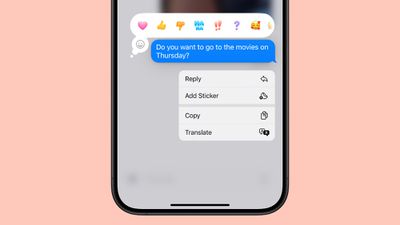
In iOS 18, the six standard Tapback icons now feature more vibrant colors and intricate details. This visual refresh makes reactions more expressive and engaging, since the new design is visible both when selecting a Tapback and when receiving one from other users.
Perhaps the most notable change however is the addition of emoji support for Tapbacks. While the classic six reactions remain, you now have the option to choose from a wide array of emoji characters, adding a new layer of personalization to your message responses and making them more nuanced and expressive.
Here's how to use emoji as a Tapback reaction to a message you received in iOS 18:
- Long press on a message in the conversation thread.
- Swipe left across the standard Tapback reactions.
- Either select one of the suggested emoji to use, or tap the greyed out emoji at the end of the row to access the emoji keyboard and choose one that better suits your reaction.
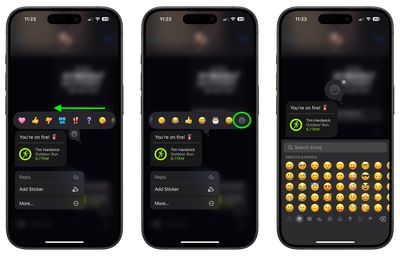
That's all there is to it. In iOS 18, Apple has also added new text effects and formatting options to the Messages app. Follow the links to learn how to use them.

















Top Rated Comments
To other interfaces and non iMessages (car etc) if you use one of the standard reacts it changes it to loved/emphasized/questioned/etc: