


How to Mirror a FaceTime Call to Apple TV or an AirPlay 2-Compatible Smart TV - MacRumorsOpen MenuShow RoundupsShow Forums menuVisit ForumsOpen Sidebar
Skip to Content

How to Mirror a FaceTime Call to Apple TV or an AirPlay 2-Compatible Smart TV

by

ios12 facetime iconDid you know that you can use the AirPlay feature on an iPhone or iPad to mirror a FaceTime call to an Apple TV or ‌AirPlay‌ 2-compatible smart TV? This article shows you how.

Before following the steps below, make sure that your iOS device is connected to the same Wi-Fi network as your ‌Apple TV‌ or ‌AirPlay‌ 2-compatible smart TV.

Not sure if your smart TV supports ‌AirPlay‌ 2? You can find the official list of ‌AirPlay‌ 2-compatible smart TVs on Apple's Home Accessories webpage.

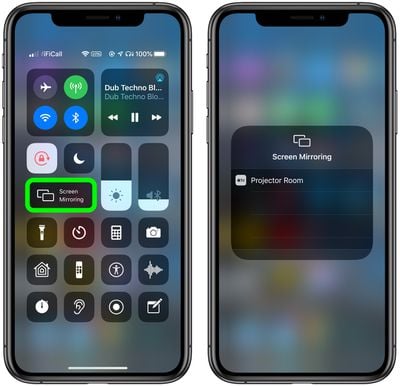
  1. Open Control Center on your iOS device: On an ‌‌iPad‌‌ with a Home button, double-tap the Home button; on iPhone 8 or earlier, swipe up from the bottom of the screen; and on a 2018 iPad Pro or ‌iPhone‌ X and later, swipe down from the upper right of the screen.
  2. Tap Screen Mirroring.
  3. Select your ‌Apple TV‌ or ‌AirPlay‌ 2-compatible smart TV from the list.
    facetime screen mirroring

  4. If an ‌AirPlay‌ passcode appears on your TV screen, enter the passcode on your iOS device.
  5. Once screen mirroring is established, launch the FaceTime app and initiate a video call in the usual way.
Once you've followed the steps, you should see the video of your ‌FaceTime‌ call on the chosen mirrored device.

To stop mirroring your iOS device, open the Control Center again, tap Screen Mirroring, then tap Stop Mirroring. Alternatively, if mirroring to an ‌Apple TV‌, press the Menu button on your ‌Apple TV‌ Remote.

Popular Stories

iOS 27 on iPhone 17 1

New iOS 27 Rumors Include Revamped AirPods Settings Menu and More

Sunday May 24, 2026 1:02 pm PDT by
Apple is set to unveil iOS 27 next month ahead of a September release. The update is expected to include a dedicated Siri app, expanded Apple Intelligence capabilities in apps like Wallet, Safari, and Shortcuts, an upgraded keyboard with improved autocorrect, the ability to use Apple Maps via satellite connection, and more. In his Power On newsletter today, Bloomberg's Mark Gurman revealed...
macOS 27 on MacBook Pro

Apple Says macOS 27 Won't Be Compatible With These Macs

Wednesday June 3, 2026 8:29 am PDT by
During WWDC 2025, Apple revealed that macOS 26 Tahoe would be the final major macOS version for Intel-based Macs. macOS 27 will be compatible with Apple silicon Macs only, meaning that you will need a Mac with an M-series chip or a MacBook Neo with an A18 Pro chip in order to install the software update. Apple will unveil macOS 27 during its WWDC 2026 keynote this Monday, June 8, and the...
MacBook Neo on Yellow Feature

MacBook Neo is So Popular That Apple Reportedly Doubled Production

Wednesday June 3, 2026 9:24 am PDT by
On an earnings call in late April, Apple's CEO Tim Cook said that customer response to the MacBook Neo was "off the charts," and the popularity of the laptop has reportedly led the company to significantly boost production. Apple supply chain analyst Ming-Chi Kuo this week said he believes that MacBook Neo shipments to Apple were doubled from an initial target of 5 million units to 10...















