How to Block Unwanted FaceTime Calls - MacRumorsOpen MenuShow RoundupsShow Forums menuVisit ForumsOpen Sidebar
Skip to Content

How to Block Unwanted FaceTime Calls

by

ios12 facetime iconFaceTime is great for when you want to stay in touch with friends and family, but it's also good at dealing with people you don't want to hear from, too.

Apple provides features on Mac and iOS that allow you to block nuisance calls from the same number coming through to your FaceTime account. The steps below show you how it works.

How to Block Unwanted FaceTime Calls on Your iPhone or iPad

  1. Launch the FaceTime app on your iPhone or iPad.
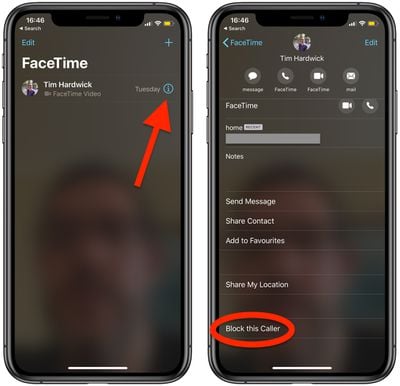
  2. Tap the Info (the encircled "i" icon) button next to the name of the contact that you want to block.
    block facetime caller ios

  3. Tap Block this Caller at the bottom of the screen.
  4. Tap Block Contact to confirm.

The name, number, and email addresses associated with the contact are now added to your block list.

How to Block Unwanted FaceTime Calls on Mac

  1. Launch the FaceTime app from your Mac's Applications folder.
  2. Find the caller you want to block in the sidebar menu.
    block facetime caller mac

  3. Right-click (or Ctrl-click) on the contact and select Block this caller from the contextual menu.

The name, number, and email addresses associated with the contact are now added to your block list.

Popular Stories

iOS 27 and FaceTime Feature

iOS 27 Improves FaceTime in Three Ways, Including Dual Capture

Thursday June 11, 2026 6:27 am PDT by
iOS 27 includes three enhancements for FaceTime, with the most notable one being a dual camera feature on some newer iPhone models. On the iPhone 17, iPhone 17 Pro, iPhone 17 Pro Max, and iPhone Air, a Dual Capture feature allows you to record video of yourself and what is in front of you at the same time. Starting with iOS 27, this feature is now supported in the FaceTime app on these...
iCloud iPhone 17 Pro

iPhone Users Who Pay for iCloud Storage Get Two New Perks on iOS 27

Thursday July 2, 2026 6:10 am PDT by
If you pay for certain iCloud+ storage plans beyond the 5GB that Apple offers for free, you will receive two more perks on iOS 27 at no additional cost. A summary of the two new iCloud+ perks on iOS 27:Increased daily usage limits for some new Apple Intelligence features, including image generation in the revamped Image Playground app. HomeKit Secure Video cameras receive generated video...
iPhone 4 on Black Feature

Apple Facing One of Its Worst Leaks Since the iPhone 4

Thursday July 2, 2026 9:53 am PDT by
Apple supplier Tata Electronics recently suffered a cyberattack that resulted in thousands of confidential files being published on the dark web, and this reportedly included some photos and documents related to the upcoming iPhone 18 Pro. We have elected not to share any of the leaked photos in this story due to the illegal nature in which they were obtained, but they can easily be found...