How to Turn Off FaceTime - MacRumorsOpen MenuShow RoundupsShow Forums menuVisit ForumsOpen Sidebar
Skip to Content

How to Turn Off FaceTime

by

ios12 facetime iconAs convenient as Apple's FaceTime is, sometimes you might not want to be surprised or interrupted by a prompt asking you to accept a video or audio call on your iPhone, iPad, or Mac.

Fortunately, Apple has made ‌FaceTime‌ very easy to turn off, and if you want re-enable it in future, you won't have to set it up all over again. Simply follow the steps below.

How to Turn Off FaceTime on iPhone and iPad

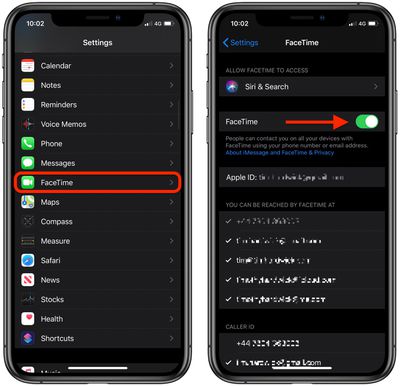
  1. Launch the Settings app on your iOS device.
  2. Scroll down and tap FaceTime.
  3. Tap the switch next to FaceTime to turn it off (the switch will become colorless).
    settings

If you ever want to re-enable ‌FaceTime‌ on your device, simply go back into Settings and tap the ‌FaceTime‌ switch again.

How to Turn Off FaceTime on Mac

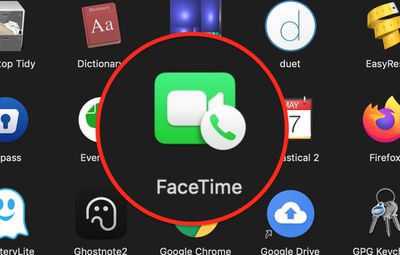
  1. Launch the FaceTime app on your Mac, from your Dock or the Applications folder.
    apps

  2. From the menu bar at the top of your screen, select FaceTime -> Turn FaceTime Off.
    FaceTime

If you ever want to re-enable ‌FaceTime‌ on your device, simply go back into settings and toggle on the ‌FaceTime‌ switch again.

Popular Stories

iOS 27 and FaceTime Feature

iOS 27 Improves FaceTime in Three Ways, Including Dual Capture

Thursday June 11, 2026 6:27 am PDT by
iOS 27 includes three enhancements for FaceTime, with the most notable one being a dual camera feature on some newer iPhone models. On the iPhone 17, iPhone 17 Pro, iPhone 17 Pro Max, and iPhone Air, a Dual Capture feature allows you to record video of yourself and what is in front of you at the same time. Starting with iOS 27, this feature is now supported in the FaceTime app on these...
iCloud iPhone 17 Pro

iPhone Users Who Pay for iCloud Storage Get Two New Perks on iOS 27

Thursday July 2, 2026 6:10 am PDT by
If you pay for certain iCloud+ storage plans beyond the 5GB that Apple offers for free, you will receive two more perks on iOS 27 at no additional cost. A summary of the two new iCloud+ perks on iOS 27:Increased daily usage limits for some new Apple Intelligence features, including image generation in the revamped Image Playground app. HomeKit Secure Video cameras receive generated video...
American Express Gold Apple Pay Feature

American Express Announces New Apple Pay Feature

Tuesday June 30, 2026 10:27 am PDT by
American Express today announced that you can now redeem Membership Rewards points when checking out with Apple Pay on the web and in apps on the iPhone and iPad. When checking out with Apple Pay on iOS 18 or iPadOS 18 or later, tap on your eligible American Express card (Platinum, Gold, Green, and others) and select the Membership Rewards points option. You can use points to cover all or...